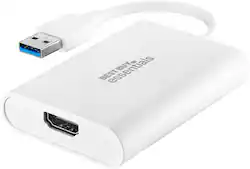
Best Buy essentials™ - USB to HDMI Adapter - White
- Key Specs
- Connector Type (End 1): USB
- Gender (End 1): Male
- Connector Type (End 2): HDMI Type A
- Gender (End 2): Female
- General
- Brand: Best Buy essentials™
- Model Number: BE-PA3UHD
- Product Name: USB to HDMI Adapter
- Color: White
- Quantity: 1
- Compatibility: Most male USB 3.0 to female HDMI enabled monitors
- Connectivity
- Cable Type: USB, HDMI
- Product Type: Adapter
- Connector Type (End 1): USB
- Gender (End 1): Male
- Connector Type (End 2): HDMI Type A
- Gender (End 2): Female
- Environmental
- Indoor Or Outdoor Use: Indoor (Indicates the appropriate environment product was designed to be used in.)
- Other
- UPC: 600603275647
It’s just an adapter—unless you’re settling for a small, single monitor. This Best Buy essentials BE-PA3UHD USB to HDMI Adapter can help you mirror or extend your display, granting you a setup that shows videos, presentations, games and more on a better screen. It supports 4K resolution to mirror the display from a computer or gaming console without losing image quality. Plug-and-play technology on Windows computers makes the connection simple. Just connect to a HDMI-enabled monitor and you’ll be ready to work or play. This adapter is also USB 2.0 backwards compatible, giving you the option to use it with an older computer. And it’s backed by Best Buy, so you can trust it to upgrade your computer setup.
- Male USB 3.0 to female HDMI conversion: Connects your computer’s USB 3.0 port to an HDMI-enabled monitor, for mirroring or extending your display.
- Wide-ranging use: Connects USB 3.0 computers and laptops running Windows 10 (32 bit/64 bit) or macOS 10.12 through 11.4. View your content on HDMI-compatible TVs, monitors and projectors.
- Up to 4K resolution at 30 Hz: Supports resolutions up to 4K at 30 Hz for clear, realistic images.
- USB 2.0 backwards compatibility: Works with older computers for better compatibility (max resolution is 2048 × 1152).
- Windows plug-and-play connection: Provides a hassle-free connection with Windows 10 updates available online (macOS requires manual driver installation).
- 3 in. (7.6 cm) cord: Includes a small, attached cord for flexible placement options.
- Compact: Our small design makes the adapter simple to transport.
- White design: Matches your computer and other accessories.
- Backed by Best Buy: For quality and reliability that you can trust.
Whats Included
- Best Buy essentials USB to HDMI Adapter
- Quick Setup Guide
Q: Can this work on the S8 Ultra tablet while coonnected to another usb port?
A: Hello Blu, This adapter is compatible with most male USB 3.0 to female HDMI enabled monitors. It connects your computer’s USB 3.0 port to an HDMI-enabled monitor, for mirroring or extending your display. For more questions and product support you may contact our customer service at 1 (888) 237-8289 Daily 8am - 9pm CT. Chelsea Best Buy Essentials
A: So far I haven’t experienced any lag or delay in mouse response. I’ve been using it consistently for at least 2 weeks now.
Q: With a Mac does this require the installation of a driver? If so, how?
A: Hello nel, Yes, as long as your computer is connected to the internet, the driver will automatically install in your device. Also, this adapter is compatible with USB 3.0 computers and laptops running Windows 10 (32 bit/64 bit) or macOS 10.12 through 11.4. For more questions and product support you may contact our customer service at 1-(888)-237-8289 Monday to Saturday 8am - 9pm CST. Chelsea Best Buy Essentials
A: I don't have this problem on Win 11. My screen is extended to the Projector, Meaning projector is SCREEN 2 and my laptop screen is screen 1.
Q: Does this need installation of a driver?
A: no..automatically installs the drivers.
People also viewed









Today's top picks
 $199.99The price was $249.99
 $479.99The price was $729.99
 $789.99The price was $1,049.99
 $799.99The price was $1,199.99