Blackmagic Design - ATEM Camera Control
Reviews coming soon
About this product
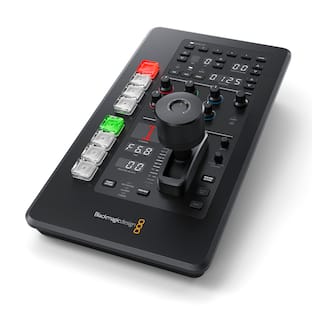
Explore the realm of professional broadcasting with the sleek and sophisticated Blackmagic Design ATEM Camera Control Panel. This advanced control surface is a game-changer in live broadcasting, offering seamless management of up to four URSA Mini, URSA Broadcast, Blackmagic Studio, or Micro Studio cameras. The ATEM Camera Control Panel is intuitively designed for immediate hands-on control of critical camera functions such as iris, shutter speed, white balance, gain, pedestal, and RGB for white and black. This ensures you have comprehensive control over every aspect of your broadcast, enhancing the quality and consistency of your live multi-camera programs.The ATEM Camera Control Panel stands out with its four camera controllers, each housed within a single, user-friendly panel. Each controller features a large LCD screen, soft buttons, and knobs at the top, along with a full set of professional controls on the main body. This eliminates the need for multiple devices, streamlining your workflow and enhancing your efficiency.Adapting to lighting changes is a breeze with the ATEM Camera Control Panel. The top section of the panel allows you to save and recall scene presets quickly, enabling rapid adjustments to cameras based on changes in lighting, master gain, white balance, and shutter speed. This ensures you capture the best shots, every time, regardless of changing conditions.The center section of the ATEM Camera Control Panel offers precision gain and pedestal adjustments. With independent RGB controls for gain and pedestal, you can fine-tune the individual red, green, and blue levels in your blacks and whites, compensating for any unwanted color.The bottom section of the panel is equipped with detailed lens and iris controls, featuring an LED camera number indicating preview and on-air status, along with a high-quality professional joystick for precise iris and master black adjustments. Additional features like the call button for talkback with the operator, panel lock button, and indicators for network, power, and cable connection to the camera make this a comprehensive tool for any broadcast professional.The ATEM Camera Control Panel is designed for seamless integration with your ATEM live production switcher or ATEM hardware control panel via Ethernet. If you're using multiple ATEM products, the Ethernet can simply be looped from one ATEM device to another, ensuring a smooth and efficient workflow.Elevate your live broadcasting capabilities with the Blackmagic Design ATEM Camera Control Panel. Experience unprecedented control, seamless integration, and the kind of efficiency that makes every broadcast smooth and professional.
Features
ENHANCED CONTROL
Features 4 LCD menu displays, offering comprehensive control over camera settings for precise adjustments during live productions.
SEAMLESS CONNECTIVITY
Equipped with 2 Ethernet ports (10/100/1000 BaseT) with loop output, facilitating easy integration with additional control panels or computers.
INTUITIVE OPERATION
Includes a 3-axis joystick and dedicated preview buttons, enabling smooth and accurate camera movements and shot selections in real-time.
VERSATILE COMPATIBILITY
Supports macOS 10.12 Sierra or later and Windows 8.1 or Windows 10, ensuring seamless integration with your existing systems.
RELIABLE POWER
Features redundant power support and an internal 110-240V AC input, guaranteeing stable and continuous operation during critical broadcasts.
Specifications
- BrandBlackmagic DesignModel NumberSWPANELCCU4Product NameBlackmagic Design ATEM Camera ControlProduct Width20.90 inchesProduct Length22.20 inchesEffect Type(s)None
Reviews
This product doesn't have any reviews yet.



Compare similar products
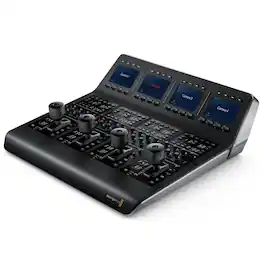
Explore the realm of professional broadcasting with the sleek and sophisticated Blackmagic Design ATEM Camera Control Panel. This advanced control surface is a game-changer in live broadcasting, offering seamless management of up to four URSA Mini, URSA Broadcast, Blackmagic Studio, or Micro Studio cameras. The ATEM Camera Control Panel is intuitively designed for immediate hands-on control of critical camera functions such as iris, shutter speed, white balance, gain, pedestal, and RGB for white and black. This ensures you have comprehensive control over every aspect of your broadcast, enhancing the quality and consistency of your live multi-camera programs.The ATEM Camera Control Panel stands out with its four camera controllers, each housed within a single, user-friendly panel. Each controller features a large LCD screen, soft buttons, and knobs at the top, along with a full set of professional controls on the main body. This eliminates the need for multiple devices, streamlining your workflow and enhancing your efficiency.Adapting to lighting changes is a breeze with the ATEM Camera Control Panel. The top section of the panel allows you to save and recall scene presets quickly, enabling rapid adjustments to cameras based on changes in lighting, master gain, white balance, and shutter speed. This ensures you capture the best shots, every time, regardless of changing conditions.The center section of the ATEM Camera Control Panel offers precision gain and pedestal adjustments. With independent RGB controls for gain and pedestal, you can fine-tune the individual red, green, and blue levels in your blacks and whites, compensating for any unwanted color.The bottom section of the panel is equipped with detailed lens and iris controls, featuring an LED camera number indicating preview and on-air status, along with a high-quality professional joystick for precise iris and master black adjustments. Additional features like the call button for talkback with the operator, panel lock button, and indicators for network, power, and cable connection to the camera make this a comprehensive tool for any broadcast professional.The ATEM Camera Control Panel is designed for seamless integration with your ATEM live production switcher or ATEM hardware control panel via Ethernet. If you're using multiple ATEM products, the Ethernet can simply be looped from one ATEM device to another, ensuring a smooth and efficient workflow.Elevate your live broadcasting capabilities with the Blackmagic Design ATEM Camera Control Panel. Experience unprecedented control, seamless integration, and the kind of efficiency that makes every broadcast smooth and professional.
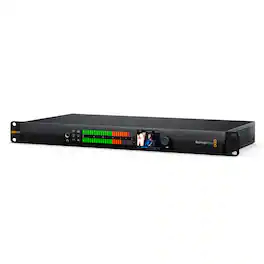
An advanced and compact solution for professional audio and video monitoring, the Blackmagic Audio Monitor 12G G3 is designed to fit seamlessly into your workflow. This powerful rack-mountable unit, occupying just 1 rack unit size, is engineered with a 10G Ethernet SMPTE-2110 IP input, enabling direct monitoring of IP broadcast systems without the need for an external converter.The Blackmagic Audio Monitor 12G G3 boasts a large audio meter with precise ballistics, ensuring accurate readings. It supports 12G-SDI input, compatible with SD, HD, and Ultra HD formats, making it a versatile tool for diverse broadcasting environments. The unit also features balanced analog XLR, HiFi, and AES/EBU inputs, providing a wide range of connectivity options.The HDMI video output of this audio monitor allows for convenient monitoring of SDI and IP video sources. The compact 1RU size, coupled with its robust aluminum machined metal design, ensures durability and resistance to acoustic vibration, even at high volumes.The Blackmagic Audio Monitor 12G G3 is more than just an audio monitor. It's a comprehensive audio and video monitoring solution, featuring a high-powered amp for clear audio monitoring in noisy environments. The dual subwoofer design and digital processor work together to deliver rich, deep bass sounds and a smooth, flat frequency response.The front panel of the Blackmagic Audio Monitor 12G G3 is equipped with a range of controls, including buttons to solo each left or right channel, select between 12G-SDI, 2110 IP, AES/EBU, Analog or HiFi audio, and mute the speakers. A convenient headphone socket is also located on the front panel for easy access.The built-in LCD allows you to monitor the 12G-SDI and 2110 IP video inputs, displaying additional status information such as the input type selected, the video standard, and the selected embedded audio pair from the video input. The LCD also displays the current audio level for real-time monitoring.The Blackmagic Audio Monitor 12G G3 supports all SD, HD, and Ultra HD Standards up to 2160p60, making it a future-proof addition to your broadcasting setup. It also includes support for SMPTE 2110 IP networks, allowing you to build modern IP video systems. The unit also supports the NMOS interface specifications, enabling all your 2110 IP video devices to operate together as a large virtual router.With its support for HDR video sources, analog and AES/EBU audio sources, and remote administration capabilities, the Blackmagic Audio Monitor 12G G3 is a comprehensive solution for professional audio and video monitoring. It's not just a tool, but a vital component of your broadcasting setup, designed to deliver exceptional performance and reliability.
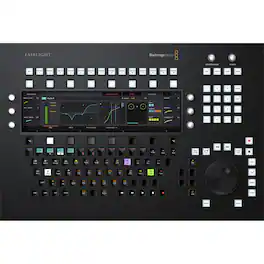
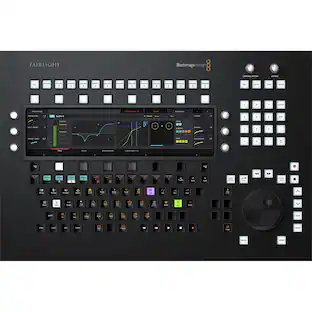
From the first touch, the Blackmagic Design Fairlight Console Audio Editor stands out as an innovative and sophisticated piece of professional audio editing equipment. This advanced control surface is meticulously engineered to provide high-quality tactile controls for nearly every parameter and feature within the Fairlight software suite. With its user-friendly interfaces and rapid-response buttons, the Fairlight Console enables audio professionals to quickly map console keys to their preferred configurations, streamlining the editing process and enhancing productivity.The Fairlight Console Audio Editor boasts a sleek design that integrates seamlessly into any professional audio editing setup. Each control is thoughtfully placed to ensure ergonomic comfort and efficiency, allowing for long sessions without fatigue. The precision-engineered jog/shuttle wheel, faders, and knobs offer an unparalleled level of control, giving users the tactile feedback that is essential for fine-tuning audio to perfection.Optimized for speed, the dedicated hardware control panel of the Fairlight Console Audio Editor surpasses traditional mouse-based editing, allowing for high-speed, precision audio adjustments. This level of control is crucial for editors who demand the utmost accuracy and fluidity when sculpting audio landscapes for film, television, and music production.Choosing the Blackmagic Design Fairlight Console Audio Editor means investing in a high-quality, professional-grade tool that is backed by the reputation of Blackmagic Designf a leader in the production of premium audio and video equipment. For audio professionals seeking to elevate their editing capabilities, the Fairlight Console Audio Editor is the pinnacle of performance and reliability.

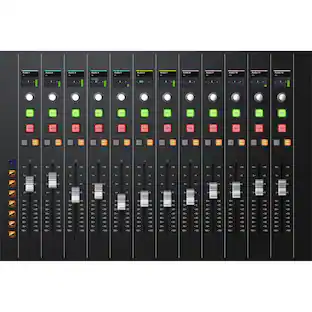
Be at the forefront of professional audio mixing with the Fairlight Console Channel Fader, a sophisticated and advanced tool designed to elevate your sound production experience. This high-quality control surface, crafted by the esteemed Blackmagic Design, offers unparalleled control over nearly every parameter and feature in your software. This console channel fader is not just a piece of equipment, but a gateway to a unique user interface that is both intuitive and efficient. With its fast-to-use buttons and controls, you can quickly map the console keys into a configuration that is optimized for your specific task. This means you can work faster with Fairlight audio than with any other tool in the world, enhancing your productivity and creative output.The Fairlight Console Channel Fader is equipped with 12 precision motorized faders, each offering call, solo, mute, and automation controls. This ensures you have the utmost control over your audio mixing, allowing for precise adjustments and fine-tuning. In addition, each channel comes with an LED display that provides real-time status updates, ensuring you're always in the know about your mix's progress.With its sleek, modern design, the Fairlight Console Channel Fader is not only a durable and reliable tool but also a visually appealing addition to your audio equipment setup. Experience the difference in audio mixing with this advanced, high-quality console channel fader.
Specs
Be the first to ask a question.
We’ll try to get your question answered within 24 hours by a Best Buy customer or brand representative.