Rating 4.4 out of 5 stars with 201 reviews
4.4- Scan Speed (69)
- Ease of use (63)
- Size (38)
- Duplex (6)
- Quality (4)
- Software (10)
- USB Cable (9)
- Paper Feed (6)
- Page Capacity (3)
Customer Images
The vast majority of our reviews come from verified purchases. Reviews from customers may include My Best Buy members, employees, and Tech Insider Network members (as tagged). Select reviewers may receive discounted products, promotional considerations or entries into drawings for honest, helpful reviews.
- Rated 4 out of 5 stars
Acceptable but can be frustrating.
It works okay. My main complaint (and the reason for the 4 stars only) is that it constantly grabs two sheets at a time. The mechanism for picking up individual sheets could be better. The machine appears to have compromised footprint size for complexity of design and the simple design can't pick up individual sheets.
Posted by SontheScurvy
- Rated 5 out of 5 stars
Compact, Portable & Reliable – Saves Time & Money
I do construction and and architectural, specifications inspections, which requires me to travel. Occasionally, for up to three weeks at a time. Like any business person I have to keep records of related expense receipts for re-reimbursement. Several years ago I had several incidental kinds of receipts from big box stores actually fade away (disappearing-ink) before I could claim them as legitimate expenses. Auditors have strict rules concerning 'valid' receipts, so I wound up out-of-pocket on those, purchased incidentals. It was then I decided to purchase a home office scanner to digitize all my job-related, expense receipts. The scanner eventually paid for itself accounting for faded, unrecognizable, and, damaged, travel receipts. YooHoo! So, when I had an opportunity to review a complimentary Brother ADS-1200 Compact Color Desktop Scanner with Duplex in exchange for the portable scanner, I got excited. I never thought of utilizing a portable scanner on-the-road in the field before. WoW, was I surprised. After using this portable scanner for three weeks, I am now a believer. It is so convenient, quick, and reliable. I no longer have to save fistfuls of paper receipts for future reimbursement. And, since the auditors allow me to submit valid receipts on a weekly basis. I can daily digitize my various expense documents before they get tattered, wrinkled, and torn. I don't have to wait 'till I get home to process expenses on my home office scanner. Using this Brother Compact Scanner on-the-road has saved me time and allows me to take advantage of weekly reimbursements too. I am not going to list each and every feature, and, or, specifications of this scanner. You can find all that info at the Best Buy website. However here is what I really appreciate about this Brother ADS-1200 Compact Scanner: * Portability & Connection To My Laptop – This baby only weighs approximately 3 pounds and 5 ounces. Lightweight and compact to take anywhere I travel. It neatly fits into my backpack, which also stores my laptop too. I power my scanner through my laptop with a USB 3.0 micro-cable connection. It is not included in the scanner package, but readily available and reasonably priced at stores like Best Buy. This scanner can also be powered through the proprietary, A/C adapter cable, which is included in the package. There is also a USB 2.0 micro-cable port, which you can use to connect to your computer to transfer scanned documents. However, it does not provide any power to the scanner – you must use the A/C adapter cable to power the unit up. Additionally, If I insert a flash drive in the USB 2.0 port on the back of my scanner I can scan documents directly to it. * Software & Driver Package – I downloaded the software bundle from the Brother Support website indicated in the Quick Setup Guide included with the scanner. This is a large file (145 MB), and, could take some time to download depending on the speed of your Internet connection. After downloading this Zip file will self-extract and install on your computer. Be patient, the wait is worth it. The included software suite provides document management and OCR software. An iPrint&Scan Icon together with a Brother Utilities icon will be placed on your home screen (Win 10). I open the iPrint&Scan icon and scan my documents to files I have setup through 'Creative Workflow'. For example, I have my files setup as Hotel Receipts, Meals, Incidentals, Mileage, Vendor Services, etc. (See Attached Pic). My scanned documents will go directly to one of those main files I designated. * Simple To Use & Operate – I could actually scan without downloading the Brother I-Print & Scan software. However, there are numerous, valuable features included when you download the software. The software allows you to change the quality of your scan, color or monochrome, and files it in the folder that you designate. You can also change the type of file you want to save and forward it to e-mail, OCR, file, or a USB flash drive. * Nuance Power PDF Software - This software allows me to edit my scanned documents, and, arrange the pages as necessary. It also enables me to convert PDFs or scanned documents into editable formats. Super useful when I don’t have the original documents. * Duplex Scanning – I was floored by the quality of the automatic, two-sided (duplex) scanning, which only takes one pass. This scanner doesn't care how I feed the document or receipt – it automatically orientates it correctly even when I feed it upside down. However, because of the 'guides' in the ADF (Automatic Document Feeder) I cannot mix various sizes of documents and, or receipts. Not a big deal - I just scan my letter-sized docs first, then, re-adjust the guides to feed the smaller, width-sized receipts. * NOT Dependent on Wi-Fi – Most motels and hotels have 'open' and inconsistent Wi-Fi Internet service. So, for me a direct wired connection from the scanner to my laptop gives me privacy, convenience, and reliability too. * Easy Care & Maintenance – I also downloaded the Online Users Guide for a more comprehensive list of scanner operations and functions. On Pages 174 to 178 are detailed instructions and illustrations on how to properly clean the rollers, glass strips, and sensors of the ADS-1200. All that is required to clean these important parts is a soft, lint-free cloth moistened with plain water. After three weeks of almost daily use I love this Brother ADS-1200 Compact Scanner. I send my scanned receipts to Accounts Payable using a cloud service directly from my laptop while still on-the-road. I now receive my reimbursement money pretty fast as they transfer funds directly to my bank account after approval of my travel expenses. Isn't computer technology grand? WooHoo! I highly recommend this Brother ADS-1200 Compact Color Desktop Scanner. It has made my home office scanner obsolete. In fact when it comes time to purchase a new printer I will look for a less expensive unit that is not an All-In-One. I now have exactly what I need for on-the-road and home office use too. If you travel and need to scan your expenses or other documents while away – this is what you need. Buy It, you won't be disappointed.
Posted by pauldar
- Rated 3 out of 5 stars
The Little Scanner That Tried
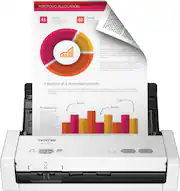
Brother - ADS-1200 Compact Desktop Scanner is very compact and light. This gave me high hopes when first setting the unit up. It does a decent job of scanning, but it's many 'qualifications' make it more of a hassle than using scanning apps via my smartphone. Cons: - It doesn't come with the needed cable to hook it up to your computer and it's not a common USB cable. - It is only rated to accept up to 20 pages, but I found that it had trouble keeping pages fed straight after about 10-12 pages. - The de-skew feature only works on 300 dpi or less quality. It will not work with higher resolution scans. - As a Mac user, the software is very clunky to use and the online manual was limited in clear information (mainly because it was for 3 different models). - Although it claims to work off of a powered USB port, the documentation also says that you need to have AC power for longer pages or documents. - The documentation also states that you should not use it to scan "Documents written in pencil / Documents that use coated paper / Photographs (photographic paper) / Documents printed on perforated paper / Documents that use loose-leaf paper or any paper with holes in it / ..." That's just a few of the 17 types of 'Unacceptable Documents' mentioned (see picture). In fairness, I'm used to having access to a more expensive, still-fairly-mobile scanner that takes whatever fits in the machine and handles it solidly and with great quality. It may be unfair to review this unit from that perspective. However, the limitations of the ADS-1200 cause me to compare it unfavorably with the alternative of scanning documents with my smartphone. I can't help thinking that Brother can produce a truly mobile scanner that's not so limited in what or how it scans. For now, I cannot recommend the Brother - ADS-1200 Compact Desktop Scanner. Perhaps the 1250 or 1700 are the better choice. -
Posted by JBCTECH
- Rated 3 out of 5 stars
Picture (almost) Perfect
The clarity of pictures and documents is great. Recently my grandmother got sick and she’s had these albums of pictures from the 70’s which she prizes like gold. I got her an iPad and scanned all the pictures so that I could upload them to her iPad digitally. She lives on the other side of the state so when she was able to look at her memories and swipe through them she was so pleased. This Brother scanner is ideal for me because it is compact, easy to use, and the best part is that it can be powered by a AC adapter or powered through my computer. The power-through-computer feature was the best part for me. I thought it was to good to be true but no features were compromised for me. Overall a cool machine, my one downfall is the actual set up. Boy was it lengthy and when the updates were done it didn’t even recognize my scanner so I had to manually tell my Brother Software that a scanner was connected. Don’t let that derail you though because if you’re always on the go like me this compact scanner is your machine!
Posted by Txstatesal
- Rated 4 out of 5 stars
Simple set up, simple to use
I purchased this scanner as an upgrade to the previous mobile scanner I purchased a few months ago. *I will say, if you have it have had a Previous Brother Scanner, you'll have to update and remove the previous device Before this will work. Set up was reasonably simple. After I synced this device with my laptop, I scanned a sample doc, and this was Super Fast. One thing I Will mention - there is Nothing along the bottom to hold outcoming papers upon passing through the scanner, you must have it on a table, or have your hand ready to catch them as they pass through. Also, make sure Everything scans. At times, pages will pass through together and you'll have to run the ones it missed again... One great advantage, it has a 20-page capacity automatic doc feeder and you can add pages/docs in 20-page increments to your scans. This is great considering my need to scan large packages, sometimes, 100 pages or more, at a time. One small con: counting pages into 20-page increments to feed so you don't miss any pages to be scanned. All in all, it's a good, economical, Portable device that works well for me as a Signing Agent and Mobile Notary.
Posted by Arris