Rating 3.9 out of 5 stars with 46 reviews
3.9- Print Quality (31)
- Size (5)
- Noise Level (4)
- Setup (4)
- Design (3)
- USB (9)
- Connectivity (8)
Customer Images
The vast majority of our reviews come from verified purchases. Reviews from customers may include My Best Buy members, employees, and Tech Insider Network members (as tagged). Select reviewers may receive discounted products, promotional considerations or entries into drawings for honest, helpful reviews.
- Rated 4 out of 5 stars
The Best Printer should still come with a cable
There are three certainties in life: death, taxes and Brother laser printers. All three do exactly what you expect them to and are unfailingly reliable. Jokes aside, this is the 2nd Brother laser printer I own and the only reason I have a 2nd one is because I wanted a 2nd one. The other one still works absolutely fine after probably seven years of ownership and use. That one has wifi connectivity and I don't even remember the last time I've had to restart it to connect to the internet. It's just that reliable. I liked the idea that this one is even simpler: a dedicated printing machine when all you want to do is connect it straight to your computer and print something in black and white. That is at least 98% of what I print any time I need or want to print something. I am confident I will be able to do that with this machine for years and years and years. All I'll need to do is get toner and paper periodically. Done. So, this thing works exactly as you would expect when it comes to printing. You put the toner drum and cartridge in, plug it into your computer, click print and out comes a really nice looking black and white document. It does this quickly and relatively quietly. I don't even know what the page per minute count is, because that's just not something I ever bump up against as a problem. Obviously, if you're looking to outfit a sizable office with a bunch of employees then you're not looking at this printer in the first place. But for a home office? Again, this is what you want. There are two things that keep this from being a no-brainer 5 star review. The first is that I'm of the firm opinion a printer that has no connectivity beyond using a direct connection via USB cable... should include such a cable in the box. This one doesn't. There is no other reason in the world that exists for this other than corporate greed. Maybe they'll claim it's better for the environment because people just have a bunch of printer cables laying around their house, but that is not accurrate. I have a million cables laying around my house, but no printer to USB-C cable. It should be in the box. Charge an extera five dollars. Instead, that money went to another company and that's just silly. So just know you're gonna have to buy a cable if you don't already have one. Second, it's not exactly as straightforward as it should be to get this working with a Mac. It's not challenging, but when you add a printer in MacOS it asks you to select a driver. There are roughly a billion Brother models to choose from in the dropdown window... except for this exact model. Instead, just pick one that has a number closest to this model and it'll work fine. But even on Brother's website the status of the driver for this model was listed as "checking." I don't even know what that means as the site was not actively checking for anything! It's just strange. Maybe this is a newer model and those things aren't ironed out just yet, but really they should be given this is just an iterative (and simpler) model of the same printer they've had for ever at this point. Those dings aside, just buy this. You won't regret it. It may even outlive me.
Posted by Shwanny
- Rated 4 out of 5 stars
Works Decently Despite Setup Woes
[PROS] Compact size: This laser printer is sized perfectly. For the mini powerhouse that it is, it's only a tad bit longer and wider than my personal printer. I'm not a fan of having printers stationed next to me, but this one doesn't take up as much space as I thought it would. Prints quickly: When I first started to use this device, I was particularly interested in the PPM (pages per minute) speed. The description stated that it prints "up to 32 PPM" so I wanted to see how close I could get to it. After timing it twice, I was able to hit the benchmark in both instances so I am extremely impressed. Furthermore, I found myself please with the actual quality of the document once it came out. Simple Software: The Brother iPrint&Scan program is pretty straightforward. Given that this device lacks scanning features, I was only able to evaluate the print functionality. The app is easy to grasp, and it provided adequate options that enabled me to complete all of my tasks including double-sided printing. [CONS] Burden to setup: The biggest challenge in working with this printer is getting it set up. The first issue is that a USB-B ("printer") cable is not included. This is a wired printer, but to not provide the only cable needed to connect to the computer is baffling. Fortunately, I found a USB-B cable in the midst of a several dozen HDMI, USB C, and Ethernet cables that I own. The next issue I had was that the paper guide directs you to "support.brother.com" to download companion software. Once I navigated to the page, I was greeted by an "Access Denied" error almost 2 days straight (and on different machines) when I attempted to download the software. Eventually, I was able to download the software which I attribute the issue as a one-off. Not Wireless: In my opinion, I do not like this design choice. It's a step back and adds an unnecessary hassle when dealing with the printer. Although it's compact in size, it's still the largest thing sitting on my desk and make things more cluttered when I would prefer it to be in a different location. [CONCLUSION] As a wired, B&W printer the HL-L2400D is fine only if you don't require much. It is bare bones given there's no color printing, scanning, or wireless capability. It's smaller than typical printer, but it is fast.
Posted by HBCUgrad13
- Rated 5 out of 5 stars
Quality, Quickness and High Quantity Printing
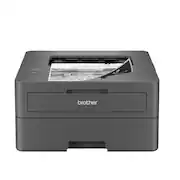
As far as printers go, the Brother HL-L2400D Black and White Laser Printer is one of the best you’ll find. It is easy to setup, prints fast and is about medium size and weight. I enjoyed the printing out some of the projects I participated in. I play guitar and get a lot of sheet music that I print from the web. When looking at notes, TAB, chords, 6 string outline, text and something easy to read, I knew I needed clear and precise printing. Printing quickly is another thing I would like with music sheets. Well, the Brother L2400D performed under pressure. No issues with smearing, the ink was flawless and easy to read so I can play guitar at my best. This is going to be the printer I use from now on. Another project perfect for the Brother L2400D is a “meet and greet” handout with the neighbors on the block. I plan on putting printing out the date, place, time as well as any food that might be needed. With different fonts, thickness/thinness of the text and checking the ink for smearing, the Brother L2400D will be able to handle it. I ran a test page and had no problems at all. The Brother L2400D is a laser monochrome printer meaning the pages are produced in shades of black. Not a color printer but I have had printers with color for years and never even used the option. So, the fact there is no color just black and white printing is great as far as I am concerned. You can get about 32 pages a minute in “letter” sized paper and 15 pages a minute on two sided black and white “letter” sized paper. That is a great productive speed that will help if you have a lot of pages to print. The fact that the Brother L2400D printer has two-sided printing is even better. Paper can definitively be saved when you go that route. Printing from the 250-page tray, the printed side of the paper is face down. It really makes no difference in printing, but it is good to know, especially when printing on two-sided paper. Another great feature is you can print on just about any size paper or paper weight (there are very little exclusions that this Brother won’t print on). (The information on this is included in the online manual). A large 250-page paper count tray is located on the front. That is a large total for such a medium form factor sized printer. This also makes the printer front heavy. This should not be a problem, but it is worth noting depending on how you set your printer setup. The width is 14”, Height 7.2” and Depth 14.2”. This is a medium sized printer that is almost a complete square. Once you load up of the 250-count paper tray the overall weight is around 16lbs. This is a great weight because of the stability in printing that it brings. There is not a lot of movement from the printer, so the documents printed are clear. The only negative in the printing process is the noise. It is loud, but not louder than any other Laser printer I have heard. You will also want to let the vent push out the hot air, so be sure to leave some room for that. Installing the drum and toner was easy, once I pulled out the correct slot. The directions were not very clear on this. It did take a short bit of time, but the front plastic drawer pulls down and the drum and toner slide right in. Once that was done, I plugged in the Brother L2400D to the wall socket. Then I plugged the “fast USB 2.0 interface” from the printer (USB Type B) to my computer’s USB Type A slot. This cord is NOT included in the Brother L2400D box. You will have to get one from the store or online. It is not expensive, but I don’t know why the cord couldn’t be with the printer. It is a small hassle. I just happen to have an extra USB Type B toa USB Type A. Then I went and turned on the Brother L2400D monochrome printer. After it got done setting up and the lights went on and off, then the light for “Ready” was on. I went to settings and made sure the Brother L2400D was set as the main printer. Next, I printed a test page. It came out clear and precise, looking great, how a laser printer should print. Now that I can print from the Brother L2400D and my laptop, that was most of the setup required. Finding the manual online, you can find more detailed things to look for, like firmware updates, or different type settings. Included with the printer is a 4-step process to hook up the Brother L2400D printer to your computer. It is one of the easiest printer setups I have done (with exception where the drum and toner was to be installed). Most important are the controls which operate the Brother L2400D laser printer. The controls are stacked on one another, so they are easy to read. A power button, Lights for Toner, Drum, Paper and Ready are at your disposal. Just below the Ready Light is a solid green bar with a Go button beneath it. All of these lights have different shades of green or a blinking yellow light to let you know the corresponding job the Printer is supposed to execute. The category for the 4 actions is Toner Low, Replace Toner, Drum End Soon, Replace Drum, Drum 1 2-3, Paper jam or cover open and no paper. These settings and colored lights provide all the information you need to succeed in running the Brother L2400D properly. Overall, I enjoyed the simple, easy to read and making copies with Brother L2400D. The black monochrome ink didn’t smear after drying, printed clear and is a “keeper” among the many other similar products out there.
Posted by stoptheclocks
- Rated 4 out of 5 stars
It's basic, but it's probably all you need for B&W
I've still got a working Brother monochrome laser printer that is about 10 years old so I've got a lot of faith in the reliability of the brand. This Brother HL-L2400D Black-and-White Laser Printer is a better version. It's a little faster, it offers 2-sided printing, and it's a little more efficient with the toner. Weight with the toner was approximately 15 pounds. Dimensions are 14.25 x 14 x 7.25" so it's got a rather small footprint. Setup was fairly easy. I will note that it does not ship with a printer cable, so you need one for setup; this is not the wireless version. You basically insert the toner by opening the front of the printer. I was up and running in about 10 minutes. You can go to the Brother website, install the driver and software package, download the manual, and that's it. The standard tray capacity is about 250 sheets of 20lb 8.5x11" (letter size) bond paper. You can feed 16 to 43 lb paper which is fairly regular text weight paper. The manual tray can take up to 61 lb (heavy text weight) 8.5x14 legal size paper. Your manual feed isn't going to handle more than one sheet at a time, but it will handle a few sizes of envelopes too. 2-sided printing tops out at 28lb paper (your basic color copy paper.) Printing speed is 32 pages per minute for single-sided prints, about 15ppm for 2-sided prints. I counted approximately 9 seconds to the first printed piece once I sent a file. Overall, this is your basic budget laser printer. Laser B&W is very affordable, and this printer can meet your needs for school, work, and personal use. It's quick and it's quiet. The printer has a small footprint and has all of the basic led indicators to let you know when you need toner, paper, a new drum, or that dreaded paper jam. If this printer is anything like my old Brother Laser printer, it will be around the house another 10 years.
Posted by NanoEthan
- Rated 3 out of 5 stars
Basic Home Office Laser Printer
The Brother HL-L2400D Laser Printer is a black and white laser printer designed for personal or home office use. It has a wired USB 2.0 connection and supports 2-sided printing. What It Comes With Inside the box you will find the printer, toner cartridge, power cord and instructions. A USB 2.0 cord no longer than 6 feet is required, but does not come with the printer. Installation The printer is a basic unit and the setup should be easy. I had trouble with the software, so the installation took a long time. As far as the components go, they were quick to put together. The printer is fully assembled. Insert the toner, load the paper tray, connect the power cord, turn it on, and then connect the USB cord to the computer. All of this was straight forward. Things started to go downhill when I tried to install the software. The software was supposed to install following the prompts once you connect the USB cord to the computer. I went through the prompts, but it never located the software for this particular model number. This should have been found when typing in the model number, but this model number is not loaded in the Brother installation software yet. I followed the troubleshooting ideas on the instructions, but the restart of the printer and computer did not fix it. I had to go to the Brother website and manually find the software which was not easy. Once I found the software, I downloaded the recommended software and ran the exe file. It proceeded to install several programs. Keep in mind that this is only a black & white printer, yet it installed the iPrint & Scan software. Window after window popped up during the install, and when it was over there were three desktop icons. The software installed supports internet printing, but this printer does not have a wired or wireless connection. It also does not have a scanner, but the software supports scanning. When I printed a test page a message appeared and said something like “Scanning not supported” and the icon for scanning permanently disappeared. It was quite clear that Brother did not put enough effort in the development of the installation software. This needs to drastically improve and be connected to the prompts so that the customer doesn’t have to spend time hunting for it. It was a very disappointing experience. Features As I mentioned, this is a basic laser printer. These are some of its features: • Black and white printing • Up to 32 pages per minute • Wired-only connection through USB 2.0 cord • 2-sided printing • Paper tray loading up to 250 sheets • Front loading for paper/envelopes • Resolution up to 1200 x 1200 dpi • 3 options for toners/drum refills Quality/Speed of Printing The print quality was as-expected. Printing the page was quick. Specs say that the first print should take less than 8.5 seconds. Additional sheets in the same print job are quicker. Power Like most laser printers, this unit is power-hungry. It can use up to 920W of power, so this makes my lights flicker when it turns on and when it goes to print. The room that I am in has a standard 15-Amp breaker. I’m giving the Brother HL-L2400D Laser Printer 3 stars. It does what it states that it should do, but the software installation was terrible. Also, though it’s standard practice these days to not include a USB 2.0 cord, it really irks me that the company can’t throw in a 6’-0” USB 2.0 cable. It’s only a couple of dollars to package one in, and could prevent someone from being able to set up their printer for the first time. Lastly, there’s a wireless version of this printer that you may consider if you’d like to stay with the Brother brand. With the limitation of a maximum 6’-0” USB cord, you must place this near you. On top of that, you have to have an available USB-A port. Most laptops now don’t have that. You end up have to buy adapters and possibly use one of the few available ports on your machine.
Posted by sgriesch