Black Friday is hereShop new DoorbustersShop now

Skip to content
Main Content
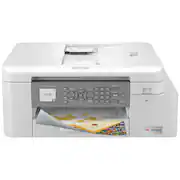
product image

Brother - INKvestment MFC-J4335DW Wireless All-in-One Inkjet Printer with up to 1-Year of Ink In-box - White/Gray

Model: MFCJ4335DW
SKU: 6461536
This item is no longer available in new condition. See similar items below
  • Key Specs
    • Networking: Wireless
    • ENERGY STAR Certified: true (Devices carrying the ENERGY STAR service mark, such as computer products and peripherals, kitchen appliances, and other products, generally use 20% to 30% less energy than required by federal standards.)
    • Printer Type: All In One, Printer, Copier, Scanner
    • ISO Color Print Speed: 19 pages per minute (The number of color pages able to be printed per minute in the device's default single-side mode, as tested by the International Standards Organization (ISO).)
    • ISO Mono Print Speed: 20 pages per minute (The number of black ink (grayscale) pages able to be printed per minute in the device's default single-side mode, as tested by the International Standards Organization (ISO).)
    • Touch Screen: true (Touch-screen devices make navigating more intuitive. Using a touch-screen display, you can do things such as tap to select, hold and drag to move items, swipe to scroll, and pinch to zoom.)
  • General
    • Brand: Brother
    • Model Number: MFCJ4335DW
    • Product Name: INKvestment MFC-J4335DW Wireless All-in-One Inkjet Printer with up to 1-Year of Ink In-box
    • Color: White/Gray
    • Display Screen: true
    • Display Screen Size: 1.8 inches
  • Dimensions
    • Product Height: 7.1 inches (The out of box height of the item. Height is measured as the vertical distance from the bottom of the item to the top as it would be primarily used or placed.)
    • Product Width: 17.1 inches (The out of box width of the item. Width is measured as the horizontal distance from one side of the item to the other as it would be primarily used or placed.)
    • Product Depth: 14.2 inches (The out of box depth of the item. Depth is measured as the distance from the front of the item to the back as it would be primarily used or placed.)
    • Product Weight: 17.6 pounds (The out of box weight of the item.)
  • Features
    • Automatic Document Feeder: true
    • Photo Printing: true
    • Monochromatic/Color: Color
    • Automatic Reduction/Enlargement: true
    • Automatic Two-Sided Printing: true
    • Tray Capacity: 150
    • Duty Cycle: Up to 2,000 (The maximum number of pages per month that the device can produce without failing, as specified by the manufacturer.)
  • Connectivity
    • Wired Connectivity: USB-B
    • Wireless Connectivity: Wi-Fi (The manner in which a device sends data to another device over a short distance without the use of wires or cables.)
    • Minimum System Requirements: Windows 7 SP1/8.1/10, Server 2008/2008, R2/2012/2012, R2/2016/2019; MAC®: OS v10.14.6/10.15.x/10.16.x
  • Certifications Listings & Approvals
    • EPEAT Qualified: false (The Electronic Product Environmental Assessment Tool (EPEAT) was designed to provide an environmental assessment tool for purchasers. In order to qualify for EPEAT, a product must meet all 23 required criteria.)
    • TWAIN Compliant: true (Products with this label are compliant with standards set by the TWAIN Working Group for regulating communication between software and digital imaging devices. Devices that are TWAIN compliant are compatible for use with each other without requiring additional software, even if they have different capabilities.)
  • Scanner Info
    • Scanner Type: Flatbed, Sheetfed
    • Duplex Scan Function: false
    • Scanner Resolution: Up to 2400 x 1200 (Refers to the number of pixels/dots, both horizontally and vertically, of the image produced by the scanner. Generally, the higher the resolution, the sharper and cleaner the produced image.)
  • Fax Info
    • Integrated Fax: true
  • Ink
    • Compatible Cartridges: Brother LC406
    • Ink Subscription Service Available: true (The printer monitors ink usage and alerts the subscription provider when levels are low. A purchased subscription provides refills of ink based on usage.)
    • Ink Cartridges Required: 1 x Black, 1 x Cyan, 1 x Magenta, 1 x Yellow (The quantity and color of ink cartridges required for the printer to operate.)
    • Ink Cartridges Included: 1 x Black, 1 x Cyan, 1 x Magenta, 1 x Yellow (The quantity and color of ink cartridges included.)
    • Ink Bags/Bottles Required: None (The quantity and color of ink bags/bottles required for the printer to operate.)
    • Ink Bags/Bottles Included: None (The quantity and color of ink bags/bottles included.)
  • Memory
    • Memory Card Slot: false
  • Paper Info
    • Automatic Document Feeder Capacity: 20 sheets
    • Maximum Document Length: 8.5 inches
    • Maximum Document Width: 14 inches
    • Supported Paper Sizes: Up to 8.5" x 11.7" (Letter size)
    • Paper Feeder: Cassette tray, Multipurpose tray
    • Paper Handling: 150 Sheets
    • Compatible Media Types: Letter, Envelope, Legal, Executive, A4, A6, Envelope (C5), Envelope (DL), Envelope (Monarch), Photo (3.5" x 5"), Photo (4" x 6"), Photo (5" x 7"), Photo (5" x 8"), Photo (8" x 10")
  • Performance
    • Printer Resolution (Black): Up to 4800 x 1200 (Refers to the number of pixels/dots, both horizontally and vertically, of the image produced by the printer in black ink. Generally, the higher the resolution, the sharper and cleaner the produced image.)
    • Printer Resolution (Color): Up to 4800 x 1200 (Refers to the number of pixels/dots, both horizontally and vertically, of the image produced by the printer in colored ink. Generally, the higher the resolution, the sharper and cleaner the produced image.)
    • Approximate Page Yield (Black): 3000
  • Copier Info
    • Copier Resolution (Black): Up to 1200 x 1200 (Refers to the number of pixels/dots, both horizontally and vertically, of the image produced by the copier in black ink. Generally, the higher the resolution, the sharper and cleaner the produced image.)
    • Copier Resolution (Color): Up to 1200 x 1200 (Refers to the number of pixels/dots, both horizontally and vertically, of the image produced by the copier in colored ink. Generally, the higher the resolution, the sharper and cleaner the produced image.)
  • Warranty
    • Warranty - Parts: 2-year limited warranty
    • Warranty - Labor: Not applicable
  • Compatibility
    • Works With: Amazon Alexa (Compatible with or able to be connected to other smart devices or applications.)
  • Other
    • UPC: 012502662730

When you need a reliable, compact color inkjet printer with up to 1-year of ink in-box(1) to print, copy, scan and fax for your home, home office, schoolwork or small office, the Brother MFCJ4335DW INKvestment all-in-one color inkjet printer is a great choice. It features versatile connection options, wireless printing and scanning(2), automatic duplex printing plus fast print and scan speeds. This feature-filled INKvestment printer is supported by the free Brother Mobile Connect(3) App providing a convenient user interface that enables printing, scanning, copying and device management from your smartphone or tablet. There’s an up to 20-sheet automatic document feeder, bypass tray and 150-sheet capacity adjustable paper tray for letter or legal-size paper that offers paper handling versatility. Easily navigate to powerful features plus print-from and scan-to popular cloud services including Google Drive, Dropbox, OneDrive and more(4), directly from the printer using the 1.8” color display. And when a cartridge is empty, simply pop out the cartridge and plug in a front-loading plug-in replacement and get back to printing – no waiting and no mess. The MFC-J4335DW features the unique Brother Page Gauge(5), a visual, numerical way to know the amount of ink used, estimating the remaining page levels and amount of ink remaining to help take the guesswork out of when to replace ink. Works with Alexa; add voice control by combining with an Alexa device. It comes with a 2-Year Limited Warranty and At Your Side support for the life of the product.

  • INKvest in a printer you won’t want to replace: With the Brother MFC-J4335DW you can print for up to 1-year using only the 4 cartridges provided in-box(1). With a full range of features and capabilities, this is a printer you won’t want to replace.
  • Brother Genuine INKvestment ink cartridges deliver convenience: The easy-to-use, front-loading plug-in INKvestment ink cartridges hold more and continually deliver ink to the internal ink reservior for convenient, uninterrupted printing.
  • Put the power of printing at your fingertips: The simple to use, free Brother Mobile Connect(2) App delivers easy onscreen menu navigation for printing, copying, scanning and device management from your smartphone or tablet.
  • Large page yields mean less ink replacement: When you do need to replace your ink, choose Brother Genuine LC406 Standard or High-Yield INKvestment replacement cartridges. To avoid worrying about running out of ink again, get started with Refresh EZ Print Subscription & save up to 50% on ink(4).
  • Page Gauge helps take the guesswork out of when to replace ink: Page Gauge is a visual, numerical way to know the amount of ink you have remaining(5). Check ink levels directly from the printer LCD color display or use the free Brother Mobile Connect(2) App to check from your mobile device.
  • Connect your way and print from virtually anywhere: Versatile connection options include built-in wireless(3), Wi-Fi Direct or connect locally to a single computer via USB interface.
  • Works with Amazon Alexa: Ask your compatible device (separate device is required) to print custom shopping lists, to-do lists, as well as a variety of coloring activities and crossword puzzles.
  • Convenient, color 1.8” display: Navigate to powerful features and scan-to popular cloud services directly from the printer, including Google Drive, Dropbox, Box, OneDrive and more(6).
  • Prints up to 20 ISO ppm in black, up to 19 ISO ppm in color(6): Generates documents quickly.
  • Standard paper handling: Up to 150-sheet input and 100-sheet output capacity.
  • Up to 4800 x 1200 dpi (dots per inch) print resolution(7): High resolution for producing incredible quality and detail in documents and photos.
  • Full Brother At Your Side Support: The MFC-J4335DW comes with a 2-Year Limited Warranty and Brother At Your Side support for the life of your printer.
  • INKvest in a printer you won’t want to replace: With the Brother MFC-J4335DW you can print for up to 1-year using only the 4 cartridges provided in-box(1). With a full range of features and capabilities, this is a printer you won’t want to replace.
  • Brother Genuine INKvestment ink cartridges deliver convenience: The easy-to-use, front-loading plug-in INKvestment ink cartridges hold more and continually deliver ink to the internal ink reservior for convenient, uninterrupted printing.
  • Put the power of printing at your fingertips: The simple to use, free Brother Mobile Connect(2) App delivers easy onscreen menu navigation for printing, copying, scanning and device management from your smartphone or tablet.
  • Large page yields mean less ink replacement: When you do need to replace your ink, choose Brother Genuine LC406 Standard or High-Yield INKvestment replacement cartridges. To avoid worrying about running out of ink again, get started with Refresh EZ Print Subscription & save up to 50% on ink(4).
  • Page Gauge helps take the guesswork out of when to replace ink: Page Gauge is a visual, numerical way to know the amount of ink you have remaining(5). Check ink levels directly from the printer LCD color display or use the free Brother Mobile Connect(2) App to check from your mobile device.
  • Connect your way and print from virtually anywhere: Versatile connection options include built-in wireless(3), Wi-Fi Direct or connect locally to a single computer via USB interface.
  • Works with Amazon Alexa: Ask your compatible device (separate device is required) to print custom shopping lists, to-do lists, as well as a variety of coloring activities and crossword puzzles.
  • Convenient, color 1.8” display: Navigate to powerful features and scan-to popular cloud services directly from the printer, including Google Drive, Dropbox, Box, OneDrive and more(6).
  • Prints up to 20 ISO ppm in black, up to 19 ISO ppm in color(6): Generates documents quickly.
  • Standard paper handling: Up to 150-sheet input and 100-sheet output capacity.
  • Up to 4800 x 1200 dpi (dots per inch) print resolution(7): High resolution for producing incredible quality and detail in documents and photos.
  • Full Brother At Your Side Support: The MFC-J4335DW comes with a 2-Year Limited Warranty and Brother At Your Side support for the life of your printer.
Whats Included
  • Brother MFCJ4335dw; Black, Cyan, Magenta, Yellow Starter Ink Cartridges; Quick Setup Guide; Product Safety Guide; Reference Guide; Warranty Card
  • Brother MFCJ4335dw; Black, Cyan, Magenta, Yellow Starter Ink Cartridges; Quick Setup Guide; Product Safety Guide; Reference Guide; Warranty Card
Disclaimers
  • *Requires a high-speed Internet connection.
  • (1) Based on average monthly print volumes of approximately 150 pages at 60% black pages/40% color pages in accordance with ISO/IEC 24711 using 4 cartridges provided in-box.
  • (2) Requires connection to a wireless network. Brother Mobile Connect free app download is not available in all countries.
  • (3) Requires connection to a wireless network.
  • (4) Based on monthly subscription cost in U.S. for Inkjet High Plan vs. average cost per page of eligible like standard capacity cartridges
  • (5) Page Gauge is an estimate for informational purposes only. For actual cartridge yield information refer to manufacturer’s website; (6) Requires internet connection and account with desired service.
  • (6) ISO print speed based on ISO/IEC 24734 (after first set of ISO test pages). For more details, visit www.brother-usa.com.
  • (7) Resolutions are listed by vertical by horizontal dpi.
  • *Requires a high-speed Internet connection.
  • (1) Based on average monthly print volumes of approximately 150 pages at 60% black pages/40% color pages in accordance with ISO/IEC 24711 using 4 cartridges provided in-box.
  • (2) Requires connection to a wireless network. Brother Mobile Connect free app download is not available in all countries.
  • (3) Requires connection to a wireless network.
  • (4) Based on monthly subscription cost in U.S. for Inkjet High Plan vs. average cost per page of eligible like standard capacity cartridges
  • (5) Page Gauge is an estimate for informational purposes only. For actual cartridge yield information refer to manufacturer’s website; (6) Requires internet connection and account with desired service.
  • (6) ISO print speed based on ISO/IEC 24734 (after first set of ISO test pages). For more details, visit www.brother-usa.com.
  • (7) Resolutions are listed by vertical by horizontal dpi.

Q: What is the print resolution of this inkjet printer?

A: The printer has a resolution of up to 4800 x 1200 dpi.

Q: How do I know when to replace the ink in this printer?

A: The Brother Page Gauge provides a visual and numerical indication of the remaining ink levels.

Q: Can I scan documents directly to cloud services with this printer?

A: Yes, you can scan to popular cloud services like Google Drive, Dropbox, and OneDrive directly from the printer.

Q: What is the paper handling capacity of this Brother printer?

A: This printer has a paper handling capacity of up to 150 sheets.

Q: Does this printer offer duplex printing?

A: Yes, the Brother MFCJ4335DW allows for automatic duplex printing.

Q: How can I connect this printer to my computer?

A: You can connect it wirelessly, via Wi-Fi Direct, or locally to a single computer using a USB interface.

Q: If you do not print a lot, do the print heads clog up as I have heard with other "mega-tank" models??

A: YES. If I haven't used the printer for a few days the print gets garbled. The "normal" cleaning process fixes it. The printer cleans itself periodically but apparently that's not enough to avoid the clogging. I love the printer but this is a problem. I'm nearing the end of my first set of ink cartridges so I'll see what happens after I replace them.

Q: What is cost of the inks cartridges for this printer????

A: 65.98 but the ink capacity is large and should last a year depending on how much use it has gotten.