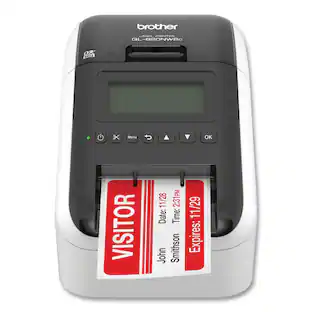
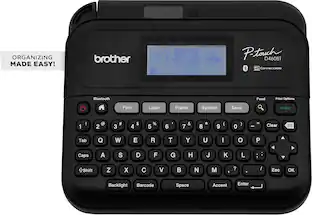
Brother - P-touch PT-D610BT Wireless Label Printer - Black
Customers are saying
Customers are positive about the P-touch PT-D610BT Wireless Label Printer's functionality. Users appreciate that it offers a wide array of options to suit their individual requirements.
Label & organize practically anything
With ~1” (24mm) labels. The perfect organizational partner for your office or workplace!
Connect and Create with free P-touch Editor Software(1)
Make professional-looking labels with barcodes, images and QR codes from your computer via included USB cable or Bluetooth connection.
Brother P-touch goes mobile with free Brother iPrint&Label software
Connect your iOS or Android device via Bluetooth to create and print labels, or quickly create address labels from your contacts.
Uses durable Brother Genuine TZe Label Tapes
Water-resistant, fade-resistant, and chemical-resistant - for indoor and outdoor use. Ideal for application-specific uses such as cable labeling and outdoor equipment identification. Available in a variety of finishes and colors.
Impressive full-color, high resolution LCD display screen
With QWERTY keyboard for easy typing, quick one-touch formatting keys, and a large 20-character, 2-line screen to preview labels before printing.
Handles high-volume jobs with ease
With faster print speeds and an automatic built-in label cutter. Enjoy sharp, vivid 180 x 360 dpi(2) printing.
Express yourself
With 17 fonts, 17 font styles, 160 frames, and 900 symbols.
175 pre-set label templates
Increase efficiency and label-making speed with pre-programmed templates for asset management, time, and date stamps and more!
Increased memory capacity saves up to 90 frequently used labels.
Create them, save them, find them, and reprint them… as many times as needed.
Make a bold statement.
With 8 font sizes and up to 7 lines of text.
(1) Additional download required. Software app compatibility may vary based on operating system. App availability may vary based on country.
(2) Requires connection to a wireless network.
- BrandBrotherModel NumberPT-D610BTProduct NameP-touch PT-D610BT Wireless Label PrinterColorBlackWarranty - Parts2-Year Limited WarrantyWarranty - LaborNot applicable
Reviews
Rating 4.8 out of 5 stars with 21 reviews
- Ease of Use (9)
- Label Size Variety (7)
- Overall Performance (3)
Customer Images
The vast majority of our reviews come from verified purchases. Reviews from customers may include My Best Buy members, employees, and Tech Insider Network members (as tagged). Select reviewers may receive discounted products, promotional considerations or entries into drawings for honest, helpful reviews.
Compare similar products

The pinnacle of business and inventory organization! Featuring high resolution printing for sharper barcodes, crisp logos, and detailed graphics. Connect and Create labels for your workspace using your computer or mobile device (Android or iOS) with the P-touch PT-D610BT Business Professional Connected Label Maker. Use the Brother P-touch Editor software(1) and iPrint&Label app to create and print from your PC, or mobile device over Bluetooth. Advanced connectivity allows multiple users to work with the same label maker from their own computer or smart device as they need! Or simply use the built-in QWERTY keyboard to quickly tap out a label when you need it. Increase efficiency on high volume labeling jobs with faster printing and a built-in automatic label cutter. So where do you need Brother P-touch label makers the most? In busy retail stores and services with lots of customer traffic. In packed warehouses and storerooms when you need to manage inventory that’s constantly coming and going. Where you need to track customer and employee possessions in lockers and bins or print ID badges. If keeping track of your assets, inventory, or employee equipment has been preventing you from focusing on the ins and outs of your business, this is the label maker you and your business needs.

Brother P-touch PT-D610BTVP Business Professional Connected Label Maker is the complete organization solution for retail, business, and inventory tasks! Connect and create labels from a computer or mobile device via Bluetooth. Enjoy higher resolution and faster printing for increased efficiency on high-volume labeling jobs. Features full color, LCD display, 175 pre-set label templates for asset management, date, and time tracking. Store up to 90 labels for quick reprinting. Advanced connectivity allows multiple users to work with the same label maker from their own computer or smart device. Uses Brother Genuine TZe label tapes up to ~1.

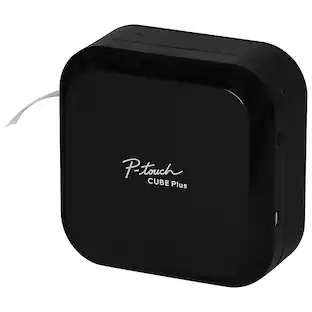
Label printing your way! The Brother P-touch CUBE Plus PT-P710BT lets you easily design and print labels up to 24mm (~1 inch) wide from your Apple or Android smartphone, tablet, laptop or desktop. Design and print unique labels with Bluetooth wireless technology using free P-touch Design&Print 2* or Brother iPrint & Label* apps. Use P-touch Editor software to access database information from your desktop to create and print labels using the USB cable provided. P-touch CUBE Plus lets you create the labels you need - from simple text for organizing and identifying, to unique labels with a variety of symbols, frames and fonts including most Google and Apple font libraries. Select from pre-designed templates plus new templates created for retail store and crafting businesses to help your products stand out. Enjoy smartphone features such as spell check and voice to text to simplify label creation. The sleek design makes a welcome addition in your craft business, retail store, home or office. The built-in Li-ion battery offers easy portability. The built-in automatic cutter provides clean full cuts, so you can create just the right size label. The P-touch CUBE Plus uses P-touch, laminated tapes up to 24mm (~ 1 inch) wide available in a variety of colors and types. P-touch CUBE Plus also works with Premium Glitter and Premium Matte tapes great for special events, gift wrapping and customized product identification. The P-touch CUBE Plus PTP-710BT comes with Black on White Starter Tape, Black on Premium Glitter Gold Starter Tape, built-in Li-ion battery and USB cable. *Wireless connection required.
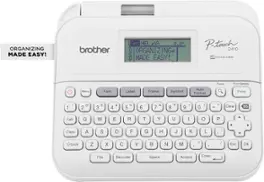
This is how to achieve next level home and office organization! Presenting the Brother P-touch PT-D410 Home / Office Advanced Label Maker. Simply connect it to a PC or Mac with the included USB cable to unlock the power of P-touch Editor Software(1). Designed to add even more flexibility to organization solutions, it provides access to a wide selection of pre-designed templates with 15 fonts, 13 font styles, 120 frames, and 700 symbols to choose from. Want to create custom labels instead? No worries! It’s simple to add symbols or barcodes using intuitive, built-in drawing tools. Plus, the P-touch Editor(1) makes ordering compatible Genuine Brother TZe label tapes as easy as a mouse click. Looking for a few ideas to put the Brother P-touch PT-D410 to work? We’ve got plenty! Personalize office equipment, label drawers to keep supplies in their proper place, add a little organizational zen to your workspace, identify vials to keep samples separate, arrange file boxes for easy retrieval, track inventory with bar codes, and so much more. And, if you find yourself repeatedly printing the same label, you’ll appreciate having the option to save up to 50 commonly used labels for quick access and reprinting. Featuring a built-in QWERTY keyboard with easy one-touch formatting keys, creating labels that help you organize and personalize items around any home and office space is sure to become your new favorite activity. With the ability to preview labels before they’re printed, the large 15-character, 2-line display screen promises the effortless ease of error-free confidence. Includes one 4m Black Print on White Sample Label Tape ~3/4” (18mm), AC Adapter and USB cable. Optional VP model includes carry case and 4m Black Print on Clear Sample Label Tape ~1/2” (12mm).
| Pros for Brother - P-touch PT-D610BT Wireless Label Printer - Black | |||
|---|---|---|---|
| Overall Performance, Ease of Use, Label Size Variety | There were no pros for this product— | There were no pros for this product— | Overall Performance, Ease of use, Print Quality, Font Options, Price |
| Cons for Brother - P-touch PT-D610BT Wireless Label Printer - Black | |||
| There were no cons for this product— | There were no cons for this product— | There were no cons for this product— | Label Waste |
Specs
What size labels does this use
Answered by BrotherThe Brother PTD610BT supports the following tape sizes: 0.13" (3.5 mm), 0.23" (6 mm), 0.35" (9 mm), 0.47" (12 mm), 0.70" (18 mm), 0.94" (24 mm).
Will the USB cable that comes with this Brother label printer work with my Apple 11-inch iPad A16 chip with Wi-Fi 128GB?
Answered by BrotherNo, the USB Version.2.0 (Full Speed) (Micro B) that is used with the Brother PT-D610BT is not compatible with your iPad. The Apple 11-inch iPad (A16 chip) features a USB Type-C port, while your USB Version. 2.0 (Micro B) cable uses a legacy rectangular Micro-USB connector.
What tape can I use with this?
Answered by BrotherThe list of compatible tapes for the Brother PT‑D610BT is extensive and includes a wide variety of color combinations and sizes. For a complete list of compatible tapes, please visit: https://www.brother-usa.com/products/ptd610bt#accessories
Can this printer use the smaller sizes such as the 9, 12 and 18mm wide tape?
Answered by BrotherYes, the Brother PT-D610BT wireless labeler printer uses 24mm, 18mm, 12mm, 9mm, 6mm, and 3.5mm tapes. Here is a link to the compatible tapes for the Brother PT-D610BT machine. https://support.brother.com/g/b/colist.aspx?c=us&lang=en&prod=d610bteus&cao=tape#24
What is the maximum number of lines this label maker can print on a label?
It can print up to 7 lines of text on a label.
This question and answer was generated by AI based on customer and product data.

Customers often buy these together

Customers ultimately bought
 $114.98The price was $136.32
 $79.99The price was $88.88
Explore tech essentials Sponsored
 Top Deal$469.99The price was $499.99


Discover related products
 $12.99The price was $13.99
 $504.68The price was $535.66
 $249.00The price was $275.00









Keep exploring
 $232.16The price was $243.02
 $79.99The price was $88.88
 $29.99The price was $59.99
 $34.99The price was $39.99