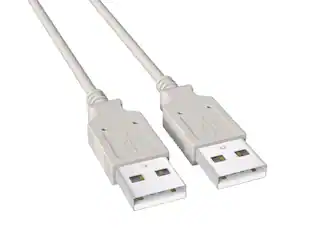
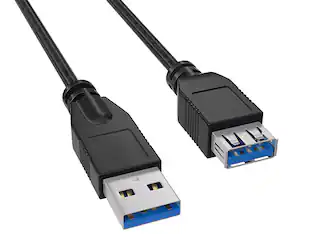
Cable Leader - USB 3.0 USB-A to USB-A SuperSpeed Cable, 5Gbps for KVM Switch, External Hard Drive, USB Hub - Black
About this product
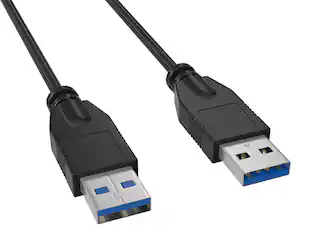
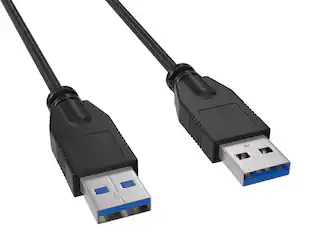
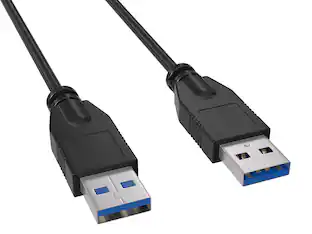
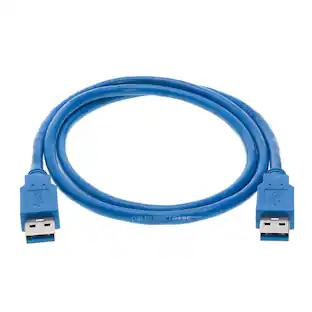
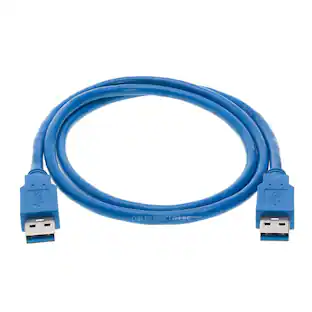
Need to connect two USB-A devices at SuperSpeed for fast data transfer? This Cable Leader SuperSpeed USB 3.0 USB-A to USB-A cable provides a male-to-male connection at up to 5 Gbps — over 10× faster than USB 2.0 — perfect for high-speed KVM switches, external hard drive enclosures, and USB 3.0 hub uplinks. Built with shielded conductors to maintain signal integrity at SuperSpeed rates, gold-plated contacts for reliable connection, and fully molded strain relief. Compatible with USB 3.0 KVM switches, hard drive enclosures with USB-A host ports, USB 3.0 hubs that use USB-A uplink, professional video capture cards, and DAQ devices. Best for: SuperSpeed device-to-host connections where one end of the device cable is USB-A. Not for: PC-to-PC direct connection (use a USB bridge cable). RoHS compliant.
Cable Length
6'Features
SuperSpeed USB 3.0 Connection — KVM, Hard Drive, Hub Uplink
Connect any two USB-A devices at SuperSpeed 5 Gbps — perfect for KVM switches, external hard drive enclosures with USB-A host ports, USB 3.0 hub uplinks, and professional video capture devices. Backward compatible with USB 2.0 ports for fallback connection.
5Gbps SuperSpeed — Foil + Braid Double-Shielded
Built to USB 3.0 SuperSpeed specification with shielded cable construction that maintains signal integrity at 5 Gbps — over 10× faster than USB 2.0. Gold-plated contacts and copper conductors prevent signal degradation common in cheap USB 3.0 cables that drop to USB 2.0 speeds intermittently.
Compatible with USB 3.0 Devices — Not for PC-to-PC Direct
Works with USB 3.0 KVM switches, hard drive enclosures, USB 3.0 hubs, capture cards, DAQ devices. Quick check: KVM switch / hub to host PC — Yes. External SSD / HDD enclosure — Yes. Direct PC-to-PC data transfer — No, requires USB bridge cable. USB 2.0 device — Yes, falls back to 480 Mbps. For PC-to-PC linking, use a USB bridge or networking cable.
Gold-Plated Contacts — Built for Workstation Use
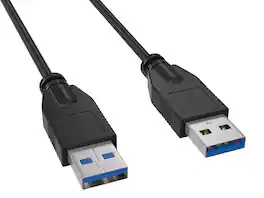
Standard USB 3.0 USB-A connectors fit any USB 3.0 or USB 2.0 port (backward compatible). Built with shielded cable construction, gold-plated contacts, and fully molded strain relief at both ends. Designed for workstation, server rack, and rack-mounted KVM use.
Sample-Tested Production — Cable Leader Direct Support
Each cable is sample-tested during production for continuity, current rating, and data integrity. Manufactured to RoHS environmental standards (lead, mercury, and cadmium-free). If your cable arrives defective or stops working in normal use, Cable Leader handles replacement requests directly — no manufacturer redirects.
Specifications
- Cable Length6 feetConnector Type (End 1)USB-AGender (End 1)MaleConnector Type (End 2)USB-AGender (End 2)MaleMaximum Data Transfer Rate5000 megabits per second
Reviews
Rating 3 out of 5 stars with 2 reviews
The vast majority of our reviews come from verified purchases. Reviews from customers may include My Best Buy members, employees, and Tech Insider Network members (as tagged). Select reviewers may receive discounted products, promotional considerations or entries into drawings for honest, helpful reviews.
Compare similar products
Need to connect two USB-A devices at SuperSpeed for fast data transfer? This Cable Leader SuperSpeed USB 3.0 USB-A to USB-A cable provides a male-to-male connection at up to 5 Gbps — over 10× faster than USB 2.0 — perfect for high-speed KVM switches, external hard drive enclosures, and USB 3.0 hub uplinks. Built with shielded conductors to maintain signal integrity at SuperSpeed rates, gold-plated contacts for reliable connection, and fully molded strain relief. Compatible with USB 3.0 KVM switches, hard drive enclosures with USB-A host ports, USB 3.0 hubs that use USB-A uplink, professional video capture cards, and DAQ devices. Best for: SuperSpeed device-to-host connections where one end of the device cable is USB-A. Not for: PC-to-PC direct connection (use a USB bridge cable). RoHS compliant.

Seamlessly transfer data between computers with the Insignia 6 ft. USB File Transfer Cable. The cable connects to your device’s USB or USB-C port and allows you to transfer files between two devices at a rate of 5 Gbps. It’s compatible with Windows 11, Windows 10, and macOS 10.15-15.3 systems using SmartDataLink (Windows) and U3MacKMLink (Mac) (both included). The cable can be used to control two computers simultaneously or transfer files between them. The cable ensures maximum transfer performance by eliminating charging capability.

Need to connect two USB-A devices at SuperSpeed for fast data transfer? This Cable Leader SuperSpeed USB 3.0 USB-A to USB-A cable provides a male-to-male connection at up to 5 Gbps — over 10× faster than USB 2.0 — perfect for high-speed KVM switches, external hard drive enclosures, and USB 3.0 hub uplinks. Built with shielded conductors to maintain signal integrity at SuperSpeed rates, gold-plated contacts for reliable connection, and fully molded strain relief. Compatible with USB 3.0 KVM switches, hard drive enclosures with USB-A host ports, USB 3.0 hubs that use USB-A uplink, professional video capture cards, and DAQ devices. Best for: SuperSpeed device-to-host connections where one end of the device cable is USB-A. Not for: PC-to-PC direct connection (use a USB bridge cable). RoHS compliant.

Need to connect two USB-A devices at SuperSpeed for fast data transfer? This Cable Leader SuperSpeed USB 3.0 USB-A to USB-A cable provides a male-to-male connection at up to 5 Gbps — over 10× faster than USB 2.0 — perfect for high-speed KVM switches, external hard drive enclosures, and USB 3.0 hub uplinks. Built with shielded conductors to maintain signal integrity at SuperSpeed rates, gold-plated contacts for reliable connection, and fully molded strain relief. Compatible with USB 3.0 KVM switches, hard drive enclosures with USB-A host ports, USB 3.0 hubs that use USB-A uplink, professional video capture cards, and DAQ devices. Best for: SuperSpeed device-to-host connections where one end of the device cable is USB-A. Not for: PC-to-PC direct connection (use a USB bridge cable). RoHS compliant.
| Pros for Cable Leader - USB 3.0 USB-A to USB-A SuperSpeed Cable, 5Gbps for KVM Switch, External Hard Drive, USB Hub - Black | |||
|---|---|---|---|
| There were no pros for this product— | Overall Performance, Connectivity, Ease of Use | There were no pros for this product— | There were no pros for this product— |
Specs
Be the first to ask a question.
We’ll try to get your question answered within 24 hours by a Best Buy customer or brand representative.
Customers often buy these together
More to consider
Explore tech essentials Sponsored
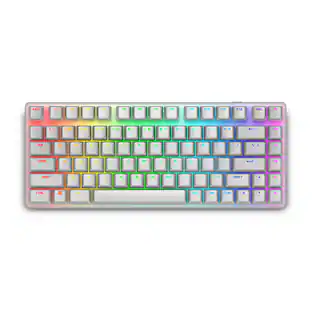
Alienware Pro 75% Wireless Mechanical Gaming Keyboard with RGB Back Lighting
$148.99The price was $199.99
Keep exploring
Acer USB C to HDMI Cable for Home Office 6.6FT (4K@60Hz), High-Speed Type C to HDMI 2.0 Braided Cord
$12.99The price was $13.99UGREEN USB to Ethernet Adapter, 1Gbps Gigabit Network Adapter for Laptop, Nintendo Switch, and More
$12.99The price was $14.99