Rating 4.3 out of 5 stars with 40 reviews
4.3- Scan Quality (13)
- Ease of use (12)
Customer Images
The vast majority of our reviews come from verified purchases. Reviews from customers may include My Best Buy members, employees, and Tech Insider Network members (as tagged). Select reviewers may receive discounted products, promotional considerations or entries into drawings for honest, helpful reviews.
- Rated 5 out of 5 stars
Great scanner
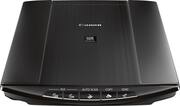
The CanoScan LiDE220 scanner is a superb scanner for the money. I have a Mac running Windows 10 as a virtual machine. The scanner easily plugged and configured itself in both operating systems. It is hard to make a mistake using the scanner as the software interfaces are very easy to use. The scan quality is excellent, and I create pdf files right from the scan. The device is light yet sturdy enough to feel solid. There is no power supply to plug in as the scanner is powered through the USB port - a great idea. All in all a great scanner.
Posted by HarleyDF
- Rated 5 out of 5 stars
meets expectations
Easy to use - good results. Easy to set up. compact, lightweight, fit into my home office well.
Posted by LittleDrummerGirl
- Rated 4 out of 5 stars
Excellent scans, slightly flimsy build
Great price, scan quality, and speed. Works well with MacOS. The unit itself is slightly flimsy, and the sideways stand that comes with it is poorly connected and designed.
Posted by TheEditDen
- Rated 4 out of 5 stars
Easy set up and works well
I purchased this to replace an aging Canon D1250 scanner that was so old they never made 64 bit drivers for it. I did a little research and was disappointed they didn't stock them, but Best Buy did well and had it in the store in just a few days. Set up was easy - started the software setup and then plugged in the USB cable when prompted. First scan was blazing fast compared to my old scanner, and a little customization of the software settings had my scans where I wanted them and converted to PDF in one shot. Very nice. For some things you just need a flatbed scanner, and this did just what I wanted. The old scanner had a special tray for slides, but the functionality of this one beats that - it will pick out an image or multiple ones - and makes scanning multi-page documents easy too.
Posted by JIMinSD
- Rated 5 out of 5 stars
Great value.
This is my second Canon flat bed scanner. I bought it because my first one is so good. (I leave it up north). This one is just as good. Easy to set up and use. Reliable and superior results. Reasonable price. What's not to like?!
Posted by billyj