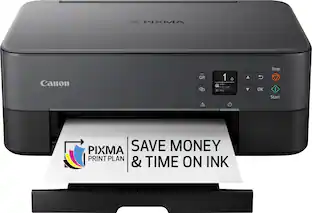
Canon - PIXMA TS302a Wireless Inkjet Printer - Black
- Key Specs
- Networking: Wireless, Wired
- ENERGY STAR Certified: true (Devices carrying the ENERGY STAR service mark, such as computer products and peripherals, kitchen appliances, and other products, generally use 20% to 30% less energy than required by federal standards.)
- Printer Type: Printer, Copier
- ISO Color Print Speed: 4 pages per minute (The number of color pages able to be printed per minute in the device's default single-side mode, as tested by the International Standards Organization (ISO).)
- ISO Mono Print Speed: 7.7 pages per minute (The number of black ink (grayscale) pages able to be printed per minute in the device's default single-side mode, as tested by the International Standards Organization (ISO).)
- General
- Brand: Canon
- Model Number: 2321C022
- Product Name: PIXMA TS302a Wireless Inkjet Printer
- Color: Black
- Display Screen: false
- Dimensions
- Product Height: 5.7 inches (The out of box height of the item. Height is measured as the vertical distance from the bottom of the item to the top as it would be primarily used or placed.)
- Product Width: 11.1 inches (The out of box width of the item. Width is measured as the horizontal distance from one side of the item to the other as it would be primarily used or placed.)
- Product Depth: 17 inches (The out of box depth of the item. Depth is measured as the distance from the front of the item to the back as it would be primarily used or placed.)
- Product Weight: 6.5 pounds (The out of box weight of the item.)
- Features
- Automatic Document Feeder: false
- Photo Printing: true
- Wide Format Printing: false (Machines with this function support printing on media with widths between 18 and 100 inches, such as posters, banners, canvases, and more.)
- Wide Format Scanning: false
- Monochromatic/Color: Color
- Automatic Reduction/Enlargement: false
- Automatic Two-Sided Printing: false
- Tray Capacity: 60
- Duty Cycle: Unknown (The maximum number of pages per month that the device can produce without failing, as specified by the manufacturer.)
- Connectivity
- Wired Connectivity: USB-A
- Wireless Connectivity: Wi-Fi (The manner in which a device sends data to another device over a short distance without the use of wires or cables.)
- Minimum System Requirements: Windows: Windows 10, Windows 8.1, Windows 7 SP1 | Mac: Mac OS X v10.10.5 – macOS v10.12 (Sierra) | Mobile Operating Systems: iOS, Android, Windows 10 Mobile |Chromebook Compatible: Yes | Smart Assistant Support: Amazon Alexa
- Certifications Listings & Approvals
- EPEAT Qualified: false (The Electronic Product Environmental Assessment Tool (EPEAT) was designed to provide an environmental assessment tool for purchasers. In order to qualify for EPEAT, a product must meet all 23 required criteria.)
- Ink
- Compatible Cartridges: Canon PG-243, Canon CL-244, Canon CL-246, Canon PG-245
- Ink Subscription Service Available: false (The printer monitors ink usage and alerts the subscription provider when levels are low. A purchased subscription provides refills of ink based on usage.)
- Ink Cartridges Required: 1 x Black, 1 x Tri-color (The quantity and color of ink cartridges required for the printer to operate.)
- Ink Cartridges Included: 1 x Black, 1 x Tri-color (The quantity and color of ink cartridges included.)
- Ink Bags/Bottles Required: None (The quantity and color of ink bags/bottles required for the printer to operate.)
- Ink Bags/Bottles Included: None (The quantity and color of ink bags/bottles included.)
- Memory
- Memory Card Slot: false
- Paper Info
- Maximum Document Length: 26.6 inches
- Maximum Document Width: 8.5 inches
- Supported Paper Sizes: 4" x 6", 5" x 7", 8" x 10", Letter, Custom: .5 x 5 to 8.5 x 26.6 (8.9 x 12.7 cm to 21.6 x 67.6 cm)
- Paper Feeder: Tray loader
- Paper Handling: 60-sheets rear paper tray
- Media Weight (Minimum): 64 grams per square meter
- Media Weight (Maximum): 275 grams per square meter
- Compatible Media Types: [Plain paper, Photo Paper Plus Glossy II, Photo Paper Glossy]
- Copier Info
- Maximum Number Of Copies: 99
- Performance
- Printer Resolution (Black): Up to 4800 x 1200 (Refers to the number of pixels/dots, both horizontally and vertically, of the image produced by the printer in black ink. Generally, the higher the resolution, the sharper and cleaner the produced image.)
- Printer Resolution (Color): Up to 4800 x 1200 (Refers to the number of pixels/dots, both horizontally and vertically, of the image produced by the printer in colored ink. Generally, the higher the resolution, the sharper and cleaner the produced image.)
- Approximate Page Yield (Black): 180
- Warranty
- Warranty - Parts: 1 year limited
- Warranty - Labor: 1 year limited
- Compatibility
- Works With: Amazon Alexa (Compatible with or able to be connected to other smart devices or applications.)
- Other
- UPC: 013803377354
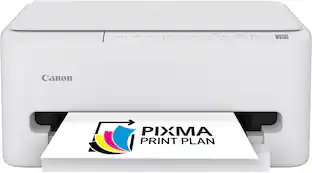
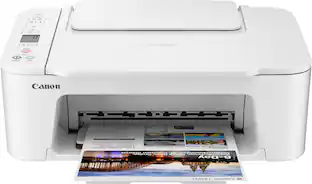
Designed for home use, the Canon PIXMA TS302a wireless inkjet printer delivers high-quality printing and copying and wireless connectivity in a compact size. The PIXMA TS302a easy to set up and maintain and offers great media versatility to print on a variety of media types and sizes, including envelopes, photos, high resolution paper, and more. Print both documents and photos on a variety of paper types using a hybrid ink system with pigment black for sharp black text and dye-based colors for vivid photos up to 8.5” x 11”. Produce crisp, colorful documents and photos quickly with fast print speeds and high-quality 2 cartridge FINE Hybrid ink system. Keep printing with a plain paper capacity of up to 60 sheets in the rear tray. Easily connect and print through high-speed USB or wirelessly1 from computers or mobile devices, and print from your compatible mobile devices using the free Canon PRINT app², Apple AirPrint³, and Mopria Print Service⁴. This printer comes with a 1-year limited warranty⁵ and is backed by Canon's Service and Support network.
- Print and copy: Print and copy functions and sing single-sided printing.
- Fast print speeds: Print approximately 7.7 (black) or 4 (color) images per minute.
- WiFi certified: Easily print from any room in the house with WiFi.
- Page yield: PG-245/CL-246 Standard: 180 (Black) / 180 (Color) | Pages PG-245XL/CL-246XL: 300 (Black) / 300 (Color) Pages | PG-243/CL-244 Standard: 100 (Black) / 100 (Color) Pages
- Easy to install ink: Print full color with only 2 (no mess) easy-to-replace ink cartridges.
- Rear paper feeding: Load up to 60-Sheets of plain paper in rear tray.
- Mobile device printing: Print from your compatible mobile devices using the free Canon PRINT app, Apple AirPrint, and Mopria Print Service.
- Versatile media support: Print envelopes, photos high resolution paper, and more!
- Auto power on/off: Your printer will turn on when you need it and off when you don't!
- Quiet mode: Reduce printer noise when you are worried about disturbing others.
- Borderless photo printing: Print beautiful borderless photos up to 4' x 6" and documents up to 8.5 x 11".
- Chromebook compatible: Works withChromebook, so you can print schoolwork and other documents hassle-free.
- 1-year warranty: Have peace of mind with a 1-year warranty.
Whats Included
- PIXMA TS302a Wireless Home Inkjet Printer
- 4” x 6” Photo Paper Sample Pack (3 sheets GP-701)
- Setup CD-ROM
- Set of Ink Cartridges (PG-243/CL-244)
- Power Cord
Product Manuals
Disclaimers
- 1. Wireless printing and scanning requires a working network with wireless 802.11b/g/n/ac or ad capability, operating at 2.4GHz. Wireless performance may vary based on terrain and distance between the printer and wireless network clients.
- 2. Requires an Internet connection and the Canon PRINT app, available for free on the App Store and at Google Play. Compatible with iPad, iPhone 3GS or later, and iPod touch 3rd generation or later devices running iOS 7.0 or later, and Android mobile devices running Android 2.3.3 or later. Your device must be connected to the same working network with wireless 802.11 b/g/n/ac/ad capability as your printer.
- 2 (cont) Requires a compatible social media account and is subject to that social media account’s Terms of Service. Certain exceptions may apply.
- 3. AirPrint functionality requires a compatible iPad, iPhone, or iPod Touch device running iOS 7.0 or later, and an AirPrint-enabled printer connected to the same network as your iOS device. A printer connected to the USB port of your Mac, PC, AirPort Base station, or Time Capsule is not supported.
- 4. Requires Android mobile device with Android 4.4 operating system or later with the Mopria Print Service pre-loaded with that device and the compatible PIXMA printer on the same wireless network. The Mopria experience is also available on Android 4.4 mobile devices with a download of the Mopria Print Service from Google Play.
- 5. Warranty programs are subject to certain conditions and restrictions. See www.usa.canon.com/support for details.
- 6. Document print speeds are the averages of ESAT in Office Category Test for the default simplex mode, ISO/IEC 24734. Photo print speed is based on the default setting using ISO/JIS-SCID N2 on Photo Paper Plus Glossy II and does not take into account data processing time on host computer. Print speed may vary depending on system configuration, interface, software, document complexity, print mode, page coverage, type of paper used etc.
- 7. Paper types NOT supported for borderless printing are as follows: Envelope, High Resolution Paper, T-Shirt Transfer and Photo Stickers. The maximum borderless printing size is 4”x6”.
- 8.Works edited by using this application cannot be displayed, edited, or printed without this application. Compatible with Android device of 7 inches or more using Chrome (latest version compatible with your current version of Android OS),
- iOS Devices of 7 inches or more using Safari 5.1 or later, Windows PC (excluding RT) using Internet Explorer 10 or later of Microsoft Modern UI version, Microsoft Internet Explorer 9 or later, Mozilla Firefox 31 or later, or Google Chrome version 36 or later, and with Mac OS X 10.6.8 or later using Safari 5.1 or later.
- 9.DPS over IP compatible device required.
- 10. Document print speeds are the averages of ESAT in Office Category Test for the default simplex mode, ISO/IEC 24734. Photo print speed is based on the default setting using ISO/JIS-SCID N2 on Photo Paper Plus Glossy II and does not take into account data processing time on host computer. Print speed may vary depending on system configuration, interface, software, document complexity, print mode, page coverage, type of paper used etc.
- 11. Resolution may vary based on printer driver setting. Color ink droplets can be placed with a horizontal pitch of 1/4800 inch at minimum.
- 12. Operation can only be guaranteed on a PC with pre-installed Windows 10, Windows 8.1, Windows 7 SP1.
- 13. Internet Connection required during software installation. For full compatibility macOS v10.12.1 or later is recommended.
- 14.Functions and features may vary by printer model. Scanning requires Chrome OS 89 or later.
- 15. As an ENERGY STAR Partner, Canon U.S.A., Inc. has certified this printer as meeting the ENERGY STAR energy efficiency criteria through an EPA-recognized certification body.
- *Requires a high-speed Internet connection.
- Requires a high-speed Internet connection.
Q: Does this printer have WiFi?
A: Yes, this Canon inkjet printer is WiFi certified.
Q: How many sheets of paper can the printer hold?
A: This Canon printer can hold up to 60 sheets of plain paper in the rear tray.
Q: Does this printer offer borderless photo printing?
A: Yes, this printer offers borderless photo printing up to 4" x 6".
Q: Is this Canon printer compatible with Chromebook?
A: Yes, this Canon printer is compatible with Chromebook for printing documents.
Q: What is the page yield for this Canon printer?
A: The page yield for this Canon printer is PG-245/CL-246 Standard: 180 (Black) / 180 (Color) | Pages PG-245XL/CL-246XL: 300 (Black) / 300 (Color) Pages | PG-243/CL-244 Standard: 100 (Black) / 100 (Color) Pages.
Q: What is the print speed for this Canon printer?
A: This Canon printer has a print speed of approximately 7.7 (black) or 4 (color) images per minute.
Q: How do you install the ink for this Canon inkjet printer?
A: This Canon inkjet printer uses 2 easy-to-replace ink cartridges.
Q: What's the height with paper loader?
A: undefined
People also viewed
 $119.89The price was $159.89
 $79.89The price was $109.89