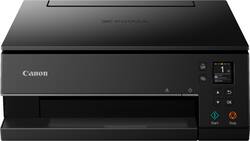
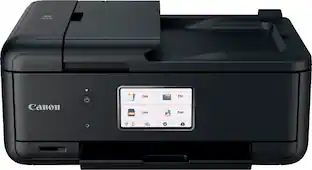
Canon - PIXMA TS6320 Color All-In-One Inkjet Printer - Black
- Key Specs
- Networking: Wireless
- ENERGY STAR Certified: true (Devices carrying the ENERGY STAR service mark, such as computer products and peripherals, kitchen appliances, and other products, generally use 20% to 30% less energy than required by federal standards.)
- Printer Type: All In One
- ISO Color Print Speed: 10 pages per minute (The number of color pages able to be printed per minute in the device's default single-side mode, as tested by the International Standards Organization (ISO).)
- ISO Mono Print Speed: 15 pages per minute (The number of black ink (grayscale) pages able to be printed per minute in the device's default single-side mode, as tested by the International Standards Organization (ISO).)
- Touch Screen: false (Touch-screen devices make navigating more intuitive. Using a touch-screen display, you can do things such as tap to select, hold and drag to move items, swipe to scroll, and pinch to zoom.)
- General
- Brand: Canon
- Model Number: 3774C002
- Product Name: PIXMA TS6320 Color All-In-One Inkjet Printer
- Color: Black
- Display Screen: true
- Display Screen Size: 1.44 inches
- Dimensions
- Product Height: 5.6 inches (The out of box height of the item. Height is measured as the vertical distance from the bottom of the item to the top as it would be primarily used or placed.)
- Product Width: 14.9 inches (The out of box width of the item. Width is measured as the horizontal distance from one side of the item to the other as it would be primarily used or placed.)
- Product Depth: 14.2 inches (The out of box depth of the item. Depth is measured as the distance from the front of the item to the back as it would be primarily used or placed.)
- Product Weight: 13.9 pounds (The out of box weight of the item.)
- Features
- Automatic Document Feeder: false
- Photo Printing: true
- Monochromatic/Color: Color
- Automatic Two-Sided Printing: true
- Tray Capacity: 200
- Scanner Info
- Scanner Type: Flatbed
- Scanner Resolution: Up to 1200 x 2400 (Refers to the number of pixels/dots, both horizontally and vertically, of the image produced by the scanner. Generally, the higher the resolution, the sharper and cleaner the produced image.)
- Ink
- Compatible Cartridges: Pigment black ink tank: PGI-280 PGBK XXL, PGI-280 PGBK XL, PGI-280 PGBK, Black ink tank: CLI-281 BK XXL, CLI-281 BK XL, CLI-281 BK, Cyan ink tank: CLI-281 C XXL, CLI-281 C XL, CLI-281 C, Magenta ink tank: CLI-281 M XXL, CLI-281 M XL, CLI-281 M, Yellow ink tank: CLI-281 Y XXL, CLI-281 Y XL, CLI-281 Y
- Paper Info
- Maximum Document Length: 14 inches
- Maximum Document Width: 8.5 inches
- Supported Paper Sizes: 3.5" x 3.5" (Square), 4" x 6", 5" x 5" (Square), 5" x 7", 7" x 10", 8" x 10", Letter (8.5" x 11"), Legal (8.5" x 14"), U.S. #10 Envelopes
- Paper Feeder: Cassette, Tray loader
- Paper Handling: Front Paper Cassette: 100 Sheets of Plain Paper Rear Paper Tray: 100 Sheets of Plain Paper OR 20 Sheets (4 x 6) / 10 Sheets (5 x 7) Photo Paper
- Copier Info
- Maximum Number Of Copies: 99
- Performance
- Printer Resolution (Black): Up to 4800 x 1200 (Refers to the number of pixels/dots, both horizontally and vertically, of the image produced by the printer in black ink. Generally, the higher the resolution, the sharper and cleaner the produced image.)
- Printer Resolution (Color): Up to 4800 x 1200 (Refers to the number of pixels/dots, both horizontally and vertically, of the image produced by the printer in colored ink. Generally, the higher the resolution, the sharper and cleaner the produced image.)
- Compatibility
- Works With: Amazon Alexa, Google Assistant (Compatible with or able to be connected to other smart devices or applications.)
- Other
- UPC: 013803322743
Connect to your Wi-Fi network and start printing from any room with this Canon PIXMA all-in-one wireless inkjet printer. The separate ink system lets you replace individual ink tanks as they run out for added efficiency, while dual paper feeding holds plain and photo paper simultaneously. This Canon PIXMA all-in-one wireless inkjet printer features Mopria printing for pairing with your smartphone or tablet easily.
Prints up to 15 ISO ipm* in black, up to 10 ipm* in color
- Fast print speeds up to 15 ISO ipm* in black and up to 10 ISO ipm* in color: Creates a 4" x 6" photo-quality print in as little as 21 seconds.*
- Be sure you have the right cartridge: Enter your printer's model number into the Ink and Toner Finder to find compatible cartridges. Get started ›
- Works with Amazon Alexa and Google Assistant for voice control: Ask your compatible voice assistant (device required) to help you print shopping lists, to-do lists, various crossword puzzles and games, coloring activities, comics and more.
- Ideal for home or small business use: This inkjet printer offers excellent print quality for photos and documents and accepts a variety of paper types and sizes.
- Wireless and mobile printing capability: Connect computers or devices easily with built-in Wi-Fi. You can also print from your mobile device and from select online cloud services with Canon's free mobile printing app or Apple® AirPrint.**
- Apple® AirPrint enabled: You can use it for Apple iPad® and iPhone® printing.
- Compatible with Canon PGI-280/CLI-281 ink tanks: Including PGI-280 PGBK XXL/CLI-281 XXL (black, cyan, magenta, yellow), PGI-280 PGBK XL/CLI-281 XL (black, cyan, magenta, yellow), and PGI-280 (pigment black)/CLI-281 (black, cyan, magenta, yellow) models.
- Up to 4800 x 1200 dpi (dots per inch) color resolution: High resolution allows producing incredible quality and detail in documents and photos.
- Five economical individual ink tanks: Only replace the ink tank you need when a color runs out. Four dye-based inks produce vivid color in photos, and the pigment-based black ink ensures crisp text.
- Large paper trays for your high-volume printing: Reload less often with the front and rear input trays with total capacity of up to 100 sheets each.
- Easy-to-use control panel: Features a 1.44" OLED display and LED status bar for simple navigation and viewing your printer status.
- One USB port for simple connectivity: The high-speed USB port offers a standard connection to your PC.
- Built-in duplex printing: Print on both sides of the page without turning it over manually to minimize your printing costs and help the environment.
Whats Included
- Canon PIXMA TS6320 Color All-In-One Printer
- Set of standard ink tanks
- Power cord
- Setup CD
- 5" x 5" photo paper sample pack (3 Sheets PP-301)
- Owner's manual
Product Manuals
Q: Will it print on card stock?
A: Yes it can print on cardstock. There is a rear tray feed for thicker paper like card stock and photo paper.
Q: Does it come with ink or do I have to buy it separately?
A: My printer came with the 5 ink cartridges needed to print included in the box.
A: Yes both Bluetooth and WiFi
Q: Will this work with computer that connects to a modem? Does it have USB cable?
A: No USB cable. I don’t see anywhere to plug one. The primer/copier/scanner is wireless. I do not use a modem so I can’t answer that question.
Q: Is this compatible with Cromebook?
A: Based on the specs on Canon's website, no. For OS compatibility, the following are included: Windows:21 Windows® 10, Windows 8.1, Windows 7 SP1 Mac:22 Mac OS® X v10.11.6 - macOS v10.14 (Mojave) Mobile Operating Systems:23 iOS®, Android™, Windows 10 Mobile, and Fire OS (Amazon Fire) devices
Q: Can I copy multiple copies at one time on this printer? I don't see a feeder to enable me to do so.
A: One by one.
Q: Can this print/load 8x10 and 8x11 paper?
A: Yes, it can print 8x11 paper.
A: I believe it should, I have ours setup for wifi
People also viewed
 $249.00The price was $323.00
 $159.99The price was $189.99




Today's top picks
 $479.99The price was $729.99
 $69.99The price was $129.99
 $199.99The price was $249.99
 $49.99The price was $62.99