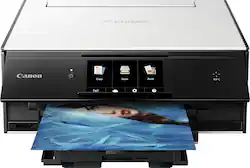
Canon - PIXMA TS9020 Wireless All-In-One Printer - White/Black
- Key Specs
- Networking: Wireless
- ENERGY STAR Certified: true (Devices carrying the ENERGY STAR service mark, such as computer products and peripherals, kitchen appliances, and other products, generally use 20% to 30% less energy than required by federal standards.)
- Printer Type: All In One
- ISO Color Print Speed: 10 pages per minute (The number of color pages able to be printed per minute in the device's default single-side mode, as tested by the International Standards Organization (ISO).)
- ISO Mono Print Speed: 15 pages per minute (The number of black ink (grayscale) pages able to be printed per minute in the device's default single-side mode, as tested by the International Standards Organization (ISO).)
- Output Tray Capacity: 100
- General
- Brand: Canon
- Model Number: 1371C002
- Product Name: PIXMA TS9020 Wireless All-In-One Printer
- Color: White/Black
- Display Screen: false
- Dimensions
- Product Height: 5.6 inches (The out of box height of the item. Height is measured as the vertical distance from the bottom of the item to the top as it would be primarily used or placed.)
- Product Width: 14.7 inches (The out of box width of the item. Width is measured as the horizontal distance from one side of the item to the other as it would be primarily used or placed.)
- Product Depth: 14.7 inches (The out of box depth of the item. Depth is measured as the distance from the front of the item to the back as it would be primarily used or placed.)
- Product Weight: 14.7 pounds (The out of box weight of the item.)
- Features
- Automatic Document Feeder: false
- Photo Printing: true
- Automatic Two-Sided Printing: false
- Tray Capacity: 100
- Certifications Listings & Approvals
- EPEAT Qualified: false (The Electronic Product Environmental Assessment Tool (EPEAT) was designed to provide an environmental assessment tool for purchasers. In order to qualify for EPEAT, a product must meet all 23 required criteria.)
- Scanner Info
- Scanner Type: Flatbed
- Duplex Scan Function: true
- Ink
- Compatible Cartridges: PGI-270 PGBK, PGI-270 XL PGBK, CLI-271 Black, CLI-271 XL Black, CLI-271 Cyan, CLI-271 XL Cyan, CLI-271 Magenta, CLI-271 XL Magenta, CLI-271 Yellow, CLI-271 XL Yellow, CLI-271 Gray, CLI-271 XL Gray
- Memory
- Memory Card Slot: true
- Paper Info
- Maximum Document Length: 11.7 inches
- Maximum Document Width: 8.5 inches
- Supported Paper Sizes: 4" x 6", 5" x 5" Square, 5" x 7", 8" x 10", Letter, Legal, U.S. No 10
- Compatible Media Types: Plain paper, Canon High Resolution paper, Glossy photo paper, Matte paper, Semi-glossy paper
- Copier Info
- Maximum Number Of Copies: 99
- Performance
- Printer Resolution (Black): Up to 9600 x 2400 (Refers to the number of pixels/dots, both horizontally and vertically, of the image produced by the printer in black ink. Generally, the higher the resolution, the sharper and cleaner the produced image.)
- Printer Resolution (Color): Up to 9600 x 2400 (Refers to the number of pixels/dots, both horizontally and vertically, of the image produced by the printer in colored ink. Generally, the higher the resolution, the sharper and cleaner the produced image.)
- Connectivity
- Minimum System Requirements: Apple Mac OS X v10.8.5 - macOS v10.12 (Sierra); Windows 10, Windows 8, Windows 8.1, Windows 7, Windows 7 SP1, Windows Vista SP2
- Other
- UPC: 013803273441
Print, copy or scan documents in seconds with this multifunctional Canon printer. Wi-Fi, Cloud and NFC support let you print from any computer in your home or straight from your favorite devices, while the six-color ink system produces true-to-life hues. This Canon printer has a print resolution of 9600 x 2400 dpi to produce crisp images and readable text.
- Easy Replenish: With a printer set up for Easy Replenish, you'll automatically receive shipments of the ink you need. The printer monitors its own ink levels, so you'll only receive ink when you need it.
- Prints up to 15 ISO ipm* in black, up to 10 ISO ipm* in color: To produce documents quickly.
- Ideal for home or small business use: Offers excellent print quality for photos and documents and accepts a variety of paper types and sizes.
- Wireless and mobile printing capability: Connect this printer to your home or office network with the built-in wireless LAN.
- Apple® AirPrint enabled: For Apple iPad® and iPhone® printing.
- Edit and organize your photos: My Image Garden provides filter effects and automatic layout suggestions for customizing your prints, calendar view for easy organizing, and more.
- Color resolution of up to 9600 x 2400 dpi: Produces clear, vibrant images.
- Six individual ink tank system: Stunning print quality from a six individual ink tank system with a dedicated gray ink for true black & white photos. The gray ink also helps stabilize colors so your color prints look true to life.
- 5" LCD touch screen: Makes it easy to select the functions you want.
- More connectivity options: The built-in memory card slots, LAN and USB 2.0 ports let you simply plug in your memory card, USB drive, camera or other device and print.
- Scanner with a color CIS (contact image sensor): Allows you to scan documents in up to 2400 x 4800 dpi optical resolution and in up to 19200 dpi interpolated resolution, so you can enjoy faithful document reproduction.
- Automatic 2-sided print: Allows you to automatically print on both sides of the paper and can help reduce paper use and cost by up to 50%.
- Automatically expanding paper tray: Designed to be ready to print at a moment's notice, the TS9020 features an automatically expanding paper tray that automatically lifts the front display and extends the output tray.
- Borderless photos fast: Print a beautiful, borderless 4" x 6" photo in approximately 39 seconds.
- Automatic power on/off: This convenient feature automatically powers up the printer whenever you send a photo or document to be printed.
- PIXMA Touch & Print (NFC): Print a photo or document by simply opening the Canon PRINT app and touching your NFC compatible device to the printer.
Whats Included
- Canon PIXMA TS9020 Wireless All-In-One Printer
- 4" x 6" photo paper sample pack (3-sheets PP-301)
- Setup CD-ROM
- Full set of ink tanks
- Power cord
- CD/DVD/Blu-ray disc printing tray
Q: Printer is showing a code 1259 Says out put tray is retracted. Pushed in and out nothing changes
A: I am sure you have already figured this out by now, but here it is in a nutshell. We did the same thing. There are 2 trays. 1 is the bottom cassette that holds the paper. That is not the one they are referring to. The picture is very misleading. The 2nd tray, if you will bend down a bit and look directly at the front, just above where the other cassette was. It is a 5-6 inch wide black tray. This is where your paper after print comes out. Very irritating as no one wanted to admit they did it, we had a step backwards before we found this. Hope this helps people afraid to ask.
A: Yes. You use the "back paper tray" (which is actually on the top) and it will work fine. I printed several greeting cards using heavy double weight glossy photo paper and had no problems with it at all. It will not do duplex printing with the heavier stock. The printer does a wonderful job on things like this.
Q: If i run out f color ink will this still print in black for documents?
A: if you hold down the stop key for about 6 seconds it will reset and let you print
Q: does this printer fax, scan, and print
A: Yes it does!
Q: Is this computer loud when printing
A: A little when it starts, but minimal after it kicks on.
Q: Is this a High Quality Photo printer? Vivid Colors?
A: this printer is just outstanding cant imagine anything better
Q: Thinking about buying. Can I refill the ink cartridges ?
A: You probably can. It does have a chip on it, so you may need to reset the cartridge (don't know for sure) to get accurate ink levels. The Canon tanks are black, so you cannot see the levels. I used to fill my own tanks, but with the hassle of everything, I just buy a set of generic tanks for around $12.
Q: Is this printer compatible with edible ink cartridges?
A: I am not 100% sure but on Inkedibles they have the cartridges that are compatible. I dont know the quality of that brand. https://inkedibles.com/cic/eg/ieprinter.php?printer=Canon+PIXMA+TS9020
People also viewed



Today's top picks
 $199.99The price was $249.99
 $789.99The price was $1,049.99
 $799.99The price was $1,199.99