Corel - Pinnacle Studio 25 (1-User) - Windows [Digital]
About this product
Explore flexible video editing with Pinnacle Studio 25 - your gateway to creating professional-caliber productions. Produce one-of-a-kind projects using themed templates, and combine photos and videos across the multitrack timeline with keyframe precision. Create custom titles and motions, and explore hundreds of filters and effects to help your videos stand out. Let your creativity shine with tools for Stop Motion Animation, Selective Color, Screen Recording, and multi-camera editing. Bring out your inner editor with Pinnacle Studio 25.
One-user installation on PC.
Creative effects and Color Grading tools
Enhance your videos with hundreds of creative effects, Color Grading, and Color Correction tools.
Professional-caliber editing tools
Edit across unlimited tracks with the professional-caliber editing tools, including enhanced Video Masking, Color Grading, Motion Tracking, Screen Recording and more.
Advanced keyframing controls
Allows fine-tuning every parameter of your clips, transitions, and effects.
Customizable workspace
Optimize your workflow with a flexible workspace, customizable shortcuts, and timeline efficiencies.
Supported formats
Include most video, audio, and image formats to edit a variety of video to enhance your projects.
Intel, Pentium, Celeron, Centrino, Core, Viiv, Intel Inside, and the Intel Inside logo are trademarks or registered trademarks of Intel Corporation or its subsidiaries in the United States and other countries.
- Number of Users1Operating System CompatibilityWindowsSoftware FormatDigital
Reviews
Rating 3.6 out of 5 stars with 5 reviews
Customer Images
The vast majority of our reviews come from verified purchases. Reviews from customers may include My Best Buy members, employees, and Tech Insider Network members (as tagged). Select reviewers may receive discounted products, promotional considerations or entries into drawings for honest, helpful reviews.
Compare similar products
![Corel - Pinnacle Studio 25 (1-User) - Windows [Digital]](https://pisces.bbystatic.com/image2/BestBuy_US/images/products/6479/6479642_sd.jpg;maxHeight=422;maxWidth=264?format=webp)
Explore flexible video editing with Pinnacle Studio 25 - your gateway to creating professional-caliber productions. Produce one-of-a-kind projects using themed templates, and combine photos and videos across the multitrack timeline with keyframe precision. Create custom titles and motions, and explore hundreds of filters and effects to help your videos stand out. Let your creativity shine with tools for Stop Motion Animation, Selective Color, Screen Recording, and multi-camera editing. Bring out your inner editor with Pinnacle Studio 25.
![MAGIX - Video deluxe 2026 Premium - Windows [Digital]](https://pisces.bbystatic.com/image2/BestBuy_US/images/products/7ebaa978-42c0-45ea-b027-c66e37b2c2c8.jpg;maxHeight=422;maxWidth=264?format=webp)
Video deluxe 2026 Premium makes advanced video editing feel easy. Discover intuitive editing tools, the seamless all-in-one media window and the proDAD VitaScene V5 Pro effects suite with over 1,700 effects, filters and transitions for impressive cinematic results. Use AI-generated subtitles and voiceovers and browse premium stock content for your B-roll scenes. New features: Make your subtitles pop with the Highlight function, organize your footage with AI media management and access exclusive content— including customizable LUTs, music tracks and sound effects.
![MAGIX - Music Maker 2026 Premium - Windows [Digital]](https://pisces.bbystatic.com/image2/BestBuy_US/images/products/effbda12-219a-4ee3-b010-62d59bb763bb.jpg;maxHeight=422;maxWidth=264?format=webp)
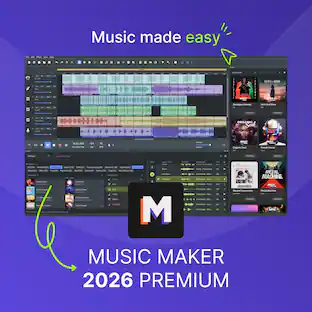
MUSIC MAKER is the intuitive, loop-based music software that lets anyone create their own songs and beats with an easy drag-and-drop workflow, no expensive gear or years of experience required. Browse through genre-based Soundpools, pick your favorite loops and arrange them into complete songs with just a few clicks. Shape your sound with virtual instruments, MIDI editing, built-in effects and powerful mixing and mastering tools. New features: Optimized Loop Browser, custom Beatbox kits, and easier pitch control.
![Corel - VideoStudio Ultimate 2022 - Windows [Digital]](https://pisces.bbystatic.com/image2/BestBuy_US/images/products/6519/6519152_sd.jpg;maxHeight=422;maxWidth=264?format=webp)
Take your filmmaking and video editing up a notch with this Windows-compatible VideoStudio Ultimate 2022 software. The customizable filters, video masking and color grading enable seamless edits, while built-in recording tools let you capture your screen or multi-camera videos. This digital download of VideoStudio Ultimate 2022 software features custom menus to directly upload content to YouTube or burn to discs, easily sharing your creations.
Specs
Customers often buy these together
 $111.00The price was $139.00
 $59.99The price was $89.99







More to consider










Explore tech essentials Sponsored



Discover related products
 $12.99The price was $13.99













