60th Anniversary SaleEnds Sunday. Exclusions, terms and conditions apply.Shop now

Skip to contentGo to Product Search
Main Content

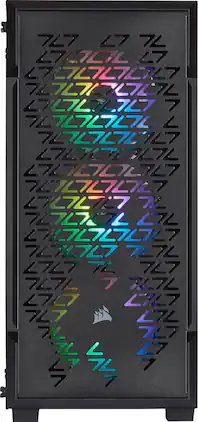
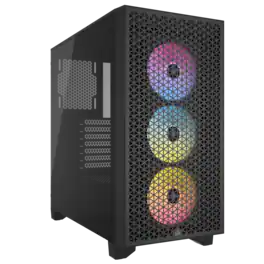
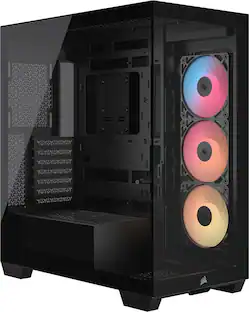
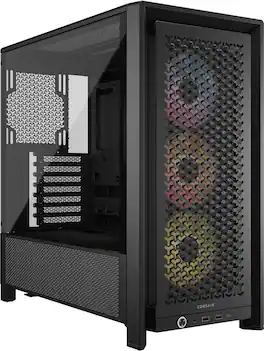
CORSAIR - iCUE 220T RGB Airflow ATX Mid-Tower Smart Case - Black

Model: CC-9011173-WW
SKU: 13006720
Sold & shipped by

About this product

Build a PC system using this Corsair iCUE mid-tower ATX smart case. The high airflow layout and three 120mm RGB fans ensure optimal cooling, while the tempered glass side panel lets you show off your components. This Corsair iCUE mid-tower ATX smart case features flexible storage options with dual 2.5-inch bays and two removable trays.

Features
  • Steel construction

    Provides durability for long-lasting use.

  • 4 drive bays

    Include 2 internal 3.5" and 2 internal 2.5" drive bays for installing a variety of components.

  • Front-panel ports

    Include 2 USB 3.0 and 1 headphone/microphone jacks for installing peripherals.

  • 3 cooling fans

    Include 3 front-mounted 120mm fans. Two 120/140mm top fan mounts and one 120mm rear fan mount allow easy enhancements.

  • Top panel, front and PSU fan filters

    Help maintain a dust-free interior.

  • 7 expansion slots

    For adding graphics cards and other components.

  • Fits ATX, micro ATX and mini ITX motherboards

    So you can easily begin building a custom computer.

See all features
Specifications
  • Motherboard Form Factor
    ATX
    Maximum GPU Length
    300 millimeters
    Product Height
    17.7 inches
    Product Width
    8.3 inches
    Product Depth
    15.6 inches
    Window Panel(s)
    Front
Sponsored

Reviews

Customer Images

The vast majority of our reviews come from verified purchases. Reviews from customers may include My Best Buy members, employees, and Tech Insider Network members (as tagged). Select reviewers may receive discounted products, promotional considerations or entries into drawings for honest, helpful reviews.

  • Rated 5 out of 5 stars

    Great Case! a few notes tho :)

    Absolutely great case! One of the big motivation factors for choosing this case was that it came with the 3 iCUE rgb fans (those are valued at nearly the price of what I paid for the case ~$90). As with all ATX cases, there's no space issues even with the new monster GPUs. One interesting point was that I needed to take the 3.5 HDD bay enclosure out of the case to get my fully modular PSU into the case - this was no big deal for me since I'm using 1 TB NVME m.2 and 1 TB ssd SATA. The tempered glass is great, the looks is great, there's tons of space, the airflow is fantastic. One other thing I think you should know is that with my GPU, I had a tough time getting the HDMI cable to fully seat due to the proximity of the GPU output port and the divider between the PCIe exterior ports ... Probably should include a pic to make it make more sense. Anyway - used a DP cable and all was well!! Hope this was a helpful review!

    This review is from CORSAIR - iCUE 220T RGB Airflow ATX Mid-Tower Smart Case - Black

    Posted by jdalbright

  • Rated 5 out of 5 stars

    Great case for any build.

    Sturdy case with lots of room for a any build. The fans are quiet and cable tucks are easy to use yet sturdy. Solid construction and quality parts.

    This review is from CORSAIR - iCUE 220T RGB Airflow ATX Mid-Tower Smart Case - Black

    Posted by Edward

  • Rated 4 out of 5 stars

    Great airflow! Tight squeeze.

    I purchased the Corsair iCUE 220T case to house my all-new gaming components as I was looking for something with great airflow at a bargain price. First off, I should mention that while it can handle an ATX motherboard, it's a very tight squeeze. In addition, you'll want to purchase a smaller graphics card and power supply in order for everything to fit. You'll also want to take into consideration that the (removable) HDD cage makes it really difficult for your power cords to run through the back of your power source without pinching them, so you may want to use SSD drives instead. That being said, I'm very pleased with its performance. It contains 3 RGB fans in front, has 2 SSD slots on the closed back side so you can slip them in with no effort. There are 2 USB ports and a headphone jack next to the power button on top, which makes it very easy to plug things in without heading towards the back. It has an HDD cage to slip in 2 old-school hard drives (I had to remove mine in order for my modular power cables to fit properly.) There is plenty of airflow in this case! Vented front, back and top allows everything inside to run extremely cool. In addition, there's a tempered glass side panel so you can view all your components. With the capability to run your component cables through the other side, there are plenty of openings to fish your cables through, along with many tie-down possibilities. You can also place additional fans and water pump cooler if desired (I added a rear Thermaltake LED fan just to be sure.) If you're looking for a computer chassis with plenty of airflow, this is an excellent choice. Just be aware in advance that some of your parts might not fit. I was lucky.

    This review is from CORSAIR - iCUE 220T RGB Airflow ATX Mid-Tower Smart Case - Black

    Posted by Plan9Shopper

  • Rated 4 out of 5 stars

    Good case. Not great case.

    I liked this case but it has quirks. The design on the front is kinda strange. But I liked it. Since my 220T was all black I wanted to break that up a bit so I cut out a circle to cover the Corsair logo at the bottom fo the front panel, rough sanded the panel then painted it Krylon Fusion Pepper Red. Once it dried, I removed the tape and applied a gloss coat. I like this accent. Below the front panel, which is held into place by pressure tabs, is a mesh screen which pops off and is easy to clean. The RGB fans are fin for moving air and are pre-hooked up to the iCue hub on the back side which will have to be hooked up to an USB hub on your motherboard. You have to go to Corsair's website to download the iCue software. Some people love it. Some people hate it. But honestly, you are buying a Corsair product so don't be surprised. If you mount a top radiator, you need to buy low profile RAM for the clearance issue you will run into. At first I ran a Corsair H60 radiator and it hooked up to the back of the case no problem at all. But I can't leave well enough alone so I ran a front mounted radiator H100 Pro. Both fit with no issues. There is also a magnetic filter that sits on the top. Not a small particulate filter but one of the larger ones really used for exhaust more than intake filter. You could remove it for better exhaust airflow if you are using a pressurized cooling configuration. Something I didn't like was the access ports to run your power cables to the front of the chassis seem to not be where you need them. The 24 pin motherboard connector was directly between two ports which caused the 24 pin cable to have to be twisted to the side. I took my Dremel tool with a cutting wheel and just cut out the center spans to give me clear paths to hook up all my cables. I like this much better. But you don't have to do this. The front glass is clear and not tinted. I like this a lot! I get to clearly see all the work I did inside and the RGB set up that I paid extra for. On the back side there are two removable mounting brackets for SATA 2.5 drives that are very nicely done and the area next to the power supply has a mounting cage for 3 drives that is adjustable forward or aft depending on your needs. I ended up removing the cages all together to have a place to put excess power cable. It really gets tight in there with an 850 power supply. On the front top edge, there are two USB 2.0 ports, headphone jack and a power button all next to each other. The power button feels kind cheap for this price point. Overall this is a good case. Not a great case. It wouldn't take much to put it into the great case category with just a few small modifications. I think it is on the high end price wise for the size but it does have a few features that I like (RGB fans pre-installed) A little fun case modding and playing with different cooling fans and liquid coolers fit what I wanted from a case.

    This review is from CORSAIR - iCUE 220T RGB Airflow ATX Mid-Tower Smart Case - Black

    Posted by Kelly

  • Rated 5 out of 5 stars

    UPGRADED ALIENWARE R7 CASE AND MOBO, SO NICE

    Great small form factor ATX case, snug fit for 240mm AIO, but case is well built, easy to put together, all screws and included and in black color. Glass window was clear and high quality. Great price I paid $89.99 and includes 3 x 120mm ML RGB Corsair fans.....basically the case was free as these ML *Magnetic levitation fans run $45 each. I decided to transplant my current ALIENWARE R7 *i7 8700, 32gb 2666mhz DDR, RTX 2080 into a new case in preparation for RTX 3080 in the new year. After tearing down the ALIENWARE there was no way to move the board into a new CASE as font panel/switch pins for the MOBO are only usable in stock ALIENWARE case =( I decided to upgrade the MOBO, from Z370 Stock AW to AORUS z390 pro WIFI. Transplant went flawless with no windows reconfig or reinstall needed. This case was a tight fit for ICUE h100 elite Capellix AIO but top mount position exhaust fit perfectly. CPU temps during gaming are 10-15 degrees cooler than stock ALIENWARE AIO 120mm single fan. **My GPU temps are also lower, I saw 5-6 degrees lower in WARZONE. **I'm getting 10-15+ FPS in WARZONE from this transplant, not sure if its a combination of CASE, AIO and MOBO? I'm very happy. Stock config for front fans were all 3 120mm were intake, top mount AIO 240mm exhaust. I will be adding a rear 120mm ML RGB fan to match, this will be intake.

    This review is from CORSAIR - iCUE 220T RGB Airflow ATX Mid-Tower Smart Case - Black

    Posted by RDUB

Compare similar products

CORSAIR - iCUE 220T RGB Airflow ATX Mid-Tower Smart Case - Black

Build a PC system using this Corsair iCUE mid-tower ATX smart case. The high airflow layout and three 120mm RGB fans ensure optimal cooling, while the tempered glass side panel lets you show off your components. This Corsair iCUE mid-tower ATX smart case features flexible storage options with dual 2.5-inch bays and two removable trays.

CORSAIR - FRAME 4000D RS ARGB ATX Mid-Tower PC Case - Black

Free yourself from the constraints of traditional PC building with the CORSAIR FRAME 4000D RS ARGB, featuring the innovative FRAME Modular Case System to perfectly customize your build. Includes 3x CORSAIR RS ARGB PWM Fans with daisy-chainable 4-pin connectors, eight LEDs per fan, and +5V ARGB motherboard control. The InfiniRail Mounting System simplifies fan installation, supporting dual 360mm radiators and a 3D Y-Pattern Airflow front panel for optimal cooling. The increased width and length ensure compatibility with powerful graphics cards and cooling options, with support for reverse connection motherboards. We provide the frame. You create the art.

CORSAIR - 3500X RS-R ARGB ATX Mid-Tower PC Case - Black
4.9(69)

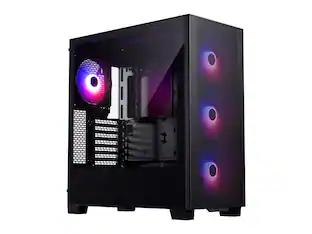
The CORSAIR 3500X RS-R ARGB Mid-Tower Glass PC Case delivers bold lighting, strong airflow, and a clean, modern look with wraparound tempered glass. Three pre-installed RS-R reverse rotor fans connect via a +5V ARGB header, while its spacious interior fits large GPUs and 360mm radiators. Includes GPU support and reverse motherboard compatibility.
Thermaltake - View 380 TG ARGB Mid Tower ATX PC Case - Black
4.7(24)

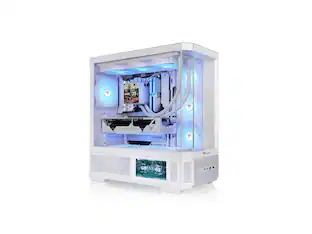
The View 380 TG ARGB focuses on maximizing viewing angles of components thanks to front and side tempered glass panel, and a spacious dual chamber design, while still maintaining mid tower height. Along with that the View 380 TG ARGB supports Universal ATX and comes with four 120mm ARGB Lite Fans preinstalled.

Pros for CORSAIR - iCUE 220T RGB Airflow ATX Mid-Tower Smart Case - Black
There were no pros for this productAirflow, Cable Management, Ease of Use, Design, Internal SpaceAirflow, Build Quality, Appearance, Case Design, Ease of InstallationBuild Quality, Cable Management, Case Size, Color, Aesthetics

Specs

Questions & Answers
  • So what series are the preinstalled fans? And is there a DisplayPort? Also are the preinstalled fans loud? Will a Noctua NH-D15 fit?

    Hi Deen, They're SP120 RGB fans. No display port since this is a case and not a motherboard nor a video card. Pre-installed fans are relatively quiet. Cooler up to 160mm tall will fit. If you have any other questions, please reach out: support.corsair.com

    Answered by Corsair
    Corsair response
  • Is a mini ATX mother board compatible with this case? Or does it only use a regular ATX motherboard?

    Hello Sam, It'd be compatible with ATX, mATX and mini ITX. If you have anything else we can help with, please reach out: support.corsair.com -Art

    Answered by Corsair
    Corsair response
  • How many gigabytes or terabytes Does it have

    Hi, None, it'd be just the computer case itself. If you have anything else we can help with, please reach out: support.corsair.com -Art

    Answered by Corsair
    Corsair response
  • What is the max FPS

    It's a case, it adds 40 FPS instantly when you buy it.

    Answered by AFKaflak
  • Do u gotta buy stuff for it

    If you intend on doing any sort of computing in the slightest, then yes. This is simply a bare chassis with a trio of fans & fan/rgb light controller node, and that setup still won't play crysis.....yet....

    Answered by Gramtron
Ask a question
No content

Customers often buy these together
Sponsored

Finance Options

My Best Buy® Credit Card
Choose a benefit:Or
Buy Now, Pay Later

Finance Options

My Best Buy® Credit Card
Choose a benefit:Or
Buy Now, Pay Later