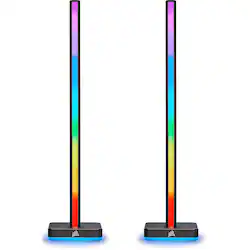
CORSAIR - iCUE LT100 RGB Smart Lighting Towers Starter Kit with Headset Holder - Black
- Key Specs
- Color Temperature: Multicolor
- Indoor or Outdoor Use: Indoor
- Product Length: 5.31 feet (The out of box length of the item. Length is measured as the longest dimension of the item.)
- General
- Brand: CORSAIR
- Model Number: CD-9010002-NA
- Product Name: iCUE LT100 RGB Smart Lighting Towers Starter Kit with Headset Holder
- Color: Black
- Lighting
- Bulb Technology: LED
- Color Temperature: Multicolor
- Lighting Type: RGB
- Customizable Lighting: true
- Compatibility
- App Compatible: false (The product can be connected to a program or software application on a mobile device, which then receives collected data from the product.)
- Features
- Pre Programmed Modes: true
- Performance
- Indoor or Outdoor Use: Indoor
- Power
- Power Source: Plug-in
- Dimensions
- Product Length: 5.31 feet (The out of box length of the item. Length is measured as the longest dimension of the item.)
- Warranty
- Warranty - Parts: 2 years
- Warranty - Labor: 2 years
- Other
- UPC: 840006620846
Extend your PC’s RGB lighting with the CORSAIR iCUE LT100 Smart Lighting Towers Starter Kit, part of the iCUE Smart Lighting Ecosystem. 92 RGB LEDs light up your room with ambient lighting that dynamically integrates with your games and media for a truly immersive experience. Cycle through 11 lighting profiles out of the box with push-button control or connect to CORSAIR iCUE software to synchronize your RGB lighting effects across all compatible CORSAIR devices in your system and all external iCUE Smart Lighting devices. The Starter Kit includes two lighting towers with 46 customizable LEDs each, housed in light-diffusing casing that softens and blends light. With an included removable headset holder, LT100 Smart Lighting Towers add convenient, versatile, and stunning RGB lighting to any setup.
- Immersive Ambient Lighting: Extend your PC’s RGB lighting, illuminating your environment with diffused colors and intricate lighting effects to create an immersive backdrop of ambient lighting.
- Integrate with Games and Media: Synchronize your ambient lighting to dynamically match the on-screen action in games, movies, and videos, or turn your room into a living visualizer for your music.
- Everything You Need to Shine: Includes two connected 422mm-tall towers with 46 customizable LEDs each, an external power supply, a 1.5m extension cable, and a removable headset holder.
- 11 Preset Lighting Profiles: Illuminate your space immediately at the push of a button with 11 profiles available out of the box.
- Part of the iCUE Smart Lighting Ecosystem: Powered by CORSAIR iCUE software, enabling fully customized and synchronized RGB lighting across all iCUE-compatible CORSAIR devices in your system and all external iCUE Smart Lighting devices.
- Reversible Orientation: Face the LT100 forward for more vivid, intense lighting or backward for more subtle illumination of your space.
- Built-In Light Diffusion: LEDs are housed in a sturdy, light-diffusing casing that softens and blends light for a continuous and smooth effect.
- Removable Headset Holder: Attaches conveniently to a lighting tower so you can hang your headset within easy reach.
- Easily Expandable: Enhance your iCUE Smart Lighting Ecosystem with additional LT100 expansion towers that connect directly to your existing towers.
Whats Included
- CORSAIR LT100 Smart Lighting Towers (2)
- AC Power Supply
- Micro USB to USB-A Cable
- Straight RGB Cable
- Removable Headset Holder
- Instruction Manual
A: Per the spec sheet, 422mm. The headphone holder adds another 2mm or so.
People also viewed
Today's top picks
 $449.99The price was $829.99
 $2,449.99The price was $3,199.99
 $199.99The price was $249.99
 $999.98The price was $1,639.98










