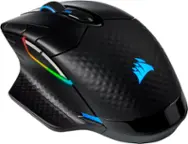
CORSAIR - IRONCLAW RGB FPS/MOBA/MMO Wireless Optical Gaming Mouse - Wireless - Black
CORSAIR - IRONCLAW RGB FPS/MOBA/MMO Wireless Optical Gaming Mouse - Wireless - Black
Related Item

Specifications
- Lighting TypeRGBMaximum Sensitivity18000 dots per inchNumber of Buttons (Total)10Connection TypeWireless
- Key Specs
- Lighting Type: RGB
- Maximum Sensitivity: 18000 dots per inch (Mouse sensitivity is measured in dots per inch (DPI). The higher the DPI, the more sensitive the mouse is and may be more useful for high-density pixel screens. Lower DPI typically means more precision and accuracy in mouse movement.)
- Number of Buttons (Total): 10
- Connection Type: Wireless
- General
- Brand: CORSAIR
- Model Number: CH-9317011-NA
- Product Name: IRONCLAW RGB FPS/MOBA/MMO Wireless Optical Gaming Mouse
- Color: Black
- System Requirements: Microsoft Windows 7 / 8 / 10 (The software that a product must have for it to be able to integrate with another product.)
- Features
- Mouse Type: Gaming
- Lighting Type: RGB
- Customizable Lighting: true
- Maximum Number of Memory Profiles: 3
- Performance
- Mouse Operation: Button(s)
- Mouse Grip Style: Palm grip (In comparison to many palm and claw grips, ergonomic grip mice are designed for a specific handedness and put the hand and wrist in a position to promote comfort. Customizable grips feature buttons/keys that can be configured to perform specific actions and may also have customizable calibration and sensitivity settings.)
- Handedness: Right-handed
- Tracking Method: Optical (There are several types of computer mice, optical and laser being among the most common. Optical mice detect less detail and provide more precise and accurate movement. Laser mice detect more detail and can be used on a wider variety of surfaces, but are more sensitive to small movements.)
- Maximum Sensitivity: 18000 dots per inch (Mouse sensitivity is measured in dots per inch (DPI). The higher the DPI, the more sensitive the mouse is and may be more useful for high-density pixel screens. Lower DPI typically means more precision and accuracy in mouse movement.)
- Number of Buttons (Total): 10
- Number of Thumb Buttons: 2
- Number of Programmable Buttons: 10
- Designed for Game Genre: FPS, MOBA
- Adjustable Weight: false
- Connectivity
- Connection Type: Wireless
- Wireless Connectivity: Bluetooth, Radio Frequency (RF) (The manner in which a device sends data to another device over a short distance without the use of wires or cables.)
- Maximum Wireless Range: 30 feet
- Operating System Compatibility: Windows
- Plug and Play Operation: true
- Number of Devices Connectable Simultaneously: 1
- Power
- Mouse Power Source: Battery-powered
- On/Off Switch: true
- Rechargeable Battery (Mouse): true
- Wireless Charging: false
- Charging Interface(s): USB-A (The connection for transmitting power to charge the device.)
- Battery Chemistry: Lithium-polymer
- Included
- Mouse Pad Included: false
- Dimensions
- Product Height: 1.5 inches (The out of box height of the item. Height is measured as the vertical distance from the bottom of the item to the top as it would be primarily used or placed.)
- Product Length: 4 inches (The out of box length of the item. Length is measured as the longest dimension of the item.)
- Product Width: 3 inches (The out of box width of the item. Width is measured as the horizontal distance from one side of the item to the other as it would be primarily used or placed.)
- Product Weight: 130.12 grams (The out of box weight of the item.)
- Warranty
- Warranty - Parts: 2 years
- Warranty - Labor: 2 years
- Other
- UPC: 843591075961
Take your competitive level higher with this Corsair Ironclaw RGB wireless mouse. The optical sensor provides pinpoint tracking for smooth accuracy, and the wireless design offers convenient freedom of movement. This Corsair Ironclaw RGB wireless mouse features a palm grip for added comfort during long gaming sessions, and the custom lighting delivers extra flair.
- Custom Pixart PMW3391 native 18,000 DPI optical sensor: Adjustable in 1 DPI resolution steps, gives you total sensitivity customization and ultra-accurate tracking.
- Dynamic, three-zone RGB backlighting: Choose from dozens of customizable presets and effects to perfectly match your setup.
- Ultra-durable Omron switches: Rated for more than 50 million clicks.
- CORSAIR iCUE software: Enables vivid dynamic RGB lighting control, sophisticated macro programming and full-system lighting synchronization with compatible CORSAIR peripherals, coolers, fans and more.
- Onboard profile storage: Take your settings with you, with hardware macro playback and lighting control.
- Wireless connection: Connect with hyper-fast, sub-1ms SLIPSTREAM WIRELESS technology, low-latency Bluetooth, or USB wired.
- Optical technology: LED lights scan the surface beneath the mouse to detect movement with a fair amount of accuracy, suitable for everyday computing and browsing.
- 10 fully programmable buttons: Customize the way you play with powerful macros and key remaps to give you an in-game advantage.
- Comfortable contoured shape: Sculpted specifically for palm-grips and larger hands.
- Compatible with most versions of Windows: Works with most PCs.
Whats Included
- CORSAIR IRONCLAW RGB Wireless Optical Gaming Mouse
Product Manuals
Q: How many buttons does the Corsair mouse have?
A: This mouse has a total of 10 buttons.
Q: What is the maximum DPI of the Corsair Ironclaw mouse?
A: This mouse features a custom Pixart PMW3391 native 18,000 DPI optical sensor.
Q: Does the Corsair Ironclaw mouse have onboard memory?
A: Yes, you can take your settings with you, with hardware macro playback and lighting control.
Q: What kind of connectivity does the Corsair Ironclaw mouse offer?
A: This mouse can connect with hyper-fast, sub-1ms SLIPSTREAM WIRELESS technology, low-latency Bluetooth, or USB wired.
Q: Is the Corsair Ironclaw mouse compatible with ICUE software?
A: Yes, it is compatible with Corsair's ICUE software for RGB lighting control and macro programming.
Q: What type of grip is the Corsair Ironclaw mouse designed for?
A: It is ergonomically sculpted specifically for palm-grips and larger hands.
A: Hi, Do you mean a charging cable? if so, yep! If you mean the wireless dongle, nope. Only products with slipstream compatibility would be able to. If you have anything else we can help with, please reach out: support.corsair.com -Art
Q: What is the length of the usb cable that connects the mouse to the PC?
A: It's about 3' but I keep it coiled up since I use it wireless most of the time.
Compare similar products

Take your competitive level higher with this Corsair Ironclaw RGB wireless mouse. The optical sensor provides pinpoint tracking for smooth accuracy, and the wireless design offers convenient freedom of movement. This Corsair Ironclaw RGB wireless mouse features a palm grip for added comfort during long gaming sessions, and the custom lighting delivers extra flair.

Upgrade your gameplay with this ergonomic Corsair Nightsword gaming mouse. Included software detects the center of gravity in real-time and automatically adjusts weight for superior grip. The adjustable 18,000 dpi optical sensor offers sensitivity customization, and 10 programmable keys provide versatility. This Corsair Nightsword gaming mouse works with Windows and MacOS systems, and the rugged construction handles over 50 million clicks.
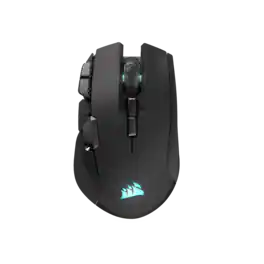
The CORSAIR IRONCLAW WIRELESS SE Gaming Mouse was designed to deliver comfortable control for right-handed players that prefer palm grips. Its uniquely-sculpted shape and textured grips are built to give players secure, comfortable control. The precise 26k DPI sensor provides amazing accuracy for MOBA, FPS, and MMO gameplay. IRONCLAW WIRELESS SE is all about longevity with up to 285 hours over 2.4GHz, 532 hours over BT, and switches rated for up to 100 million clicks. Versatile tri-mode connectivity connects via robust 2.4GHz wireless, convenient Bluetooth®, or USB-C cable. CORSAIR IRONCLAW WIRELESS SE Gaming Mouse – Comfortable Control in the Palm of Your Hand.

The CORSAIR M65 RGB ULTRA Tunable Gaming Mouse boasts a durable aluminum frame and pinpoint accuracy powered by a 26,000 DPI MARKSMAN optical sensor and optical OMRON switches. Sensor fusion technology enables convenient tilt gestures for in-game actions, while CORSAIR AXON Hyper-Processing Technology transmits those actions up to 8x faster than other gaming mice. With customizable weight between 97g and 115g, a lightweight paracord cable, and CORSAIR QUICKSTRIKE buttons, all your movements and actions register with the utmost speed. Take control with iCUE software to program the M65 RGB ULTRA’s eight buttons, customize its dynamic RGB backlighting, and save your profiles to onboard storage to take on the go. Pick up the M65 RGB ULTRA to make all your clicks count.
| Pros for CORSAIR - IRONCLAW RGB FPS/MOBA/MMO Wireless Optical Gaming Mouse - Wireless - Black | |||
|---|---|---|---|
| Overall Performance, Ergonomics, Connectivity, Battery Life, Ease of Use | Weight, Comfort, Overall Performance, RGB, Size | Ergonomics, Battery Life, Build Quality, Connectivity, Button Accessibility | Weight, Build Quality, Comfort, DPI, Feel |
| Cons for CORSAIR - IRONCLAW RGB FPS/MOBA/MMO Wireless Optical Gaming Mouse - Wireless - Black | |||
| Software, Button Quality | Software, Price, Button Placement | There were no cons for this product— | Software, Price, Left Click |
Specs
Reviews
Customers are saying
Customers are enthusiastic about the IRONCLAW RGB Wireless Optical Gaming Mouse's overall performance and comfortable ergonomics. Many appreciate its reliable connectivity, fair battery life, and ease of use. However, some users have reported concerns regarding the button quality, particularly with the scroll wheel, and have found the software to be difficult to use.
Customer Images
The vast majority of our reviews come from verified purchases. Reviews from customers may include My Best Buy members, employees, and Tech Insider Network members (as tagged). Select reviewers may receive discounted products, promotional considerations or entries into drawings for honest, helpful reviews.
- Rated 4 out of 5 stars
Fantastic Mouse Horrible Software
The reason I went with the Corsair Ironclaw was for its larger ergonomic design. I have larger hands and use a claw grip which would cause cramping on my old Razer Deathadder. I have no problems with this when using the Ironclaw and I am comfortable gaming for long periods. I have owned both the wired and wireless versions of this mouse. The wireless version has an additional three buttons on the mouse which is the main reason I upgrade to this over the wired version. A positive and negative for this mouse is the rubber grips on the side. The rubber gives you a solid grip but the left side will start to deteriorate where my pinkie grips the mouse. The fatal flaw with this mouse is the Corsair iCUE Software. Where do I start the software consistently refuses to save my custom setup on my mouse, will forget my profile when in wireless mode and is annoyingly frustrating when setting up said profiles. The newest issue is where I have set up a certain keystroke on a mouse button which on reboot the profile loses. This just started about a week ago and is frustrating on how unreliable the software is. I would recommend this mouse if you want a large ergonomic gaming mouse. I don't think the software should deter you from buying this mouse as I have heard complaints from my friends on logitech and razer software as well.
Buzz Posted
- Rated 4 out of 5 stars
Fit like a glove, Superior perf. Corsair delivers.
High quality, great for people who have larger hands. Responsive and delivers superior performance for fast paced gaming. Button placement in my opinion was a little awkward in terms of location, having said that coming from someone who’s double jointed. I would at times would find my self pressing more buttons than intended and was prone to hand cramping up on me mid match. Other than that great product would recommend as always for Corsair. Also, lots of fun customization options for rgb and macros in icue.
TheRoyalSpartan Posted
- Rated 2 out of 5 stars
Long term Corsair fan disappointed
I've been a long time user of Corsair products. I purchased this mouse specifically because of its ergonomics, which are nice. The mouse fits comfortably in the hand, and has a solid weigh to it. But I cannot recommend this product for long term durability reasons. I've had this mouse roughly two months, and relatively early in its usage (maybe a few weeks to a month), I started noticing what appeared to be fingerprints/smudges. I tried wiping them away with a damp cloth, and then some wet wipes (gentle ones), but I didn't put much effort into it. That being said, it didn't appear to work well. About two months in, I decided I would really put some time in as the grime was getting excessive. Worth noting is that I don't have particularly oily/dirty skin; I've never had any issue like this before on any mouse, Corsair or otherwise. I own (and have subsequently gone back to using) a Dark Core RGB Pro mouse and it never had any issues like this. Well long story short, I began to wipe at the mouse with gentle (soft on skin) wet wipes again, and used paper towels and water, but nothing really seemed to be working. I tried using my fingernail, and that seemed to do a little, but not much. When cleaning it, it appeared to be black flecks coming off, which I believed to be (gross I know) dead skin/oils, but was actually the paint on the product. Apparently, whatever paint Corsair used to paint these (or maybe just this) mice/mouse was being broken down by skin oils... on a mouse...which you touch a lot...with your skin... A little frustrated with the little progress I was making, and unaware at the time that it was paint and not related to bodily oils/grime, I attempted to use some 70% alcohol wet wipes on a localized area, which almost immediately striped the paint entirely (see picture). The rough patches shown, both at the palm rest and fingers is not just some smudge, it feels rough almost, like a mild sandpaper. Even if some might accuse me of causing the damage with the alcohol, the rest of the spots on the mouse are clearly being affected by general usage. So, with all that being said, I can't recommend this product. Maybe this is a one off, but I'm not sure. As I said, I have never had an issue like this before, even on mice that are a quarter of the price. I'm pretty disappointed as, ergonomically, I like the mouse and it functions well, but I will be going back to my Dark Core mouse disappointed with my previous perceptions of Corsair quality.
Shteve Posted