CORSAIR - VANGUARD 96 WIRELESS Mechanical Gaming Keyboard for PC - Black
Customers are saying
Customers regard the build quality and performance of these keyboards as exceptional, noting that they function reliably in both wired and wireless modes. Users also appreciate the versatile connectivity options, the intuitive layout, and the surprisingly quiet typing experience. While the overall feedback is highly positive regarding the typing feel and battery life, some users have noted that the keys are positioned quite close together.
Features
96% keyboard that makes it 100
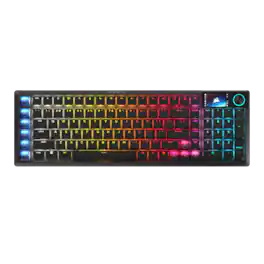
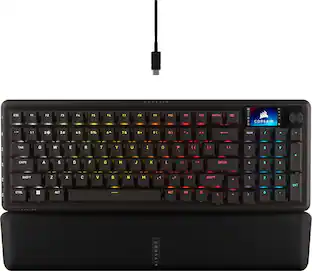
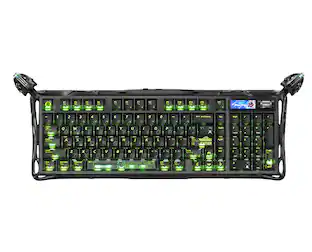
The optimized 96% layout means you’ll have full keyboard with arrow keys, a tenkey pad, an LCD screen, rotary dial, and 6 programmable G-keys, but in a super-compact frame that’s roughly the size of a TKL keyboard.
Vibrant full-color LCD screen
The keyboard of the future is here! Personalize your keyboard on a whole new level with a luminous integrated 1.9” LCD screen you can use to display custom animations, images, system specs, and more.
8,000Hz hyper-polling, wired and wireless
Enjoy 8,000Hz hyper-polling in both wireless and wired modes to eradicate input lag. Get the fastest response times for your in-game actions and stream commands, even without a wire, thanks to SLIPSTREAM WIRELESS.
Elgato Virtual Stream Deck integration
Map Stream Deck functions directly to the programmable G-keys and utilize Virtual Stream Deck to create clickable shortcuts. Unlock a world of newfound productivity and enhanced ingame performance.
FlashTap SOCD
With CORSAIR FlashTap SOCD handling, choose how the keyboard should resolve accidental SOCD inputs so you can Move Like You Mean It.
Wobble-free CORSAIR MLX switches
Wobble-free CORSAIR MLX keyswitches feature pre-lubricated stems and Fresnel lensing for stunning RGB lighting. Refined for top-tier responsiveness and rated for 80 million keypresses.
Hotswap support for 3-pin and 5-pin switches
The versatile VANGUARD 96 WIRELESS allows you to hotswap in your choice of compatible 3-pin and 5-pin mechanical keyswitches.
Quad-layer sound dampening
4 layers of sound dampening foam help keep unwanted keyboard noise to a minimum, so you’re better able to enjoy your satisfying keypress acoustics.
6 Dedicated, low-profile G-keys
Set up in-game actions, productivity macros, or common key combinations for quick access on the 6 G-keys. Their low-profile design helps ensure they don’t get triggered accidentally.
Versatile tri-mode connectivity
Connect via robust 2.4GHz wireless connection, convenient Bluetooth® , or USBC cable. Enjoy up to 125 hours* of wireless gaming freedom.
Customizable via CORSAIR Web Hub
Enjoy lightweight, powerful customization with no additional software installation via CORSAIR Web Hub. Set up macros, map buttons, and more.
Specifications
- Lighting TypeRGBForm Factor96%Keyboard TechnologyMechanicalKey Switch BehaviorLinearConnection TypeWireless, Wired
Reviews
Rating 4.6 out of 5 stars with 32 reviews
- Build Quality (15)
- Performance (12)
- Connectivity (9)
- Layout (8)
- Noise Level (7)
- Key Size (3)
Customer Images
The vast majority of our reviews come from verified purchases. Reviews from customers may include My Best Buy members, employees, and Tech Insider Network members (as tagged). Select reviewers may receive discounted products, promotional considerations or entries into drawings for honest, helpful reviews.

- HyperX - Cloud III S Wireless Gaming Headset for PC, PS5, PS4, Nintendo Switch, Mac, and Mobile - Red/Black$129.99The price was $179.99

Compare similar products
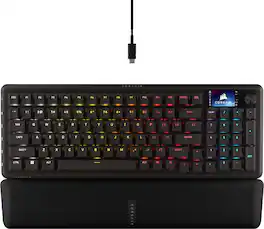
CORSAIR’s VANGUARD 96 WIRELESS shrinks a full keyboard with arrow keys, a tenkey pad, an LCD screen, rotary dial, and 6 programmable G-keys into a super-compact frame. Featuring wobble-free pre-lubricated CORSAIR MLX switches, it’s also hotswappable, supporting compatible 3-pin and 5-pin switches. The stunning LCD screen takes personalization to the next level with animations, stats, and game integration support. Quad-layer sound dampening provides satisfying keypress acoustics, and 8,000Hz wireless hyper-polling delivers lightning-fast inputs via SLIPSTREAM WIRELESS. VANGUARD 96 also features Elgato Virtual Stream Deck integration, FlashTap SOCD handling, and easy customization via our web-based utility, CORSAIR Web Hub.

CORSAIR’s VANGUARD 96 pulls off the astonishing feat of shrinking a full keyboard with arrow keys, a tenkey pad, an LCD screen, rotary dial, and 6 programmable G-keys into a super-compact frame. Featuring wobble-free pre-lubricated CORSAIR MLX switches, it’s also hotswappable, supporting compatible 3-pin and 5-pin switches. The stunning LCD screen takes keyboard personalization to the next level with animations, stats, and game integration support. Quadlayer sound dampening provides satisfying keypress acoustics, and 8,000Hz hyper-polling delivers lightning-fast inputs. VANGUARD 96 also features Elgato Virtual Stream Deck integration, FlashTap SOCD handling, and easy customization via our web-based utility, CORSAIR Web Hub.
The sleek, low-profile VANGUARD AIR 99 WIRELESS keyboard delivers exceptional performance across all aspects of your life, making controlling everything seamless. Enhance productivity using Stream Deck integration and SD-keys to streamline your daily tasks. Unleash serious gaming performance with ultra-responsive OPX low-profile optical switches and 8,000Hz hyper-polling. With its elegant aluminum frame and brilliant LCD screen, it’ll be your stunning new desktop centerpiece. Enjoy exceptional typing feel and acoustics with premium gasket mounting and 5-layer sound dampening. Connect how you want, where you want. Get tri-mode connectivity (2.4GHz, Bluetooth, and USB-C) and multiplatform compatibility with PC, Mac, console, and more.

CORSAIR’s VANGUARD PRO 96 is a high-performance mechanical keyboard that continues CORSAIR’s game-changing legacy of innovation. Built for competitive players featuring magnetic MGX Hyperdrive Hall Effect switches and 8,000Hz hyper-polling for an edge in responsiveness. The optimized 96% form factor packs arrow keys, a numpad, an LCD screen, 6 G-keys, and a rotary dial into a footprint comparable to a TKL. It’s also hotswappable, enhancing compatible magnetic switches with quad-layer sound dampening for satisfying acoustics. VANGUARD PRO 96 features Elgato Stream Deck integration, FlashTap SOCD handling, Rapid Trigger, dual-actuation points, and customization via our lightweight web-based utility, CORSAIR Web Hub.
| Pros for CORSAIR - VANGUARD 96 WIRELESS Mechanical Gaming Keyboard for PC - Black | |||
|---|---|---|---|
| Build Quality, Connectivity, Noise Level, Performance, Layout | Build Quality, Noise Level, Feel, RGB Lighting, Responsiveness | Build Quality, Noise Level, Connectivity, Typing Experience, Key Responsiveness | Build Quality, Noise Level, Typing Experience, Feel, RGB Lighting |
| Cons for CORSAIR - VANGUARD 96 WIRELESS Mechanical Gaming Keyboard for PC - Black | |||
| Key Size | Software, Key Layout, Port Placement | There were no cons for this product— | Software Compatibility |
Specs
Customers often buy these together
Mice
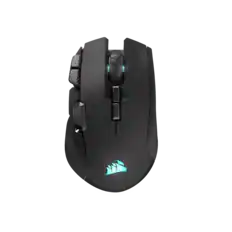
CORSAIR - IRONCLAW WIRELESS SE FPS/MOBA/MMO Optical Gaming Mouse - Wireless - Black
$69.99The price was $89.99
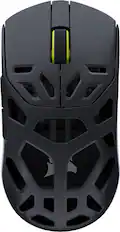

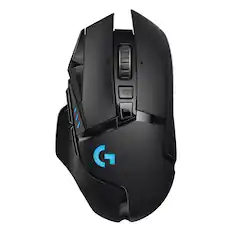
Mouse Pads

PC Gaming Headsets
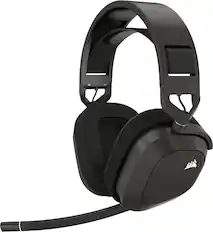
More to consider
 Top Deal$139.99The price was $179.99
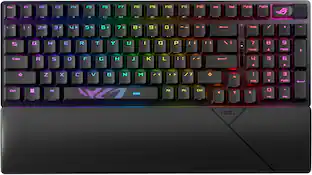 $131.99The price was $179.99
 $199.95The price was $259.95
 $119.49The price was $139.99
 $197.99The price was $269.99

Explore tech essentials Sponsored
 Top Deal$129.99The price was $159.99
Discover related products
 $229.99The price was $249.99
 $29.46The price was $55.07
 $247.00The price was $275.00
 $12.99The price was $13.99
 $149.99The price was $169.99








Keep exploring
 $259.95The price was $359.95
 $199.95The price was $299.95
 $37.99The price was $40.00
 $199.95The price was $209.95
 $129.95The price was $159.95