DJI - Osmo Mobile 6 Smartphone Gimbal 3-Axis Stabilizer CP.OS.00000284.01
Reviews coming soon
About this product
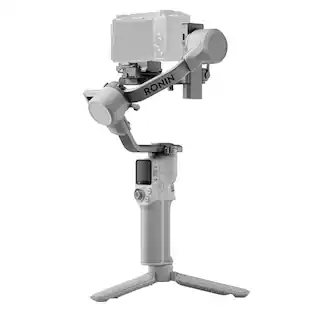
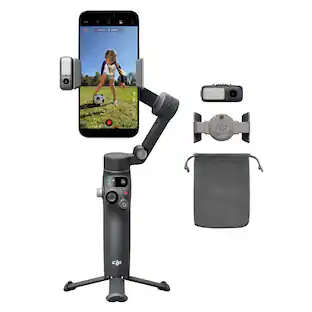
OSMO Mobile 6: Unfold Your Creativity. Osmo Mobile 6 is an intelligent smartphone stabilizer packed with creative features. It's not only compact and easily foldable to fit in your palm| but also launches automatically once unfolded to capture shots at a moment's notice. Get dynamic angles and perfect selfies by using the built-in extension rod. A whole host of intelligent functions and guides are at your disposal. The DJI Mimo app facilitates efficient shooting| editing| and sharing| allowing you to catch every unforgettable moment. Product Highlights: 3-Axis Stabilization. Portable and Foldable. Built-In Extension Rod. Quick Launch. ActiveTrack 5.0. Easy Tutorials and One-Tap Editing. Magnetic Quick-Release Design. Product Features: Compact and Portable. Carry your Osmo Mobile 6 on exciting adventures. The compact and foldable design is easy to pack| and with the quick-release magnetic phone clamp| you can get going without the hassle of removing your phone case. Snap-in or out – you're ready to shoot or take a call at a moment's notice. Quick Launch. Osmo Mobile 6 powers on as soon as you unfold it. Snap-in a paired smartphone| and the DJI Mimo app pops up automatically| allowing you to start shooting as soon as inspiration strikes. 3-Axis Stabilization. With 3-axis stabilization| capture smooth| lossless| on-the-move creations that impress and wow. Osmo Mobile 6 integrates DJI's advanced stabilization technology to put strong| stable| shake-free results at your fingertips. Lookin' Good. The new Slate Gray color is sleek| neat| and stain resistant. With an improved ergonomic design and anti-slip grip| Osmo Mobile 6 fits snugly in your hand. Smooth Operator. Conveniently check the battery level| the system status indicator| and switch between gimbal modes with the new built-in status panel. Press the M button to hop between the four modes to meet your filming needs or add creative flair. Follow. In Follow mode| the camera view follows the gimbal's pan and tilt movements and stays stable during rolls. This mode is great for shooting up| down| and diagonally. Tilt Locked. The camera view only follows the gimbal's pan movements and stays stable during tilts and rolls—ideal for shooting horizontally or moving around a subject. FPV. In FPV mode| all three axes of the gimbal follow the movement of the main body. This is wonderful for dynamic filming of still subjects like landmarks| buildings| or statues. SpinShot. Push the joystick to the left or right to control the rotation of the camera view and create dynamic footage. Perfect for shooting push| pull| and high-angle movements. Just Roll to Control. Effortlessly and fluidly control zoom and focus with Osmo Mobile 6's new side wheel. Roll the wheel to adjust the focal length for flexible composition and zoom in and out with buttery smoothness. And for even more cinematic control| press the side wheel once to switch to manual focus. Timelapse. Warp time and space with Timelapse| Motionlapse| and Hyperlapse. With simple Motionlapse templates| you can blend beautiful moments into impressive clips. DynamicZone. Use Move In and Move Out modes to get stretching and compressing visual effects to create dynamic blockbuster shots with your phone. Gesture Control. Gesture control makes taking a selfie or a group photo easy. Snapping a pic or starting a video has never been this convenient. Panorama. Try three pano modes: 3x3| 240°| or CloneMe are available for your creative vision. Try| and you shall see. Built-In Extension Rod. Get everyone in the picture. The built-in extension means no one gets left out. Include more friends| pets| or gorgeous scenery in any shot. Take dynamic selfies from higher or lower angles. Extend the rod to extend the creative possibilities. Quick Switch to Portrait. Smoothly switch between landscape and portrait mode by simply pressing the switch button twice. Keep Up. ActiveTrack 5.0 is fully upgraded for more stable tracking at longer distances. The improved version allows the front camera to track subjects that turn to the side or spin. Vlogs That Pop. Don't worry about bad lighting or distracting noise. With the DJI OM Fill Light Phone Clamp and DJI Mic| you're prepared for any situation and equipped to elevate your content to new levels.
Compact and portable
Carry your Osmo Mobile 6 on exciting adventures. The compact and foldable design is easy to pack| and with the quick-release magnetic phone clamp| you can get going without the hassle of removing your phone case. Snap-in or out – you're ready to shoot or take a call at a moment's notice.
- Maximum Weight Capacity0.64 poundsCompatible DevicesSmartphone
Reviews
This product doesn't have any reviews yet.
Compare similar products
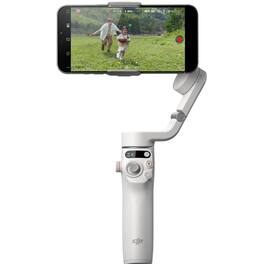
OSMO Mobile 6: Unfold Your Creativity. Osmo Mobile 6 is an intelligent smartphone stabilizer packed with creative features. It's not only compact and easily foldable to fit in your palm| but also launches automatically once unfolded to capture shots at a moment's notice. Get dynamic angles and perfect selfies by using the built-in extension rod. A whole host of intelligent functions and guides are at your disposal. The DJI Mimo app facilitates efficient shooting| editing| and sharing| allowing you to catch every unforgettable moment. Product Highlights: 3-Axis Stabilization. Portable and Foldable. Built-In Extension Rod. Quick Launch. ActiveTrack 5.0. Easy Tutorials and One-Tap Editing. Magnetic Quick-Release Design. Product Features: Compact and Portable. Carry your Osmo Mobile 6 on exciting adventures. The compact and foldable design is easy to pack| and with the quick-release magnetic phone clamp| you can get going without the hassle of removing your phone case. Snap-in or out – you're ready to shoot or take a call at a moment's notice. Quick Launch. Osmo Mobile 6 powers on as soon as you unfold it. Snap-in a paired smartphone| and the DJI Mimo app pops up automatically| allowing you to start shooting as soon as inspiration strikes. 3-Axis Stabilization. With 3-axis stabilization| capture smooth| lossless| on-the-move creations that impress and wow. Osmo Mobile 6 integrates DJI's advanced stabilization technology to put strong| stable| shake-free results at your fingertips. Lookin' Good. The new Slate Gray color is sleek| neat| and stain resistant. With an improved ergonomic design and anti-slip grip| Osmo Mobile 6 fits snugly in your hand. Smooth Operator. Conveniently check the battery level| the system status indicator| and switch between gimbal modes with the new built-in status panel. Press the M button to hop between the four modes to meet your filming needs or add creative flair. Follow. In Follow mode| the camera view follows the gimbal's pan and tilt movements and stays stable during rolls. This mode is great for shooting up| down| and diagonally. Tilt Locked. The camera view only follows the gimbal's pan movements and stays stable during tilts and rolls—ideal for shooting horizontally or moving around a subject. FPV. In FPV mode| all three axes of the gimbal follow the movement of the main body. This is wonderful for dynamic filming of still subjects like landmarks| buildings| or statues. SpinShot. Push the joystick to the left or right to control the rotation of the camera view and create dynamic footage. Perfect for shooting push| pull| and high-angle movements. Just Roll to Control. Effortlessly and fluidly control zoom and focus with Osmo Mobile 6's new side wheel. Roll the wheel to adjust the focal length for flexible composition and zoom in and out with buttery smoothness. And for even more cinematic control| press the side wheel once to switch to manual focus. Timelapse. Warp time and space with Timelapse| Motionlapse| and Hyperlapse. With simple Motionlapse templates| you can blend beautiful moments into impressive clips. DynamicZone. Use Move In and Move Out modes to get stretching and compressing visual effects to create dynamic blockbuster shots with your phone. Gesture Control. Gesture control makes taking a selfie or a group photo easy. Snapping a pic or starting a video has never been this convenient. Panorama. Try three pano modes: 3x3| 240°| or CloneMe are available for your creative vision. Try| and you shall see. Built-In Extension Rod. Get everyone in the picture. The built-in extension means no one gets left out. Include more friends| pets| or gorgeous scenery in any shot. Take dynamic selfies from higher or lower angles. Extend the rod to extend the creative possibilities. Quick Switch to Portrait. Smoothly switch between landscape and portrait mode by simply pressing the switch button twice. Keep Up. ActiveTrack 5.0 is fully upgraded for more stable tracking at longer distances. The improved version allows the front camera to track subjects that turn to the side or spin. Vlogs That Pop. Don't worry about bad lighting or distracting noise. With the DJI OM Fill Light Phone Clamp and DJI Mic| you're prepared for any situation and equipped to elevate your content to new levels.

Capture every highlight effortlessly. Introducing Osmo Mobile 7 and Osmo Mobile 7P, designed to be lightweight, portable, and user-friendly. Featuring DJI's seventh-generation stabilization and ActiveTrack 7.0 technology, these smartphone gimbals take three-axis stabilization and intelligent tracking to new heights. With a range of intelligent features, capturing cinematic-quality footage has never been easier.
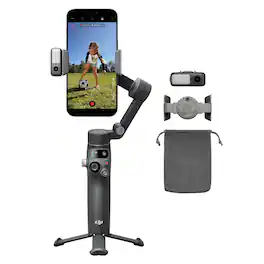
Unfold your creativity. Osmo Mobile 8 unlocks smooth 360° horizontal spin and effortless low-angle shots. With direct phone connection, enjoy native tracking that always keeps your loved ones in frame. The Multifunctional Module combines human and pet tracking, lighting, and audio capture, ensuring your subject stays in focus—whether you're creating content, recording daily life, or joining a video call. Never miss a moment!

Capture every highlight effortlessly. Introducing Osmo Mobile 7 and Osmo Mobile 7P, designed to be lightweight, portable, and user-friendly. Featuring DJI's seventh-generation stabilization and ActiveTrack 7.0 technology, these smartphone gimbals take three-axis stabilization and intelligent tracking to new heights. With a range of intelligent features, capturing cinematic-quality footage has never been easier.
| Pros for DJI - Osmo Mobile 6 Smartphone Gimbal 3-Axis Stabilizer CP.OS.00000284.01 | |||
|---|---|---|---|
| There were no pros for this product— | Overall Performance, Ease of Use, Stabilization, Battery Life, Features | Overall Performance, Ease of Use, Battery Life, Tracking Feature | Overall Performance, Ease of Use, Stabilization, Battery Life, Weight |
| Cons for DJI - Osmo Mobile 6 Smartphone Gimbal 3-Axis Stabilizer CP.OS.00000284.01 | |||
| There were no cons for this product— | Connectivity, Weight, Rotation Range | There were no cons for this product— | Connectivity |
Specs
Be the first to ask a question.
We’ll try to get your question answered within 24 hours by a Best Buy customer or brand representative.
Customers often buy these together
 $69.99The price was $79.99
 Clearance$63.99The price was $79.99
 Black Friday in July Deal$19.99The price was $24.99

More to consider
 $121.60The price was $135.80
 $369.00The price was $459.00
 Black Friday in July Deal$134.99The price was $169.99
 Black Friday in July Deal$253.99The price was $269.99

Stay connected in style Sponsored
- Black Friday in July Deal$253.99The price was $269.99
- Black Friday in July Deal$134.99The price was $169.99
Keep exploring
- $369.00The price was $459.00
 $469.99The price was $558.93