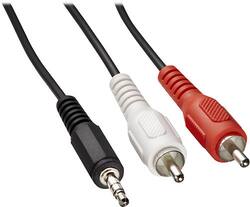
Dynex™ - 6' Stereo Audio RCA Cable - Black
Model: DX-DMP3RCA
SKU: 4812031
This item is no longer available in new condition. See similar items below
- Key Specs
- Cable Length: 6 feet
- Connector Type (End 1): RCA (phono)
- Connector Type (End 2): RCA (phono)
- General
- Brand: Dynex™
- Model Number: DX-DMP3RCA
- Product Name: 6' Stereo Audio RCA Cable
- Color: Black
- Quantity: 1
- Compatibility: Most devices with 3.5mm stereo auxiliary connectivity
- Connectivity
- Cable Type: Analog audio
- Cable Length: 6 feet
- Product Type: Cable
- Connector Type (End 1): RCA (phono)
- Connector Type (End 2): RCA (phono)
- Warranty
- Warranty - Parts: 1 year limited
- Warranty - Labor: 1 year limited
- Other
- UPC: 600603147791
This Dynex™ Direct DX-DMP3RCA 6' stereo audio RCA cable connects your MP3 player, or other device with a standard 3.5mm headphone jack, to your home stereo receiver, so you can enjoy your music.
- Compatible with devices with a standard 3.5mm headphone jack: Including Apple® iPod®, iPhone® and iPad®.
- Connects your MP3 player to your home stereo receiver: For listening to your favorite tunes from your device through your home speakers (not included).
- 6' length: Offers flexible use.
Whats Included
- Dynex™ Direct 6' Stereo Audio RCA Cable
Product Manuals
Q: Audio Input.
A: I'm not real sure but if you go to Best Buy They will tell how & show you what usb cord to buy they've helped me on my purchases & answered my questions. Thanks Ronda
Q: How do I get it to work what does the stereo have to be set on
A: Generally the system has to be set on auxiliary for output.
People also viewed
 $25.03The price was $26.40

Today's top picks
 $449.99The price was $829.99
 $2,449.99The price was $3,199.99
 $999.98The price was $1,639.98
 $199.99The price was $249.99
 $1,099.99The price was $1,499.99