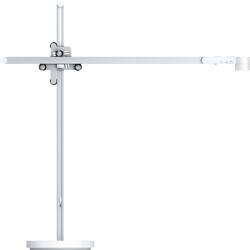
Dyson - Lightcycle Desk Task Light - White/Silver
- Key Specs
- Color Temperature: Daylight
- Works With: Google Home, Amazon Alexa, Apple Home (Compatible with or able to be connected to other smart devices or applications.)
- General
- Brand: Dyson
- Model Number: 249147-01
- Product Name: Lightcycle Desk Task Light
- Color: White/Silver
- Lighting
- Bulb Type Required: LED
- Bulb(s) Included: true
- Number Of Lights In Fixture: 1
- Light Output: 1120 lumens
- Light Direction: Uplight/downlight
- Color Temperature: Daylight
- Compatibility
- Works With: Google Home, Amazon Alexa, Apple Home (Compatible with or able to be connected to other smart devices or applications.)
- Voice Assistant Built-in: Not Applicable (A digital assistant built into the device that uses voice commands to answer questions and control smart devices.)
- App Compatible: true (The product can be connected to a program or software application on a mobile device, which then receives collected data from the product.)
- Features
- Adjustable Angle: true
- Certifications Listings & Approvals
- ENERGY STAR Certified: true (Devices carrying the ENERGY STAR service mark, such as computer products and peripherals, kitchen appliances, and other products, generally use 20% to 30% less energy than required by federal standards.)
- Power
- Power Source: Plug-in
- On/Off Switch Location: Head
- Design
- Finish: Stainless Steel
- Included
- Shade(s) Included: false
- Material
- Fixture Material: Metal
- Dimensions
- Product Height: 27.7 inches (The out of box height of the item. Height is measured as the vertical distance from the bottom of the item to the top as it would be primarily used or placed.)
- Product Width: 27.6 inches (The out of box width of the item. Width is measured as the horizontal distance from one side of the item to the other as it would be primarily used or placed.)
- Product Length: 7.5 inches (The out of box length of the item. Length is measured as the longest dimension of the item.)
- Product Weight: 9.02 pounds (The out of box weight of the item.)
- Adjustable Height: true
- Cord Length: 10.5 feet
- Warranty
- Warranty - Parts: 5 years
- Warranty - Labor: 5 Years
- Other
- UPC: 885609015415
The Dyson Lightcycle automatically simulates properties of natural daylight so you get the right light for the time of day, anywhere in your home. This light is engineered to reduce eyestrain, providing powerful, high quality light with glare control and low optical flicker*. Personalize your illumination setting your age and location or changing the light modes on the Dyson Link App.* Tested at full brightness according to IEEE 1789 - 2015 - Recommended Practices for Modulating Current in High-Brightness LEDs for Mitigating Health Risks to Viewers.
- Intelligently tracks local daylight: Automatically adjusts brightness and color temperature from 2700K to 6500K so you get the right light for the time of day, anywhere in your home.
- Designed to reduce eye strain: Powerful, high quality light, with glare control and low optical flicker¹, for your task at hand.
- Optimal light for the task at hand: Settings for wake up, work, study and relaxation in any room in the home.
- Auto-adjusts for personalization: Dyson Link App enables personalized light settings for your age and location.
- Intelligent optical head: Ambient light and motion sensors detect changes in surrounding light and motion around you.
- Precise positioning: 3 Axis Glide motion puts powerful light precisely where you need it: vertically, horizontally and through 360°.
- Fade free light quality for 60 years²: The only light with Heat Pipe technology that cools six LEDs and provides a light output of up to 1000 lx, with no deterioration over its lifetime.
Whats Included
- Dyson Lightcycle Desk Task Light
- Owner's manual
Product Manuals
A: Hello Curt, this is Kelly with Dyson. The Dyson Lightcycle task lamp will intelligently track local daylight, getting data with regard to sunrise and sunset times. A cloudy day would not bear any effect on the lamps' ability to automatically adjust the brightness and color temperature. You'll always have the right light, for the time of day, anywhere in your home. Best wishes, Kelly Dyson Customer Support
Q: What is the shipping weight of the box for this light?
A: Hi there, this is Tia from Dyson. The boxed weight for this unit is about 12.5 pounds. Thanks for your support of Dyson technology! Best wishes, Tia Dyson Customer Support
Q: Is it loud/can it be used as a docking station?
A: Hello Thomas, this is Kelly with Dyson. It looks like you may have asked your question under the wrong product. Please feel free to contact us directly via email at [email protected] and we'll be glad to answer any product questions you may have. Best Wishes, Kelly Dyson Customer Support
A: Hi Roe, this is Kelly with Dyson. We're sorry to hear that you're having issues with your Dyson Lightcycle Desk Task light. We're happy to assist with troubleshooting any issues you're having. Please contact us directly at [email protected] and we will be in touch. Best wishes, Kelly Dyson Customer Support
People also viewed
 $29.99The price was $39.99
Today's top picks
 $199.99The price was $249.99
 $479.99The price was $729.99
 $789.99The price was $1,049.99
 $799.99The price was $1,199.99