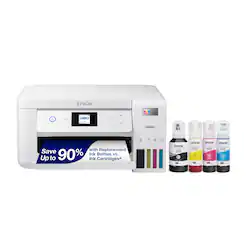
Epson - EcoTank ET-2850 All-in-One Cartridge-Free Supertank Printer (Refurbished) - White
- Key Specs
- Networking: Wireless, Wired
- ENERGY STAR Certified: true (Devices carrying the ENERGY STAR service mark, such as computer products and peripherals, kitchen appliances, and other products, generally use 20% to 30% less energy than required by federal standards.)
- Printer Type: All In One, Copier, Printer
- ISO Color Print Speed: 5 pages per minute (The number of color pages able to be printed per minute in the device's default single-side mode, as tested by the International Standards Organization (ISO).)
- ISO Mono Print Speed: 10.5 pages per minute (The number of black ink (grayscale) pages able to be printed per minute in the device's default single-side mode, as tested by the International Standards Organization (ISO).)
- Touch Screen: false (Touch-screen devices make navigating more intuitive. Using a touch-screen display, you can do things such as tap to select, hold and drag to move items, swipe to scroll, and pinch to zoom.)
- General
- Brand: Epson
- Model Number: C11CJ63202-N
- Product Name: EcoTank ET-2850 All-in-One Cartridge-Free Supertank Printer (Refurbished)
- Color: White
- Display Screen: true
- Display Screen Size: 1.44 inches
- Dimensions
- Product Height: 10.7 inches (The out of box height of the item. Height is measured as the vertical distance from the bottom of the item to the top as it would be primarily used or placed.)
- Product Width: 17.6 inches (The out of box width of the item. Width is measured as the horizontal distance from one side of the item to the other as it would be primarily used or placed.)
- Product Depth: 22.3 inches (The out of box depth of the item. Depth is measured as the distance from the front of the item to the back as it would be primarily used or placed.)
- Product Weight: 16.5 pounds (The out of box weight of the item.)
- Features
- Automatic Document Feeder: false
- Photo Printing: true
- Wide Format Printing: false (Machines with this function support printing on media with widths between 18 and 100 inches, such as posters, banners, canvases, and more.)
- Automatic Two-Sided Printing: true
- Tray Capacity: 100
- Connectivity
- Wired Connectivity: Ethernet, USB-B
- Wireless Connectivity: Wi-Fi (The manner in which a device sends data to another device over a short distance without the use of wires or cables.)
- Ink
- Compatible Cartridges: Epson T502
- Ink Cartridges Required: None (The quantity and color of ink cartridges required for the printer to operate.)
- Ink Cartridges Included: None (The quantity and color of ink cartridges included.)
- Ink Bags/Bottles Required: 1 x Black, 1 x Cyan, 1 x Magenta, 1 x Yellow (The quantity and color of ink bags/bottles required for the printer to operate.)
- Ink Bags/Bottles Included: 1 x Black, 1 x Cyan, 1 x Magenta, 1 x Yellow (The quantity and color of ink bags/bottles included.)
- Paper Info
- Supported Paper Sizes: 3.5" x 5". 4" x 6", 5" x 7", 8"x10", 8.5"x11", 8.5"x14", A4, A6, half letter, executive, user definable
- Paper Feeder: Top loader
- Paper Handling: 100 sheets plain paper
- Performance
- Printer Resolution (Color): Up to 4800 x 1200 (Refers to the number of pixels/dots, both horizontally and vertically, of the image produced by the printer in colored ink. Generally, the higher the resolution, the sharper and cleaner the produced image.)
- Warranty
- Warranty - Parts: 1 year limited
- Warranty - Labor: 1 year limited
- Other
- UPC: 010343967625
Your home needs a printer that’s fast, affordable, easy to use, and has great features. That’s why we developed the EcoTank ET-2850 – an innovative cartridge-free solution that uses high-capacity, easily refillable ink tanks. So you’ll worry less about running out of ink, and save a lot on replacement ink. The ET-2850 features outstanding print quality, auto-duplex printing, a high-resolution flatbed scanner, and convenient color display – making it the perfect family printer.
- Innovative cartridge-free printing: High-capacity ink tanks mean no more tiny, expensive ink cartridges; Epson’s exclusive EcoFit ink bottles make filling easy and worry-free
- Dramatic savings on replacement ink: Save up to 90% with replacement ink bottles vs. ink cartridges – that’s enough to print up to 7,500 pages black/6,000 color, equivalent to about 90 individual ink cartridges
- Stress-free printing: Up to 2 years of ink in the box – and with every replacement ink set – for fewer out of ink frustrations
- Zero cartridge waste: By using an EcoTank printer, you can help reduce the amount of cartridge waste ending up in landfills
- Impressive print quality: Unique Micro Piezo Heat-Free Technology and Claria ET pigment black ink produce extremely sharp text – plus impressive color photos and graphics – on virtually any paper type
- Built-in scanner and copier, plus auto 2-sided printing: High-resolution flatbed scanner and a color display for easy document copying and navigation; paper-saving auto 2-sided printing
- Modern connectivity: Features wireless, plus hands-free voice-activated printing. Easily print from your smart device with the intuitive Epson Smart Panel App
- Designed for reliability: Worry-free 1-year limited warranty
Whats Included
- EcoTank ET-2850 All-in-One Cartridge-Free Supertank Printer (Refurbished)
Product Manuals
Disclaimers
- *Requires a high-speed Internet connection.
- Requires a high-speed Internet connection.
Q: What is the printing resolution of this Epson printer?
A: This Epson printer offers a color printing resolution of up to 4800 x 1200 dpi.
Q: How much paper can the Epson printer hold at once?
A: This printer has a paper tray capacity of 100 sheets of plain paper.
Q: Does this Epson printer require ink cartridges?
A: No, this is a cartridge-free printer that uses high-capacity, easily refillable ink tanks.
Q: What type of connectivity does this Epson printer have?
A: This printer features both wireless and wired connectivity options, including Wi-Fi and Ethernet.
Q: Can this Epson printer print on both sides of the paper automatically?
A: Yes, the ET-2850 offers automatic two-sided printing to help save paper.
Q: Does this Epson printer come with a warranty?
A: Yes, this refurbished model includes a 1-year limited warranty for worry-free use.
A: It has a scanner.
Q: What size paper does it print up too?
A: 8.5x11