Rating 4.3 out of 5 stars with 1754 reviews
4.3- Ease of use (533)
- Print Quality (493)
- Wireless (222)
- Price (194)
- Size (170)
- Noise Level (8)
Customer Images
The vast majority of our reviews come from verified purchases. Reviews from customers may include My Best Buy members, employees, and Tech Insider Network members (as tagged). Select reviewers may receive discounted products, promotional considerations or entries into drawings for honest, helpful reviews.
- Rated 4 out of 5 stars
Small but multi function Printer
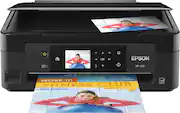
Recommended for those with small volume print needs and occasional scanning, copying. This is the closest thing out there to a portable printer in size format. More luggable than portable. The printer does a bit of everything. Setting the WIFI enabled printer up on my home LAN and connecting my devices was a breeze. Print and scan quality is good but slow. Scanning is page by page, no document feeder. The Epson software seems quite easy to use.The ink will set you back more than the printer and BestBuy does not seem to stock any of the XL sized ink packages. Easy to use, got all the required functions in basic form. I like it.
Posted by TonyVov
- Rated 4 out of 5 stars
so far...
The Epson Expression Home XP-420 is acting according to specs. My only concern is whether the ink jets will clog with disuse since I don't print all the time. After all, the whole idea of this digital age is to reduce paper consumption...right?
Posted by denisb
- Rated 4 out of 5 stars
so far so good :-) use it for my home business
Excellent so far.. great for my home business... printing out work orders for my contractors..
Posted by SAMURAI
- Rated 4 out of 5 stars
Great little printer
Very happy with this little printer, it does pretty much just like the big ones.
Posted by Highlander
- Rated 5 out of 5 stars
Great product
I like it that I can install it in my cell phone and print things there
Posted by Edi464