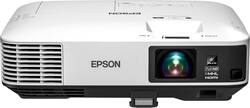
- Key Specs
- Product Weight: 10.1 pounds (The out of box weight of the item.)
- Light Source: Lamp
- Resolution: Full HD (1080p) (Refers to the number of pixels, both horizontally and vertically, used to capture video/images. The higher the resolution the finer the detail that can be seen.)
- Contrast Ratio: 15000:1 (Measured difference between a displayed image's brightest whites and darkest blacks. The larger the first number, the more detail and color that can be displayed.)
- Projector Use: Home Theater
- General
- Brand: Epson
- Model Number: EPSON HOME CINEMA 1450 V11H836
- Product Name: HC1450 1080p Smart 3LCD Projector
- Color: Gray/White
- Dimensions
- Product Height: 4 inches (The out of box height of the item. Height is measured as the vertical distance from the bottom of the item to the top as it would be primarily used or placed.)
- Product Width: 14.8 inches (The out of box width of the item. Width is measured as the horizontal distance from one side of the item to the other as it would be primarily used or placed.)
- Product Depth: 11 inches (The out of box depth of the item. Depth is measured as the distance from the front of the item to the back as it would be primarily used or placed.)
- Product Weight: 10.1 pounds (The out of box weight of the item.)
- Display
- Light Source: Lamp
- Display Technology: 3LCD (Denotes the product’s visual process, sometimes manufacturer specific, used to display an image.)
- Resolution: Full HD (1080p) (Refers to the number of pixels, both horizontally and vertically, used to capture video/images. The higher the resolution the finer the detail that can be seen.)
- Resolution (Native): 1920 x 1200 (Native resolution of a screen refers to its single, fixed resolution. Sometimes screens must scale an image up or down in order to fit the native resolution. This can cause a loss of resolution or detail.)
- 3-Chip Technology: true (Projectors with this technology are able to display images with optimal brightness, color, and detail. Because of their high-performance design, these projectors are primarily used in large venues and digital cinemas.)
- Contrast Ratio: 15000:1 (Measured difference between a displayed image's brightest whites and darkest blacks. The larger the first number, the more detail and color that can be displayed.)
- Aspect Ratio: 16:10 (The measurement of the width of a screen compared to the height of a screen, expressed as a ratio.)
- Throw Ratio Range: 1.57 - 2.58:1 (This measurement indicates what size of projected image can be produced from a certain distance. The smaller the ratio, the closer the projector can be to the screen while still producing a large image.)
- Digital Keystone Correction: true ("Keystone effect" refers to the distortion of an image when it is projected on an angled surface or when the projector is positioned too high or too low from the center of the display. Projectors with a digital keystone correction feature are able to scale the image as needed before it is projected, resulting in the correct image orientation no matter where it is displayed.)
- 3D Technology: false
- Viewing
- Minimum Projector Distance: 5 feet (Minimum distance that the projector can be placed from the screen to produce a display with acceptable visual performance.)
- Maximum Projector Distance: 29 feet (Maximum distance that the projector can be placed from the screen to produce a display with acceptable visual performance.)
- Minimum Viewable Screen Size: 30 inches
- Maximum Viewable Screen Size: 260 inches
- Features
- Projector Use: Home Theater
- Remote Control Included: true
- Exposure Control
- Focus Adjustment: Manual (The method used to focus the device in order to view or display a sharper image.)
- Minimum Aperture: f/1.5 (The smallest opening of a lens, typically expressed in f-numbers. The larger the number, the smaller the aperture and the less light that can enter the lens. A smaller aperture creates a larger depth of field, which keeps both foreground and background in focus.)
- Maximum Aperture: f/2 (The limit to how wide a lens can be open, typically expressed in f-numbers. The smaller the number, the larger the aperture and the more light that can enter the lens. A larger aperture creates a shallower depth of field, helpful for keeping subjects in focus and blurring background details.)
- Optical Zoom: 1.6x (The optical zoom uses a combination of lenses that magnify the image prior to it being registered at high resolution by the imaging sensor.)
- Digital Zoom Capability: true (Projectors with this feature allow for digital adjustment to the projected image size without changing the location of the projector.)
- Connectivity
- Number of HDMI Inputs (Total): 2
- Audio
- Sound Mode: Mono
- Integrated Speaker(s): true
- Speaker(s) Included: true
- Watts Per Channel: 16 watts
- Other
- UPC: 010343932333
Dazzle your home theater audiences with this Epson theater projector. Bright whites and lush colors combine to create a vivid picture, and HDMI and MHL ports let you hook up your gaming consoles and cable or satellite box. This Epson theater projector streams Full HD content for an immersive experience.
- 3LCD, 3-chip technology*: Delivers 3x brighter colors and reliable performance for brilliant images with true-to-life color.
- ±30° keystone correction: For distortion-free images.
- 4200 lumens of color brightness and 4200 lumens of white brightness: Boost display visibility and produce clear, vibrant on-screen images.
- 1080p resolution: Provides a brilliant high-definition picture that is ideal for watching movies, viewing photos or playing games.
- Dual HDMI inputs: Make it easy to connect to high-definition sources.
- 5' - 29' projector distance: Allows flexible placement.
- 1.57 - 2.58:1 throw ratio range: Reproduces wide images in their correct proportions.
- Manual zoom: Offers setting versatility.
- UHE 300W lamp: Delivers up to 10,000 hours of lamp life in ECO mode and up to 5,000 hours of lamp life in normal mode for extended use.
- 29-37dB fan noise: Ensures quiet operation.
- Built-in 16W speaker: Provides crisp sound.
- Remote: Enables operation from a distance.
Whats Included
- Epson Home Cinema 1450
- Wireless remote control
Q: can i watch Netflix and Amazon?
A: Absolutely. Remember the projector acts only as a monitor. Make sure you have a receiver with lots of HDMI inputs and you can plug Apple TV, firestick, DVD etc. then connect the receiver with just one HDMI our and you’re golden.
Q: Does this model have an audio out to run sound through a receiver to an external speaker system?
A: Yes it does - standard 3.5mm(1/8") stereo (min-pin) jack. From the manual: Connecting to External Speakers To enhance the sound from your presentation, you can connect the projector to external self-powered speakers. You can control the volume using the projector's remote control. You can also connect the projector to an amplifier with speakers. If you want to output audio from the external speakers when the projector is turned off, you need to select Always On as the A/V Output setting in the projector's Extended menu. Note: The projector's built-in speaker system is disabled when you connect external speakers. Make sure your computer or video source is connected to the projector with both audio and video cables as necessary. Locate the appropriate cable to connect your external speakers, such as a stereo mini-jack-to-pin-jack cable, or another type of cable or adapter. Connect one end of the cable to your external speakers as necessary. Connect the stereo mini-jack end of the cable to your projector's Audio Out port.
Q: Does this have wi-fi capability?
A: Hi Inquiringmind, The Home Cinema 1450 does not have WiFi capabilities as shipped. Check the Epson support page to learn about the optional wireless dongle. Regards, Mark - The Epson Team.
Q: Can you mount this upside down? Will the picture adjust?
A: Hi Mounting, Yes. The Home Cinema 1450 can be mounted upside-down. You have to change a setting in the menu to invert the display. Regards, Mark - The Epson Team.
Q: Does the Epson HC1450 work like a smart TV? Connect to the internet, Netflix, etc?
A: You will need a fire stick That’s how mine is set up.
Q: Is this a smart projector meaning can you watch Netflix etc
A: Yes, you can watch Netflix with this.
Q: Can you project 3D movies using a 3D bluray player?
A: undefined
People also viewed
 $189.99The price was $379.99
 $189.98The price was $199.99

Today's top picks
 $199.99The price was $249.99
 $799.99The price was $1,199.99
 $789.99The price was $1,049.99











