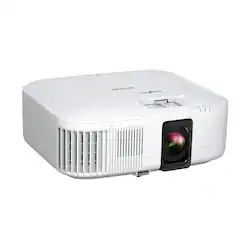
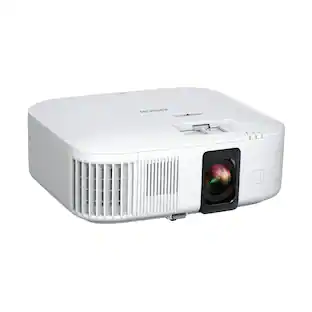
Epson - Home Cinema 2350 4K PRO-UHD 3-Chip 3LCD Smart Streaming Projector (Refurbished) - White
- Key Specs
- Product Weight: 9 pounds (The out of box weight of the item.)
- Light Source: Lamp
- Resolution: 4K (2160p) (Refers to the number of pixels, both horizontally and vertically, used to capture video/images. The higher the resolution the finer the detail that can be seen.)
- Color Brightness (IDMS): 2800 lumens (Measurement of the device's color light output measured accordance with standards established by the Information Display Measurements Standard (IDMS). The more lumens, the brighter the output. In large and/or well-lit environments, such as auditoriums or rooms with plenty of natural light, a higher brightness improves the color quality of the projected image.)
- White Brightness (ISO): 2800 lumens (Measurement of the device's white light output measured in accordance with standards established by the International Organization for Standardization (ISO). The more lumens, the brighter the output. In large and/or well-lit environments, such as auditoriums or rooms with plenty of natural light, a higher brightness improves the quality of the projected image.)
- Contrast Ratio: 35,000:1 (Measured difference between a displayed image's brightest whites and darkest blacks. The larger the first number, the more detail and color that can be displayed.)
- Projector Use: Home Theater
- Projector Throw Type: Standard Throw (The distance from the screen that the projector can be placed to project images. Standard throw projectors typically need to be at least 6 feet away while short throw and ultra short throw projectors can be placed closer to the screen for use in smaller rooms.)
- Portability: Portable (Fixed projectors are ideal when creating an authentic theater atmosphere in your home. Often designed to stay in one place they may require significant recalibration if moved. Portable projectors, weighing around 5 pounds, are easy to move, but will still require set-up calibration and often have technology to reduce the complexity. Ultra-portable projectors are very light, often battery-powered, and ideal for on-the-go use.)
- Wireless Connectivity: Wi-Fi (The manner in which a device sends data to another device over a short distance without the use of wires or cables.)
- Display Connector(s): 2 x HDMI 2.0 (The number and type of connectors used to connect to an external display.)
- Power Source: Plug-in
- General
- Brand: Epson
- Model Number: V11HA73020-N
- Product Name: Home Cinema 2350 4K PRO-UHD 3-Chip 3LCD Smart Streaming Projector (Refurbished)
- Color: White
- Dimensions
- Product Height: 4.8 inches (The out of box height of the item. Height is measured as the vertical distance from the bottom of the item to the top as it would be primarily used or placed.)
- Product Width: 13.1 inches (The out of box width of the item. Width is measured as the horizontal distance from one side of the item to the other as it would be primarily used or placed.)
- Product Depth: 10.9 inches (The out of box depth of the item. Depth is measured as the distance from the front of the item to the back as it would be primarily used or placed.)
- Product Weight: 9 pounds (The out of box weight of the item.)
- Display
- Light Source: Lamp
- Display Technology: 3LCD (Denotes the product’s visual process, sometimes manufacturer specific, used to display an image.)
- Resolution: 4K (2160p) (Refers to the number of pixels, both horizontally and vertically, used to capture video/images. The higher the resolution the finer the detail that can be seen.)
- Resolution (Native): 3840 x 2160 (4K) (Native resolution of a screen refers to its single, fixed resolution. Sometimes screens must scale an image up or down in order to fit the native resolution. This can cause a loss of resolution or detail.)
- 3-Chip Technology: true (Projectors with this technology are able to display images with optimal brightness, color, and detail. Because of their high-performance design, these projectors are primarily used in large venues and digital cinemas.)
- Color Brightness (IDMS): 2800 lumens (Measurement of the device's color light output measured accordance with standards established by the Information Display Measurements Standard (IDMS). The more lumens, the brighter the output. In large and/or well-lit environments, such as auditoriums or rooms with plenty of natural light, a higher brightness improves the color quality of the projected image.)
- White Brightness (ISO): 2800 lumens (Measurement of the device's white light output measured in accordance with standards established by the International Organization for Standardization (ISO). The more lumens, the brighter the output. In large and/or well-lit environments, such as auditoriums or rooms with plenty of natural light, a higher brightness improves the quality of the projected image.)
- High Dynamic Range (HDR): true (An HDR-compatible 4K TV or other HDR-compatible product displays HDR video content when it's available from sources like 4K Ultra HD Blu-ray Discs and 4K streaming services.)
- High Dynamic Range Format: HDR 10 (There are a few HDR formats that tell the TV or other HDR-compatible product how to best utilize its capabilities to display HDR content. HDR technology can support one or multiple formats, each with various benefits to picture quality.)
- Light Source Life (Economy Mode): 7500 hours (The light source's estimated length of operating time when economy mode is enabled.)
- Light Source Life (Normal Mode): 4500 hours (The light source's estimated length of operating time when normal operating mode is enabled.)
- Contrast Ratio: 35,000:1 (Measured difference between a displayed image's brightest whites and darkest blacks. The larger the first number, the more detail and color that can be displayed.)
- Aspect Ratio: 16:9 (The measurement of the width of a screen compared to the height of a screen, expressed as a ratio.)
- Throw Ratio Range: 1.32 - 2.15 (This measurement indicates what size of projected image can be produced from a certain distance. The smaller the ratio, the closer the projector can be to the screen while still producing a large image.)
- Digital Keystone Correction: true ("Keystone effect" refers to the distortion of an image when it is projected on an angled surface or when the projector is positioned too high or too low from the center of the display. Projectors with a digital keystone correction feature are able to scale the image as needed before it is projected, resulting in the correct image orientation no matter where it is displayed.)
- Viewing
- Screen Included: false
- Minimum Viewable Screen Size: 40 inches
- Maximum Viewable Screen Size: 500 inches
- Features
- Projector Use: Home Theater
- Projector Throw Type: Standard Throw (The distance from the screen that the projector can be placed to project images. Standard throw projectors typically need to be at least 6 feet away while short throw and ultra short throw projectors can be placed closer to the screen for use in smaller rooms.)
- Portability: Portable (Fixed projectors are ideal when creating an authentic theater atmosphere in your home. Often designed to stay in one place they may require significant recalibration if moved. Portable projectors, weighing around 5 pounds, are easy to move, but will still require set-up calibration and often have technology to reduce the complexity. Ultra-portable projectors are very light, often battery-powered, and ideal for on-the-go use.)
- Remote Control Included: true
- Exposure Control
- Focus Adjustment: Manual (The method used to focus the device in order to view or display a sharper image.)
- Connectivity
- Number of HDMI Inputs (Total): 2
- Wireless Connectivity: Wi-Fi (The manner in which a device sends data to another device over a short distance without the use of wires or cables.)
- Display Connector(s): 2 x HDMI 2.0 (The number and type of connectors used to connect to an external display.)
- Network Connector(s): No network connectors
- Audio Only Outputs: 1 x 3.5mm audio
- Audio
- Integrated Speaker(s): true
- Speaker(s) Included: true
- Compatibility
- Operating System Compatibility: Windows, Mac
- Power
- Power Source: Plug-in
- Warranty
- Warranty - Parts: 2-year projector limited warranty
- Warranty - Labor: 2-year projector limited warranty
- Other
- UPC: 010343972391
Enjoy an immersive, big screen home theater experience with the Home Cinema 2350 Smart Streaming Projector. Featuring Epson’s innovative 4K PRO-UHD technology and phenomenal HDR10 brilliance—the Home Cinema 2350 delivers a truly epic 4K experience. True 3-chip 3LCD technology offers outstanding brightness and color accuracy without disturbing the overall contrast, ensuring deep blacks and remarkably vivid colors. And with Android TV included, the Home Cinema 2350 Smart Streaming Projector also makes it easy to stream your favorite Twitch and YouTube channels—or watch the latest movies and TV shows on Netflix, Amazon Prime Video, Hulu, Disney+, HBO Max and more. Allowing for multiple audio options, the Home Cinema 2350 features an integrated 10 W bass-reflex speaker, plus Bluetooth wireless audio device support for connecting soundbars or headphones. And, with a sleek, compact design and vertical lens shift, you can place the projector nearly anywhere—including tables and bookshelves—for flexible setup and easy viewing.
- 4K PRO-UHD: An amazing 4K experience utilizing advanced processing for resolution enhancement, color and image processing; HDR10 and HLG support produce an extraordinary range of color and detail in both bright and dark scenes
- Bright Picture: 2,800 lumens of color and white brightness deliver a bright, vivid picture in a variety of lighting conditions
- Best-In-Class Color Brightness: Advanced 3-chip 3LCD technology displays 100% of the RGB color signal for every frame, allowing for outstanding color accuracy while maintaining excellent color brightness without any distracting “rainbowing” or “color brightness” issues seen with other projection technologies
- Input Lag Time Under 20 Ms: Low latency mode allows for responsive gaming with the latest generation of gaming consoles
- Smart Streaming Capability: Latest Android TV interface with a simple-to-use remote – including voice search with built-in Google Assistant; watch all your favorite streaming channels including Netflix, Amazon Prime Video, Hulu, Disney+, HBO Max, youtube and more; even stream live TV with apps like youtube TV
- Integrated Audio Technologies: Built-in 10 W bass-reflex speaker, plus Bluetooth wireless audio device support, provide audio features available right out-of-the-box
- Flexible Sound Upgrade Options With HDMI ARC Port And Audio Out: Connect your external soundbar, AV receivers or headphones to elevate your entertainment
- New Compact Design: Easily fits on racks and bookshelves; sleek, modern design seamlessly complements contemporary spaces
- Outstanding Service And Support: 2-year limited projector warranty and 90-day lamp; two-business-day replacement with free shipping
Whats Included
- Projector
- power cable
Q: What is the contrast ratio of the Home Cinema 2350 projector?
A: This projector has a contrast ratio of 35,000:1.
Q: Does this projector have a built-in speaker?
A: Yes, this projector has a built-in 10W bass reflex speaker.
Q: Does the Epson Home Cinema 2350 projector support HDR?
A: Yes, the Home Cinema 2350 supports HDR10 and HLG.
Q: How long is the lamp life on this projector?
A: The lamp life is approximately 4500 hours in normal mode and 7500 hours in economy mode.
Q: What is the maximum viewable screen size for this projector?
A: The maximum viewable screen size for this projector is 500 inches.
A: Hell Glenard. To mirror an Apple device on the Home Cinema 2350 you would need to use a product like Apple TV. The projector includes Android TV, so you should be able to mirror your Android device using Google Home. Regards, Kevin - The Epson Team.
A: Hello AnaB. The mounting screws are not included with the projector. They come separately with the Universal Epson ceiling mount. Regards, Kevin - The Epson Team.
Q: What kinds of screens can be used
A: Hello Larry. Depending on the room size, lighting, and budget, different screen types can be used with the Home Cinema 2350. We recommend starting with a conventional unity gain (1.0 gain) white screen, and you can upgrade from there. While some screens are rated for 4K images, this projector may not require one, as it’s not a dedicated home theater-level projector. If your room has a lot of ambient light, a gray screen could be a good option. However, this may reduce contrast in darker rooms, especially at night, so it's best to use room lighting with a gray screen. Epson projectors work with different screen manufacturers; consider the projector model specs, screen type, and room lighting when choosing a screen. For additional assistance, feel free to consult a Best Buy Associate in-store. Regards, Kevin - The Epson Team.
People also viewed
 $1,039.99The price was $1,399.99
 $479.99The price was $499.99
 $1,299.00The price was $1,499.00
 $249.99The price was $269.99
Today's top picks
- $1,039.99The price was $1,399.99
 $2,499.99The price was $3,799.99
 $949.99The price was $999.99
 $709.99The price was $799.99