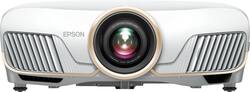
- Key Specs
- Product Weight: 25.1 pounds (The out of box weight of the item.)
- Light Source: Lamp
- Resolution: 4K (2160p) (Refers to the number of pixels, both horizontally and vertically, used to capture video/images. The higher the resolution the finer the detail that can be seen.)
- Contrast Ratio: 10,00000:1 (Measured difference between a displayed image's brightest whites and darkest blacks. The larger the first number, the more detail and color that can be displayed.)
- Projector Use: Home Theater
- General
- Brand: Epson
- Model Number: EPSON 5050UBE PROJ V11H931020
- Product Name: Home Cinema 5050UBe 4K PRO-UHD 3LCD Projector with High Dynamic Range
- Color: White
- Dimensions
- Product Height: 7.6 inches (The out of box height of the item. Height is measured as the vertical distance from the bottom of the item to the top as it would be primarily used or placed.)
- Product Width: 20.5 inches (The out of box width of the item. Width is measured as the horizontal distance from one side of the item to the other as it would be primarily used or placed.)
- Product Depth: 17.7 inches (The out of box depth of the item. Depth is measured as the distance from the front of the item to the back as it would be primarily used or placed.)
- Product Weight: 25.1 pounds (The out of box weight of the item.)
- Display
- Light Source: Lamp
- Display Technology: 3LCD (Denotes the product’s visual process, sometimes manufacturer specific, used to display an image.)
- Resolution: 4K (2160p) (Refers to the number of pixels, both horizontally and vertically, used to capture video/images. The higher the resolution the finer the detail that can be seen.)
- Resolution (Native): 3840 x 2160 (4K) (Native resolution of a screen refers to its single, fixed resolution. Sometimes screens must scale an image up or down in order to fit the native resolution. This can cause a loss of resolution or detail.)
- High Dynamic Range (HDR): true (An HDR-compatible 4K TV or other HDR-compatible product displays HDR video content when it's available from sources like 4K Ultra HD Blu-ray Discs and 4K streaming services.)
- Light Source Life (Normal Mode): 3500 hours (The light source's estimated length of operating time when normal operating mode is enabled.)
- Contrast Ratio: 10,00000:1 (Measured difference between a displayed image's brightest whites and darkest blacks. The larger the first number, the more detail and color that can be displayed.)
- Aspect Ratio: 16:9 (The measurement of the width of a screen compared to the height of a screen, expressed as a ratio.)
- Throw Ratio Range: 1.35 - 2.84:1 (This measurement indicates what size of projected image can be produced from a certain distance. The smaller the ratio, the closer the projector can be to the screen while still producing a large image.)
- 3D Technology: true
- Viewing
- Minimum Projector Distance: 5 feet (Minimum distance that the projector can be placed from the screen to produce a display with acceptable visual performance.)
- Maximum Projector Distance: 62 feet (Maximum distance that the projector can be placed from the screen to produce a display with acceptable visual performance.)
- Minimum Viewable Screen Size: 50 inches
- Maximum Viewable Screen Size: 300 inches
- Features
- Projector Use: Home Theater
- Remote Control Included: true
- Exposure Control
- Focus Adjustment: Powered (The method used to focus the device in order to view or display a sharper image.)
- Minimum Aperture: f/2 (The smallest opening of a lens, typically expressed in f-numbers. The larger the number, the smaller the aperture and the less light that can enter the lens. A smaller aperture creates a larger depth of field, which keeps both foreground and background in focus.)
- Maximum Aperture: f/3 (The limit to how wide a lens can be open, typically expressed in f-numbers. The smaller the number, the larger the aperture and the more light that can enter the lens. A larger aperture creates a shallower depth of field, helpful for keeping subjects in focus and blurring background details.)
- Connectivity
- Number of HDMI Inputs (Total): 2
- Number of USB Port(s): 1
- Audio
- Speaker(s) Included: false
- Other
- UPC: 010343943926
Enjoy modern presentation and entertainment with this Epson PowerLite home cinema projector. The Epson 3LCD chip supports 4K content delivery and 2500 lumens of color brightness for image quality, while a lightweight remote control makes for convenient wireless operation. This Epson PowerLite home cinema projector comes with a wireless HD transmitter and AC adapter for quick setup.
- High dynamic range (HDR) creates a more realistic picture: HDR technology expands the contrast and color range of the pixels on your projector to reveal a better, brighter, more colorful image. The picture quality is noticeably more natural.
- Rec.709 cinematic color: Offers bright, vibrant image quality.
- ±30° vertical keystone correction: For distortion-free images.
- 2600 lumens of color brightness and 2600 lumens of white brightness: Boost display visibility and produce clear, vibrant on-screen images.
- 1,000,000:1 contrast ratio: Provides a multitude of shades between black and white for rich color saturation.
- Lens shift: Vertical and horizontal lens shift for the ultimate installation flexibility.
- 3840 x 2160 (2 x 1920 x 1080) 4K PRO-UHD resolution: Delivers crisp, detailed high-definition images.
- Dual HDMI inputs: Make it easy to connect to high-definition sources.
- 50" - 300" viewable screen size: Allows everyone in the room to enjoy a clear view.
- 5' - 62' projector distance: Allows flexible placement.
- 1.35 - 2.84:1 throw ratio range: Reproduces wide images in their correct proportions.
- Supports a variety of signals: Including 480p, 720p, 1080i, 1080p, 480i, 576i and 576p for a wide range of compatibility options.
- UHE 250W lamp: Delivers up to 3,500 hours of lamp life in normal mode for extended use.
- 20-31dB fan noise: Ensures quiet operation.
- Included remote: Provides simple control from across the room.
Whats Included
- Epson Home Cinema 5050UBe
- WirelessHD Transmitter Set, wireless remote control, 2 x HDMI cable clamps
Product Manuals
A: The projector is great but, the wireless HDMI transmission only sends 4k @30hz. And... Also beware of the fact that the wireless sending unit and projector work great once it has found the signal. What I'm saying here is anytime you change a signal, be it blu ray or cable, etc... your screen will be blank, then you see in the bottom left corner, looking for signal, then signal found, looking for projector and 15 or so seconds go by and now you have a picture. Touch that remote and the whole delayed process starts all over. click, wait, click, wait. You will have some free time while your waiting. So I am going to run the HDMI cable to the projector to prevent all of the above issues. I would have purchased the UB if I would have known these two issues. So Epson, may I have my $200 back please? I have the Ube model and I never seen anything regarding this, but it was a new product release when I made the leap. Good Luck and Enjoy.
Q: Does this system support 3D? Thanks.
A: Hi YvonLat. Yes, the Epson Home Cinema 5050UBe supports 3D projection. Regards, Bobby - The Epson Team.
A: Hello. Yes, the official ceiling mount for the Home Cinema 5050 is the CHF4000. Unfortunately, Epson has not tested other 3rd party mounts with the device to confirm compatibility. Regards, Kevin - The Epson Team.
A: go to this website https://www.projectorcentral.com/Epson-Home_Cinema_5050UBe-projection-calculator-pro.htm
Q: Does Epson recommend a particular screen material, screen color or aspect ratio for optimum results?
A: Hello Adam. Choosing the right screen for the Home Cinema 5050 depends on different variables. Ideally, the Home Cinema 5050 should be in a light-controlled room, and if so, then a white screen would be the best option. If the projector is going to be a bright room with no light control, then perhaps a light gray screen could also be an option, but image quality could be impacted when it's dark. The aspect ratio can also vary based on the content you're watching and the limitations of the device you choose to connect to the projector to. Please see the User's Guide on our official Epson Support page for more information. Regards, Kevin - The Epson Team.
Q: How big a screen can be used with this device?
A: Hello Nana. Depending on the size of the room and distance from the screen, you can use a screen size ranging from 50 inches to 300 inches with the Home Cinema 5050UB projector. Regards, Kevin - The Epson Team.
A: Hello Sean2306. Yes, the Epson Home Cinema 5050UBe supports video connection via HDMI cable. For more information, please visit the official Epson Support page. Regards, Kevin - The Epson Team.
People also viewed
 $189.99The price was $379.99
 $189.98The price was $199.99


Today's top picks
 $199.99The price was $249.99
 $279.99The price was $479.99
 $789.99The price was $1,049.99
 $799.99The price was $1,199.99