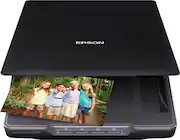
With up to 4800 dpi optical resolution and speeds as fast as 10 seconds, this Epson Perfection V39 flatbed scanner makes it easy to reproduce both photos and documents. The removable high-rise lid enables you to scan oversize media.
Q: will this scan black & white negtives
A: This item will scan negatives.
Q: will this scanner work with windows 10
A: Once my PC 'updated' to Windows 10 my Canon multi function copier/printer SCANNER drivers no longer worked. I went through MANY frustrating hours for several days to try and get them to communicate. I finally gave up and bought this Epson Perfection v39. I got rid of my flatbed scanner many years ago and really didn't want to get another one because of the space it took up on my desk. This flatbed scanner is awesome! It's compact enough to fit on my desk using the built-in kickstand. On most one-page documents and receipts, I don't even have to pull it out and lay it flat. Just leave the scanner on it's kickstand and it will work. Worked GREAT with Windows 10 right away. Best $$ ever spent! This little sucker is FAST too. Once it scans your first page, you can reload the subsequent pages while the scanner resets internally to the 'home' position. Comes with all the software you need too! I use it to archive documents mainly. Scan receipts, warranties, everything to make a more efficient paperless office. I make PDF files several times a day with it and it's always reliable and a pleasure. Scan handwritten notes for customer files and emails. The PDF files are text-searchable too. Easily makes copies too. For multiple page documents, configure your '.pdf' button on the machine to the scan settings you want, and then just keep hitting the start button on the machine. Once you're done scanning, click on the 'finish' button on the software and it will save the multiple page .pdf file when you reach the last page. No complaints. Love it for our small business. Pull the top straight off and you can place thicker books on it for scanning.
A: You have the option to save as individual files. I used it recently to scan a large batch of family photos and it worked great for getting through over 100 photos in a short time.
Q: Why is it usb 2.0? USB 3.0 is the latest and faster. When usb 4.0 comes out will epson get usb 3.0?
A: USB 3.0 is faster than USB 2.0, but you have to ask if that really makes any difference. The scanning process much takes longer than the data transmission via USB, so a faster USB wouldn't result in a noticeable improvement in the speed of the whole process.
A: This is mostly for photos and documents, but works with drawings, old photos and textured items such as a cloth cross stitch. You can scan and save to JPEG, TIFF, PDF, PNG and BMP formats.
Q: Can I use this scanner to email as an attachment?
A: Yes, you can use the scanner to use it to email an attachment.
Q: I have YEARS of photos. I want to scan and store them on a flash drive or something. Help!
A: For Windows: Scan the pictures and save them in "my pictures". Then insert the flash drive. Go to pictures and right click and copy each picture and paste on flash drive. If they are in a folder, copy & paste the folder. Should be there. This can be done with just about anything that can be copied & pasted, including software. NEVER shut down a computer with a flash drive. If you leave it in, when you start the computer, it could really mess things up. I worked for Dell for 5 years and it drove me nuts unscrabbling the mess I made with mine when I left a drive in and forgot to take it out. Good luck. Don
Q: Will this scanner work with MAC OS X El Capitan 10.11.3
A: Yes. It will work natively with OSX image capture software, but if you want multi page scanning ability (adding new scans to a single pdf etc) you can get the free support software from the website linked on the disc that comes with the scanner.