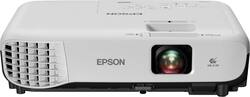
- Key Specs
- Product Weight: 5.3 pounds (The out of box weight of the item.)
- Resolution: 600 (Refers to the number of pixels, both horizontally and vertically, used to capture video/images. The higher the resolution the finer the detail that can be seen.)
- Contrast Ratio: 15000:1 (Measured difference between a displayed image's brightest whites and darkest blacks. The larger the first number, the more detail and color that can be displayed.)
- Projector Use: Business
- General
- Brand: Epson
- Model Number: EPSON VS250 PROJECTOR V11H8382
- Product Name: VS250 SVGA 3LCD Projector
- Color: Black/White
- Dimensions
- Product Height: 3 inches (The out of box height of the item. Height is measured as the vertical distance from the bottom of the item to the top as it would be primarily used or placed.)
- Product Width: 11.9 inches (The out of box width of the item. Width is measured as the horizontal distance from one side of the item to the other as it would be primarily used or placed.)
- Product Depth: 9.2 inches (The out of box depth of the item. Depth is measured as the distance from the front of the item to the back as it would be primarily used or placed.)
- Product Weight: 5.3 pounds (The out of box weight of the item.)
- Display
- Resolution: 600 (Refers to the number of pixels, both horizontally and vertically, used to capture video/images. The higher the resolution the finer the detail that can be seen.)
- Resolution (Native): 800 x 600 (Native resolution of a screen refers to its single, fixed resolution. Sometimes screens must scale an image up or down in order to fit the native resolution. This can cause a loss of resolution or detail.)
- 3-Chip Technology: true (Projectors with this technology are able to display images with optimal brightness, color, and detail. Because of their high-performance design, these projectors are primarily used in large venues and digital cinemas.)
- Contrast Ratio: 15000:1 (Measured difference between a displayed image's brightest whites and darkest blacks. The larger the first number, the more detail and color that can be displayed.)
- Aspect Ratio: 4:3 (The measurement of the width of a screen compared to the height of a screen, expressed as a ratio.)
- Throw Ratio Range: 1.45 - 1.96:1 (This measurement indicates what size of projected image can be produced from a certain distance. The smaller the ratio, the closer the projector can be to the screen while still producing a large image.)
- Digital Keystone Correction: true ("Keystone effect" refers to the distortion of an image when it is projected on an angled surface or when the projector is positioned too high or too low from the center of the display. Projectors with a digital keystone correction feature are able to scale the image as needed before it is projected, resulting in the correct image orientation no matter where it is displayed.)
- 3D Technology: false
- Viewing
- Minimum Projector Distance: 3 feet (Minimum distance that the projector can be placed from the screen to produce a display with acceptable visual performance.)
- Maximum Projector Distance: 34 feet (Maximum distance that the projector can be placed from the screen to produce a display with acceptable visual performance.)
- Minimum Viewable Screen Size: 29.9 inches
- Maximum Viewable Screen Size: 350 inches
- Features
- Projector Use: Business
- Remote Control Included: true
- Exposure Control
- Focus Adjustment: Manual (The method used to focus the device in order to view or display a sharper image.)
- Minimum Aperture: 1.44 (The smallest opening of a lens, typically expressed in f-numbers. The larger the number, the smaller the aperture and the less light that can enter the lens. A smaller aperture creates a larger depth of field, which keeps both foreground and background in focus.)
- Maximum Aperture: 1.44 (The limit to how wide a lens can be open, typically expressed in f-numbers. The smaller the number, the larger the aperture and the more light that can enter the lens. A larger aperture creates a shallower depth of field, helpful for keeping subjects in focus and blurring background details.)
- Audio
- Sound Mode: Mono
- Integrated Speaker(s): true
- Speaker(s) Included: true
- Watts Per Channel: 2 watts
- Other
- UPC: 010343935785
Display work or school presentations on this Epson projector. It produces 3200 lumens of white and color brightness for vivid images, and its easy setup lets you customize specifications in minimum time. This Epson projector is equipped with an HDMI port, so you can connect it to your computer or HD device.

- Portable design: Weighs 5.29 lbs. for easy transport to meetings, presentations and more.
- ±30° keystone correction: For distortion-free images.
- 3200 lumens of color brightness and 3200 lumens of white brightness: Boost display visibility and produce clear, vibrant on-screen images.
- 800 x 600 SVGA resolution: Provides crisp picture quality.
- HDMI input: Makes it easy to connect to high-definition sources.
- 29.9" - 350" viewable screen size: Allows everyone in the room to enjoy a clear view.
- 3' - 34' projector distance: Allows flexible placement.
- 1.45 - 1.96:1 throw ratio range: Reproduces wide images in their correct proportions.
- USB Plug 'n Play instant setup: Instantly projects audio and video from a PC or Mac via a USB connection.
- Horizontal and vertical image correction: Projects rectangular images from any angle; just move the easy-slide control bar to make the necessary horizontal image adjustments; vertical adjustments are automatic.
- Manual zoom: Offers setting versatility.
- UHE 210W lamp: Delivers up to 10,000 hours of lamp life in ECO mode and up to 6,000 hours of lamp life in normal mode for extended use.
- 28-37dBA fan noise: Ensures quiet operation.
- Built-in 2W speaker: Provides crisp sound.
- Included remote: Provides simple control from across the room.
Whats Included
- Epson VS250 SVGA 3LCD Projector
- Power cable
- Quick setup sheet
- Remote Control with AA batteries
- User Manual CD
- VGA cable
Product Manuals
Q: how is the picture with this projector with daylight in the room?
A: 3200 lumens is pretty bright. Epson would recommend you not have direct daylight for optimal use... I can tell you this projector works VERY well with direct overhead lighting, and it keeps up with sunlight okay. It's definitely not like the older deal breaker projectors that required the blinds closed.
A: Yes but you must have the three prong red yellow and white cord to hook it up.
Q: What is the sound quality for this projector? I need it for videos in my classroom.
A: We use this projector for a Sunday school classroom with 10 students and the sounds is fairly loud. But if it is a 10+ student classroom I think you would be better off getting external speakers connected.
Q: Is this good for outdoor use?
A: At night. Yes. During the day. No. Also would not be good in rainy weather.
Q: Can you streaming from Netflix or prime
A: If you connect it to a device with internet. The projector itself cannot stream anything.
Q: Can you use PowerPoint on this projector? Some projectors don’t :(
A: If you are connecting from a laptop or other device through an HDMI or VGA port, then yes. However, you have to buy the HDMI connector separately.
A: You can connect it using HDMI cable going from the Dish box to the projector.
A: You need to purchase a HDMI audio extractor. I found one on Amazon for $24.99. once you get that you can hook up your speakers via cable not Bluetooth. You would think this projector would have a audio out but it does not so you need the audio extractor. Hope this helps.
People also viewed
 $189.98The price was $199.99
 $189.99The price was $379.99


Today's top picks
 $479.99The price was $729.99
 $199.99The price was $249.99
 $1,199.99The price was $1,399.99
 $799.99The price was $1,199.99
 $789.99The price was $1,049.99