Customer Ratings & Reviews
 See more images
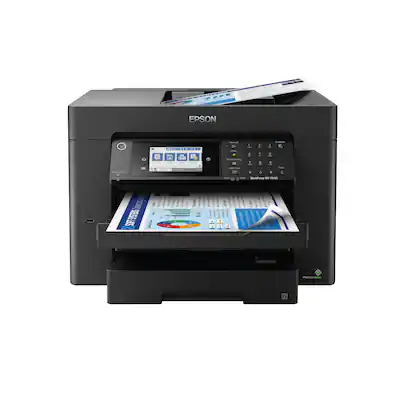
Epson - WorkForce Pro WF-7840 Wireless Wide-format All-in-One Inkjet Printer - Black
- Model:
- C11CH67201
- SKU:
- 6426725
Highly rated by customers for:
Customer reviews
Rating 4.3 out of 5 stars with 1128 reviews
Top Mentions
- Checking this box will move you to the filtered review section.
- Checking this box will move you to the filtered review section.
- Checking this box will move you to the filtered review section.
- Checking this box will move you to the filtered review section.
- Checking this box will move you to the filtered review section.
- Checking this box will move you to the filtered review section.
- Rated 5 out of 5 stars
Big and heavy but works well
Stevo Posted
This printer is a beast. Much larger than other printers I have had. Can print 11x17 and 8 1/2x111 from two different paper trays. Easy to setup but there are a lot of settings in the control panel. One nice feature is you can push a button and the output tray goes back in. Them when you print it automatically comes back out. Very nice quality prints that do not run if they get wet with a little water. The scanner works great. By some spare ink, you will need it once you start printing.
I would recommend this to a friend - Rated 5 out of 5 stars
Great multifunction printer
ejjalp Posted
Easy setup. Probably more printer than I need for my home/office. I was looking for a multifunction printer with fax, scan, etc that did borderless photo prints, with decent size ink cartridges that I don't need to constantly replace. The ability to print larger size borderless photographs and prints is a nice benefit as well. Per the photos, it takes up a good amount of space on my desk. The software is a little clunky, not as nice as the HP that I had previously. Overall, it's probably the best all in one printer that I've had and will hopefully more than meet my needs for a long time.
I would recommend this to a friend - Rated 4 out of 5 stars
Nearly Perfect Color Matching
MarketingDesigner Posted
I'm very excited about this printer, so far! 5 stars for fantastic color matching (see photo), speed, and the wide range of print sizes it offers. Minus one star for somewhat unclear error messaging and imperfect photocopying. For instance, when I put 13 x 19 paper into the rear feeder and selected A3+, the printer was happy, but when I added a slightly smaller document onto the flatbed scanner and pressed "copy," it kicked back an error saying I can't copy to that paper size. After fumbling around to figure out why my large-format printer was saying it can't print on large format paper, I finally digitally changed the paper size to A3 (keeping the original oversized paper in the feeder), and it worked fine. I'm docking the score because it was an unnecessary and confusing error that wasted time. I've also had trouble enlarging standard copies (enlarging a business card onto 8.5x11). The option to enlarge is always greyed out, so I'm not sure what the trick is there. I'll read the instructions eventually, but something as simple as enlarging a copy shouldn't require it. One major bonus: I'm very happy with the ink cartridge yield! I've printed 20-30 color and B&W documents over the past few weeks, then printed the large-format full-color doc in the attached photo--all from the original cartridges that came with the printer. I still haven't seen a low-ink warning, even after the full-color copy, so I'm very impressed there. Regarding the attached photo: The original is a folded poster that came with an oversized puzzle. It's printed on very thin paper, so it's starting to tear and wrinkle. For preservation, I copied it onto Epson's A3+ Matte Premium Presentation paper, and as you can see, the color match is nearly perfect! Certain sections of the print are somewhat blurry (see the lower left 1/6th), which I'm assuming is because the original image is folded into 6 sections and that corner probably didn't lay flat against the glass. Maybe in the next version, the printer's foam backing needs to be a few millimeters thicker to compensate for damaged originals. However, note that not one of the wrinkles showed up on the copy. Nice! Overall, I'm very glad I bought this printer. It's going to be lifesaver for printing client proofs before sending to the packaging printer.
I would recommend this to a friend - Rated 4 out of 5 stars
Worth the price
Overall this printer is fantastic. We’ve had a few issues with the wireless connection holding and down loading drivers. The print quality is really good for the price, and the overall capability for a small office works perfectly.
I would recommend this to a friend - Rated 5 out of 5 stars
Love being able to scan 11x17 again!
Parker Posted
Great printer, easy setup, love being able to scan in my 11x17 art work again and print quality is excellent.
I would recommend this to a friend - Rated 5 out of 5 stars
Great printer for Office!
PeterN Posted
This printer is GREAT. All in one that does everything. It was easy to setup, it is easy to print with. The scan feature is great! I recommend using the XL cartridges.
I would recommend this to a friend - Rated 3 out of 5 stars
Epson WorkForce WF-7840 Review
AceDuff28 Posted
I purchased this printer thinking it was very similar to my old Epson WorkForce WF-7620 and that I could place it where my WF-7630 was located. Alas, that was not the reality since 13" x 19" Super B paper has to be loaded through a rear chute rather than a front loader tray. That caused me to locate the printer in another location to allow the paper chute's 13" x 19" paper to be leaned up against a wall. This works okay, but the paper is hanging out of the printer and one needs over a foot behind the printer when placed. The actual support of the paper chute doesn't adequately support the paper and it curls down in back of that support unless a wall is at the location. I've called Epson to express my concerns, but they stated that there is no other current solution to loading 13" x 19" paper, only 11" x 17" in either of the front loading trays. Since I'm an Architect and print half size drawings I use the Super B size since it works better than the 11" x 17" size. The printer works well and prints good prints even though it tends to use a lot of ink and that can get expensive. Costco previously use to fill up the ink cartridges at a lower cost than buying new, but they've discontinued that program. Evidently Epson felt that the front loader tray wasn't working as well as a chute for larger paper (and it did have problems at times) so they changed. I've had issues with the 13" x 19" front loader tray on my WF-7620, so I will just have to see how well the rear chute works over time. That's why I can only give the printer an average rating.
I would recommend this to a friendBrand response from Epson
Posted
Hi AceDuff28, we appreciate your feedback, and we'll forward this information to the relevant departments to help us improve the quality and performance of future Epson products. Your WF-7840 also includes a 1-year Limited Warranty, plus free lifetime tech support. If we can help you with anything else, our support team can be reached by phone at (562) 276-4382; Hours: Monday - Friday, 7 am - 4 pm PT. Once again, thank you. Sincerely, Kevin - The Epson Team.

- Rated 5 out of 5 stars
A very useful and recommended printer.
OtomyTR Posted
The EPSON WorkForce WF-7840 printer is a very useful printer. My family and I have used it for scanning and printing, but I still need to explore it further to take full advantage of all its features, such as double-sided printing and scanning. I want to continue using it and learn about all its functionalities to make the most of it. Additionally, I can say that it produces sharp prints and high-resolution scans. I liked what the product itself offered, the affordable price, and the ease with which I was able to obtain it. EPSON has always been one of my favorite brands because of the excellent products it offers its customers. Thank you, Best Buy!
I would recommend this to a friend - Rated 5 out of 5 stars
Epson WF 7840
180DegreeTurn Posted
After 30 days of high production, I am pleased with the performance. The ink cartridges have lasted longer than I thought, while printing high quality graphic art cards. So happy with the wide format 11×17 scanner for artwork. Some how the initial configuration got a wrong IP address, but it is still functioning and all home devices can access and print.
I would recommend this to a friend - Rated 5 out of 5 stars
More Options Less Money - Epdon
HBeb Posted
They HP at work is totally cumbersome. I needed a printer, so I bought one that had all the features the the HP didn't. The big one being an 11x17 feeder, so I would have to copy one page at a time. This printer cost less than the HP, has more features, is way easier to use, and was $100 less to boot.
I would recommend this to a friend - Rated 5 out of 5 stars
Epson (WF-7840)
Peaches Posted
I purchased this Epson printer(WF-7840) to replace and old Hp printer I had had for 5 or more years. I haven’t did a lot of heavy printing with it yet. It’s a large printer even though I wasn’t expecting it to be that big. The installation was easy. I love the print quality and it prints fast. Overall I’m happy to have this printer and I’m looking forward in doing much more with it.
I would recommend this to a friend - Rated 5 out of 5 stars
Great printer for the price!
Tmartinjr77 Posted
Very professional quality printer. Easy to set up! Connected to all my devices wirelessly with ease. Recommend! I like super B paper option for large 13”x19” prints
I would recommend this to a friend - Rated 5 out of 5 stars
Great quality printer
CassyLauNotary Posted
Great printer, excellent price. I needed a dual tray printer for my business as a Notary Public. At times I print 200-250 pages for one job offer. Having this printer with all the extras is a plus and a very important must-have. When picture was taken black ink was low; this is after a total of 278 copies.
I would recommend this to a friend - Rated 5 out of 5 stars
So Far, So Good
JimN Posted
i spent a month or so searching for a wide-carriage printer after the transporter mechanism on my 14-year-old Canon PIXMA wide-carriage inkjet printer locked up (the resultant sound of the carriage trying free itself reminded me of a goat jousting with its mirror image.) I had scoped out this model online but needed to see it in person to understand how Epson arrived at a 38"x20" footprint - in reality the footprint is 20"x20" or 25"x20" if you count the front extension of the LED control panel and paper tray(s); add 3"-ish when using the rear, lift-up paper feeder.
I would recommend this to a friend - Rated 5 out of 5 stars
Best printer
MichaelReiss Posted
All in one Epson is one of the best printers excellent quality fast printing quality 2 sided print and the faxing is very quick
I would recommend this to a friend - Rated 5 out of 5 stars
Get it now!!!
Tada7000 Posted
I am so happy that I made the decision to purchase this All-In-One Printer. I am the owner of a small home design business and this printer is perfect for quick on demand printing. The ease of being able to print from your Mobile Device is worth the cost. Great Choice.
I would recommend this to a friend - Rated 5 out of 5 stars
Printer
BonnieH Posted
Wonderful I love it great item to purchase really e
I would recommend this to a friend - Rated 4 out of 5 stars
Perfect Home Office Multi function printer.
John Posted
Perfect for home office and printing and scanning at 11”x17” is a major plus.
I would recommend this to a friend - Rated 5 out of 5 stars
Epson
RobertM Posted
This is a excellent printer, scanner, and copier. I recommend Best buy for your products.
I would recommend this to a friend - Rated 5 out of 5 stars
You Can't Go Wrong
ITStuff Posted
LOVE LOVE LOVE this printer. Bought 5 times for different users. I love the auto shut off option, prints 11 x 17, fast printing and great quality.
I would recommend this to a friend