Garmin - Drive 61 LM 6.1" GPS with Lifetime Map Updates - Black
- Key Specs
- Screen Size: 6.1 inches (Size of the screen, measured diagonally from corner to corner.)
- Touch Screen: true (Touch-screen devices make navigating more intuitive. Using a touch-screen display, you can do things such as tap to select, hold and drag to move items, swipe to scroll, and pinch to zoom.)
- 3D-Map View: true
- Lifetime Map Updates: true
- Topographic Maps: false
- Lifetime Traffic Updates: false
- Programmable Routes: true
- Alerts: Other
- Integrated Camera: false
- App Compatible: true (The product can be connected to a program or software application on a mobile device, which then receives collected data from the product.)
- Wi-Fi Built-in: false (Able to connect directly to a wireless network without the use of an adapter.)
- General
- Brand: Garmin
- Model Number: 010-01679-0B
- Product Name: Drive 61 LM 6.1" GPS with Lifetime Map Updates
- Color: Black
- Designed Usage: Car
- Case Included: false
- Display
- Screen Size: 6.1 inches (Size of the screen, measured diagonally from corner to corner.)
- Touch Screen: true (Touch-screen devices make navigating more intuitive. Using a touch-screen display, you can do things such as tap to select, hold and drag to move items, swipe to scroll, and pinch to zoom.)
- Color Display: true
- 3D-Map View: true
- Resolution: 800 x 480 (Refers to the number of pixels, both horizontally and vertically, used to capture video/images. The higher the resolution the finer the detail that can be seen.)
- Backlit Display: true (Integrated lights allow for visibility of the display in low-light conditions.)
- Map
- Lifetime Map Updates: true
- Integrated Base Maps: true
- Map Coverage Area: U.S.
- Map Sharing: false
- Map Provider: Other
- Number Of Waypoints: 1000
- Geocaching Mode: false
- Topographic Maps: false
- Uploadable Maps: false
- Navigation
- Lifetime Traffic Updates: false
- Programmable Routes: true
- Voice Prompts: true
- Emergency Services Locator: false
- Electronic Compass: false
- Environmental
- Water Resistant: false (Resists some degree of water penetration.)
- Barometric Altimeter: false
- Sun/Moon Information: false
- Hunt/Fish Calendar: false
- Features
- Location Reporting: false
- Alerts: Other
- Integrated Camera: false
- Pedestrian Mode: false
- Text-To-Speech: true (A system that converts language text into speech.)
- MP3 Playback: false
- Storage
- Expandable Storage: true
- Memory Card Slot: true
- Memory Card Included: false (Indicates whether a memory card is included.)
- Compatibility
- App Compatible: true (The product can be connected to a program or software application on a mobile device, which then receives collected data from the product.)
- Computer Compatibility: Mac, Windows
- Unit-To-Unit Transfer: false
- Automatic Sync: false
- Connectivity
- Bluetooth Enabled: false (The device is capable of communicating with another device via Bluetooth, provided they are within the required range of each other. A Bluetooth-enabled device must also be the same Bluetooth version or higher than the accessory it is intended to pair with.)
- Number Of USB Port(s): 1 (The total number of USB ports including all generations and versions.)
- Wi-Fi Built-in: false (Able to connect directly to a wireless network without the use of an adapter.)
- Dimensions
- Product Height: 3.7 inches (The out of box height of the item. Height is measured as the vertical distance from the bottom of the item to the top as it would be primarily used or placed.)
- Product Width: 6.7 inches (The out of box width of the item. Width is measured as the horizontal distance from one side of the item to the other as it would be primarily used or placed.)
- Product Depth: 0.8 inches (The out of box depth of the item. Depth is measured as the distance from the front of the item to the back as it would be primarily used or placed.)
- Product Weight: 0.5 pounds (The out of box weight of the item.)
- Power
- Rechargeable Battery: true
- Battery Life: 1 hours (Battery life will vary depending on the product configuration, product model, applications loaded on the product, power management setting of the product and the product features used by the customer. As with all batteries, the maximum capacity of this battery will decrease with time and usage.)
- Battery Chemistry: Lithium-ion
- Interface(s): USB (Refers to the types of connections that devices use to interact and communicate with each other.)
- Charging Method: USB
- Warranty
- Warranty - Parts: 1 year limited
- Warranty - Labor: 1 year limited
- Other
- UPC: 753759169688
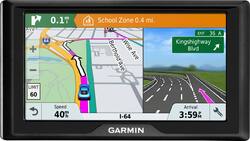
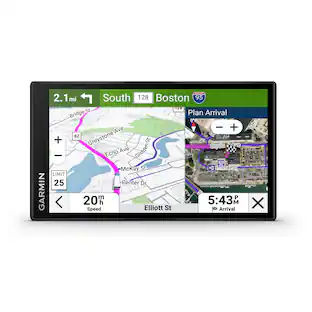
Travel throughout the United States with this Garmin Drive 61 GPS. It has a large 6-inch screen that indicates when you need to change lanes and what's up ahead, while it also displays your speed, the current road you're on and your estimated arrival time. Easy customizability lets you alter the notifications displayed by this Garmin Drive 61 GPS.
- Update your maps for free: The pre-loaded maps of the U.S. (Lower 49) can always be updated for free.
- 6.1" color touch screen offers a clear view: The large screen makes it simple to enter destinations and navigate the functions and settings.
- Customize your route options: You can set up three alternate routes so you're prepared to take advantage of the road ahead.
- Connect to your computer using USB interface: Easily connect to your computer to get map updates and more.
Whats Included
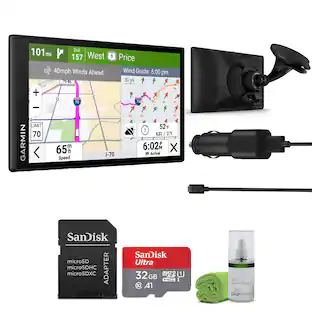
- Garmin Drive 61 LM
- USB cable, suction cup mount, car power cable
Product Manuals
Disclaimers
- Product has features that may require an additional subscription. Additional fees may apply.
Q: Can this Garmin pull any address your trying to reach from your smartphone?
A: although i really like this Garmin, I don't think it can look up any address. I did put some well known addresses in that I have traveled to in the past, and it could not locate the places.
A: It's US only. Canada and Mexico are not included.
A: Yes, it needs to be updated and charged. Took quite awhile to get all the updates, a couple hours. But I like the new Garmin. It is so much better than my old Garmin Nuvi.
Q: Is this GPS voice activated, or do you have to put address in?
A: No, the Garmin Drive™ 61 LM doesn’t include the Voice Command feature. You may want to look at the Garmin DriveAssist series for this feature. Thanks, James
A: You should always run updates on new equipment you purchase -- no telling how long they've been in a warehouse. The one I bought in the last couple of updates needed some updates. With the Garmin Express program, it's fairly painless to do -- in my case, install Garmin Express, hook up the GPS, identify the updates to install, and walk away for an hour.
Q: Garmin - Drive 61 LM 6.1 GPS with Lifetime Map Updates - Black How does it attach to the dash?
A: The Drive 61LM includes a vehicle suction cup mount for mounting to the vehicles windshields. Garmin offers a Portable Friction Mount that secures to your dashboard with a non-skid bottom, and the pliable base molds to fit any dash. Part number: 010-11277-00 Thanks, James
Q: Does it reroute you if you take a wrong turn
A: yes I do it all the time
People also viewed
 $312.99The price was $349.99

Today's top picks
 $1,029.99The price was $1,199.99
 $629.99The price was $1,099.99
 $129.99The price was $219.99
 $1,399.00The price was $1,499.00
 $49.99The price was $79.99
 $549.99The price was $849.99
 $399.99The price was $499.99
 $149.99The price was $299.99