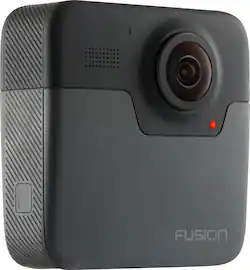
GoPro - Fusion 360-Degree Digital Camera - Black
- Key Specs
- Image Sensor Size: 1/2.3" (6.17 x 4.55mm)
- Effective Pixels: 18 megapixels (The actual number of pixels which make up the viewable image.)
- Standardized Video Resolution: 4K (2160p) (An approximated measurement of the product’s video resolution. This may not be the exact resolution of the product, which may be slightly more or less when using a pixel-by-pixel measurement.)
- General
- Brand: GoPro
- Model Number: CHDHZ-103
- Product Name: Fusion 360-Degree Digital Camera
- Color: Black
- Digital Camera Type: Point and Shoot Cameras
- Imaging
- Image Sensor Type: CMOS (CCD and CMOS are the two main technologies used in image sensors. CCD, the older of the two types, turns analog light signals into digital pixels. This conversion happens without distortion, resulting in high-quality images. Newer CMOS sensors use transistors at each pixel to move electrical charges. CMOS sensors are typically less expensive, but also require more light to create distortion-free images.)
- Image Sensor Size: 1/2.3" (6.17 x 4.55mm)
- Digital Zoom: None (A digital zoom is accomplished electronically, with no adjustment of the camera's optics, and no optical resolution gained in the process. The existing data is not enhanced or added to, merely displayed at a lower resolution, thereby giving an illusion of an enlarged image.)
- Low Light/High Sensitivity: true (High sensitivity digital imaging devices are designed to work in low light conditions to produce a high dynamic range image.)
- Image File Format(s): RAW (Standardized software format(s) of storing digital images. The type of format chosen for capturing and compressing the image can determine quality, level of detail, and storage space required.)
- Focus
- Autofocus: false (Allows the camera to automatically focus through the lens, rather than by adjusting the lens manually.)
- Eye Autofocus (Eye AF): false (Automatically seeks out and focuses on the subject's eye and holds it as the camera and subject move and as the photographer shoots at high frame rates.)
- Exposure Control
- Shutter Speeds: 1/8000 (The length of time the shutter remains open when the shutter release is activated, expressed in fractions of seconds. The longer the shutter is open, the more light that is able to be captured by the camera sensor.)
- Effective Pixels: 18 megapixels (The actual number of pixels which make up the viewable image.)
- Flash
- Integrated Flash: false
- Display
- Aspect Ratio: 16:9 (The measurement of the width of a screen compared to the height of a screen, expressed as a ratio.)
- Video
- Standardized Video Resolution: 4K (2160p) (An approximated measurement of the product’s video resolution. This may not be the exact resolution of the product, which may be slightly more or less when using a pixel-by-pixel measurement.)
- Maximum Video Frame Rate: Up to 60 fps (The maximum frequency at which consecutive images can be captured by a video recording device.)
- Slow Motion Recording: false
- Storage
- Number of Memory Card Slots: 2
- Compatibility
- Tripod/Monopod Mountable: true (A support function that allows the device to be mounted to monopods and tripods for leveling and stability.)
- Memory Card Compatibility: microSD, microSDHC, microSDXC (The type of memory card(s) recommended for use with the product.)
- Features
- Integrated GPS: Yes
- Connectivity
- Wireless Connectivity: WiFi (The manner in which a device sends data to another device over a short distance without the use of wires or cables.)
- Headphone Jack: true (The device features an interface that allows for the connection of headphones.)
- PictBridge Enabled: false (PictBridge allows digital cameras, camcorders and other image capture devices to connect and print directly to photo printers and other output devices without using a computer.)
- Charging Interface(s): USB-C (The connection for transmitting power to charge the device.)
- Power
- Rechargeable Battery: true
- AC Adapter Compatible: true (The device is able to be charged using an external power adapter which meets input and output voltages specified by the manufacturer.)
- Removable Battery: true
- Performance
- Protective Qualities: Water resistant
- Maximum Depth of Water Resistance: 16 feet (Measurement of the maximum depth of water in which the product is able to resist some degree of water penetration.)
- Included
- Batteries Included: true (Indicates whether the product comes with the required batteries for its operation.)
- Memory Card Included: false (Indicates whether a memory card is included.)
- Dimensions
- Product Height: 1.75 inches (The out of box height of the item. Height is measured as the vertical distance from the bottom of the item to the top as it would be primarily used or placed.)
- Product Width: 1.75 inches (The out of box width of the item. Width is measured as the horizontal distance from one side of the item to the other as it would be primarily used or placed.)
- Product Depth: 2.0 inches (The out of box depth of the item. Depth is measured as the distance from the front of the item to the back as it would be primarily used or placed.)
- Product Weight: 0.2 pounds (The out of box weight of the item.)
- Warranty
- Warranty - Parts: 1 year
- Warranty - Labor: 1 year
- Other
- UPC: 818279022667
Capture your most exciting adventures with the GoPro Fusion camera. Voice command functions allow for hands-free filming for selfie-style video, while access to the GoPro app lets you preview footage and stitch video all from your smartphone. Featuring VR recording capabilities and next-level video stabilization, the GoPro Fusion camera delivers immersive video quality and virtual reality compatibility.
- 360° video and photo capable: From still images to movies, this camera records your memories in Ultra HD resolution. Fusion requires two high-performance microSD cards (not included) to store your content.
- Two CMOS image sensors: Provide stunning detail and clarity with both video and still images.
- Advanced stabilization: Minimizes picture blur caused by camera movement.
- OverCapture: Lets you frame and punch out the perfect shot from any angle to create amazing traditional videos right on your phone.
- 360° audio: Its multiple microphones combine to capture spherical surround sound that comes at you from every direction.
- Water-resistant: Can be submerged up to 16'/5m deep without a housing.
- Voice commands: Easily control Fusion with commands such as "GoPro shoot burst."
- Built-in GPS: Fusion captures your GPS path, speed, elevation gain and more.
- Fast charging-ready: Boost your charge time. Fusion is fully compatible with the Supercharger power adapter (sold separately).
- Bluetooth and Wi-Fi communication: Enjoy instant remote shooting, and change shooting settings wherever you are.
- Faster data transfer speed: Upload your video and pictures to social media sites to share with friends and family via Wi-Fi.
- USB Type-C interface: Offers convenient charging.
Whats Included
- Carrying case
- Fusion Grip
- GoPro Fusion 360-Degree Digital Camera
- Owner's manual
- Rechargeable Battery
- USB cable
Product Manuals
A: as big as the classic Klondike ice cream bar, remember those?
Q: Why is this one any better than the others except the 360 part
A: It is waterproof and the stitching is so smooth you will not realize is 2 cams, that us why is a better cam, also it has the stabilization for any of your shoots, pictures or video.
Q: why it so hot every time I record it and the battery is drain out fast
A: two cameras, extra processor usage, dual everything with overlap records EVERYTHING, you would be hot too if you worked that hard...lol, as the tech gets better the heat and battery issues will get better, welcom to consumer beta testing!
Q: Is there any way to just shoot 180 degrees with it?
A: It always shoots 360, but when you select your view you have the ability to show just the portion you want too when you are editing.
A: It does go underwater, but the issue is water and the reflection will totally distort your imagery. There are 3rd party housings where the camera can remain 100% dry and work in a spherical manner and record. The Fusion camera is just stating it is waterproof, not 100% resistant and different depths (I think 30' is the max). The camera is awesome, I just would not use it under water or expect those conditions to be perfect. Download the firmware updates and good luck. It is an incredible device.
A: The Fusion is a totally different type of GoPro camera than what we've ever had before in that it is capable of shooting full 360 photos and videos. Because it's so different than our past cameras, it's not really a replacement for his current GoPro, but another type of camera he could use. If you're looking for a replacement for a traditional GoPro, check out the HERO7 Black. Regardless of which previous model he has, the HERO7 Black is a definite step-up with its HyperSmooth stabilization, ability to livestream to social media, improved photo quality, and more.
A: Yes, it does still photography, video, timelapse, night timelapse, etc.... Basically anything the Hero 6 can do, except in 360. Comparing it to the Fly.... the gopro images are MUCH higher resolution. This camera really takes excellent photos and Video. The drawback is that gopro bungled the software. The phone app is glitchy and if you are on android, support is practically non-existent.... despite what GoPro claims in their marketing.
Q: can be used with facebook live?
A: There is nothing native on GoPro app (or GoPro website) that says/shows it can live stream to Facebook. And I haven't found any third party application that might do this.
People also viewed
 $649.99The price was $829.99
 Tech Fest Deal$379.99The price was $479.99
 Tech Fest Deal$99.99The price was $129.99
Today's top picks
 $949.00The price was $1,099.00
 New Limited Time Deal$179.99The price was $249.99
 Tech Fest Deal$299.99The price was $469.99
- Tech Fest Deal$399.99The price was $649.99
 Tech Fest Deal$1,199.99The price was $2,699.99
 Tech Fest Deal$749.99The price was $1,199.99
 New Limited Time Deal$339.99The price was $599.99
 $2,034.00The price was $2,199.00