- General
- Brand: EPOS
- Model Number: 1000201
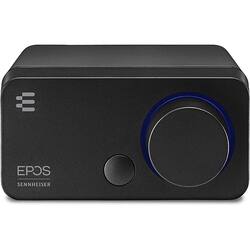
- Product Name: GSX 300 USB Gaming Sound Amplifier with EPOS Surround Sound
- Color: Black
- Dimensions
- Product Height: 1.61 inches (The out of box height of the item. Height is measured as the vertical distance from the bottom of the item to the top as it would be primarily used or placed.)
- Product Width: 3.18 inches (The out of box width of the item. Width is measured as the horizontal distance from one side of the item to the other as it would be primarily used or placed.)
- Product Depth: 3.58 inches (The out of box depth of the item. Depth is measured as the distance from the front of the item to the back as it would be primarily used or placed.)
- Product Weight: 0.4 pounds (The out of box weight of the item.)
- Other
- UPC: 840064400022
GSX 300 Black - USB Gaming Amplifier with EPOS Surround Sound. The gamer seeking enhanced audio performance instead of relying on their PC on-board sound will find excellent value in the GSX 300 external sound card. Paired with a gaming headset, the GSX 300 together with the EPOS Gaming Suite delivers digital sound processing and customizable 7.1 surround sound.
- High resolution audio: High resolution audio in stereo mode.
- Customizable : Customizable smart button for quick mode switch.
- EPOS Gaming Suite: Customizable 7.1 surround sound with EPOS Gaming Suite
- Stylish minimalist design: A contemporary high-tech look, yet unobtrusive minimalist footprint.
- Synchronized with Windows 10: Synchronized with Windows 10 so you can see your loudness level.
- External sound card: Upgrade your audio instead of relying on your PC's on-board sound.
- Smart button control: Switch between stereo and surround sound modes or between sound profiles.
- High resolution audio: High resolution audio in stereo mode.
- Customizable : Customizable smart button for quick mode switch.
- EPOS Gaming Suite: Customizable 7.1 surround sound with EPOS Gaming Suite
- Stylish minimalist design: A contemporary high-tech look, yet unobtrusive minimalist footprint.
- Synchronized with Windows 10: Synchronized with Windows 10 so you can see your loudness level.
- External sound card: Upgrade your audio instead of relying on your PC's on-board sound.
- Smart button control: Switch between stereo and surround sound modes or between sound profiles.
Product Manuals
Q: Is the microphone on this 24 bit?
A: undefined
Q: Does this work with Xbox one?
A: undefined
A: Let me start by saying that I do not own this, but do believe I know enough to answer the questions. The GSX 300 is an external sound card, and does not itself contain any speakers. It is used in scenarios such as (1) the PC does not have an internal sound card, (2) the PC has a damaged, bad sounding or too-quiet internal sound card, (3) the PC sound card is only stereo but the user wants to be immersed in 7.1 virtual surround sound, or (4) the user wants to create a more convenient access point for plugging in a headset and/or adjusting the volume of a headset . The device has a micro-USB port on the back, and connects to a PC via an included micro-USB to USB cable. It uses USB 2.0 according to the manufacturer's specification sheet (also, the device would have a USB-C port on the back instead of micro-USB if the device required USB 3.1 or 3.2). It is intended that you will connect headphones or headset (i.e. headphones + mic) to the device. Interestingly, the photos and diagrams I have seen show one of the 3.5mm ports with an icon for "headphone" (i.e. no mic), but the manufacturer specification sheets says it contains a "3.5 mm headset socket". Therefore, I cannot tell if it is a 3-pin (headphones, TRS) or 4-pin (headset, TRRS) port. Additionally, if it is 4-pin (TRRS), there is no mention about which headphone standard(s) it supports: OMTP and/or CTIA. If you purchase this, you might find yourself in need of a "headset to headphone + mic" splitter cable, and/or an "OMTP/CTIA adapter" cable.