
Honeywell Home - RCHT8600 Series Smart Programmable Touch-Screen Z-Wave Thermostat - White
- Key Specs
- App Compatible: true (The product can be connected to a program or software application on a mobile device, which then receives collected data from the product.)
- Touch Screen: true (Touch-screen devices make navigating more intuitive. Using a touch-screen display, you can do things such as tap to select, hold and drag to move items, swipe to scroll, and pinch to zoom.)
- General
- Brand: Honeywell Home
- Model Number: RCHT8600ZW
- Product Name: RCHT8600 Series Smart Programmable Touch-Screen Z-Wave Thermostat
- Color: White
- Dimensions
- Product Height: 4.09 inches (The out of box height of the item. Height is measured as the vertical distance from the bottom of the item to the top as it would be primarily used or placed.)
- Product Width: 4.09 inches (The out of box width of the item. Width is measured as the horizontal distance from one side of the item to the other as it would be primarily used or placed.)
- Product Depth: 1.06 inches (The out of box depth of the item. Depth is measured as the distance from the front of the item to the back as it would be primarily used or placed.)
- Product Weight: 0.4 pounds (The out of box weight of the item.)
- Power
- Wire Configuration: 4-Wire
- Power Source: Hard wired, Battery-powered
- Rechargeable Battery: false
- Battery Size: AA (The battery size required for operation.)
- Number of Batteries Required: 3
- Voltage Type: Low voltage (The kind of voltage used by the device.)
- Compatibility
- App Compatible: true (The product can be connected to a program or software application on a mobile device, which then receives collected data from the product.)
- Compatible Product(s): Heat pumps, Hot water systems
- Wireless Connectivity: Z-Wave (The manner in which a device sends data to another device over a short distance without the use of wires or cables.)
- Features
- 24-Hour Programming: true (Users can configure various temperature settings for different times of the day over a 24-hour period.)
- Touch Screen: true (Touch-screen devices make navigating more intuitive. Using a touch-screen display, you can do things such as tap to select, hold and drag to move items, swipe to scroll, and pinch to zoom.)
- Backlit: true
- Date/Time Display: true
- Remote Sensor Capable: true (Indicates whether the thermostat is compatible with remote sensors. This capability allows for the connection of multiple sensors in order to collect temperature data from several locations in a zone for an overall assessment of the temperature needs.)
- Periods Per Programmable Day: 4 (Thermostats with programmable days allow users to set desired temperatures for different days of the week. With multiple programmable periods per day, users can further customize the device to schedule temperatures for different times of day based on occupancy, schedule, etc.)
- Detector Type: Humidity, Temperature
- Furnace Filter Change Indicator: true
- Other
- UPC: 085267658362
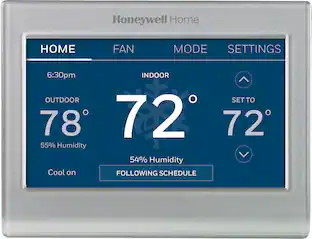
Maintain a comfortable temperature with this Honeywell Home Z-Wave touch-screen thermostat. A large touch display and streamlined interface make it easy to set temperatures, and the Smart Response Learning technology automatically learns and adapts to your preferences. This Honeywell Home Z-Wave touch-screen thermostat includes a universal plate mounting system that makes installation easy on most walls.
- Versatile compatibility: The thermostat works with most heating and cooling system types, including forced-air, convectional, heat pump (3H/2C), oil, gas and electric systems.
- Z-Wave connectivity: Honeywell Home connects to any Z-Wave compliant controller or gateway for easy programming and automation.
- Smart alerts: This thermostat can alert you when your HVAC system is not working properly and can remind you of things such as when to change your furnace filter.
- Customizable climate control for every day of week: Its 7-day schedule and up to 4 program periods per day help keep you comfortable.
- Smart Response Learning technology learns your schedule: It offers cozy temperatures and ensures energy efficiency by noticing your preferred heating and cooling cycles.
- Large touch screen: Provides information about date and time, ambient temperature, and relative humidity.
- Battery- or wire-powered: Choose the power source that fits your home.
Whats Included
- Honeywell Home RCHT8600 Series Smart Programmable Touch-Screen Z-Wave Thermostat
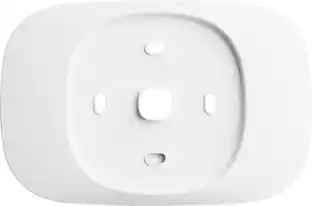
- UWP mounting system
- Mounting hardware
- Owner's manual
Product Manuals
A: This won't directly control a humidifier (Unless built into your HVAC system) or z-wave plug but it will send humidity sensor information as well as a bunch of other data to your hub (I use Hubitat but SmatThings should do the same) which you can then have a rule that triggers the humidifier plug based on information it receives from the thermostat sensor
Q: My power went out and when it came back on the thermostat did not. Is there a way to re set it?
A: undefined
Q: Need papassvofe reset the Honeywell IThermostat
A: undefined
A: undefined
A: This thermostat is asking for a code a code for watt where would I find this code
Q: How do I program permanent hold into thermostat
A: undefined
People also viewed


Today's top picks
 $499.99The price was $749.99
 $199.99The price was $249.99
 $789.99The price was $1,049.99










