DoorBOOsters are hereEnds Sunday. Limited quantities. No rainchecks.Shop now

Skip to contentGo to Product Search
Main Content

Alienware - 15.3" 2K Gaming Laptop - Intel Core 7 Series 2 240H 2026 - 16GB Memory - NVIDIA GeForce RTX 4050 6GB - 512GB Storage - Black

Model: LDA15260-7823BLK-PUS
SKU: 6678996

Customers are saying

Customers are delighted by the solid build quality and effective heat dissipation of this device, which keeps the system cool during operation. Users also appreciate the high refresh rate and the convenient, portable design. However, some customers have expressed concerns regarding the limited storage capacity and the noise levels produced by the fans. Additionally, there are mixed feelings about the graphics performance for demanding games and the relatively short battery life.

Generated by AI based on customer reviews.

Highlights

Features

  • Purposefully designed

    15.3” 16:10 WUXGA (1920x1200) 165Hz display delivers engaging visuals and fluid gameplay.

  • Powering your play, and your day

    Intel Core (Series 2) processors deliver smooth gameplay and optimized performance for gaming and beyond.

  • Game changing graphics

    NVIDIA GeForce RTX 50 Series Laptop GPUs, powered by NVIDIA Blackwell and AI.

  • Advanced thermals

    Alienware Cryo-tech cooling technology is designed to maintain system stability even during the most demanding sessions.

  • Iconic design

    Sleek lines and contoured edges for comfort, plus a robust hinge that opens fully to 180 degrees.

Specifications

  • Screen Size
    15.3 inches
    Screen Resolution
    1920 x 1200 (Full HD+)
    Touch Screen
    No
    Refresh Rate
    165Hz
    Brightness
    300 nits
Sponsored

Reviews

Rating 4.3 out of 5 stars with 48 reviews

88% would recommend to a friend
Customers are sayingCustomers are delighted by the solid build quality and effective heat dissipation of this device, which keeps the system cool during operation. Users also appreciate the high refresh rate and the convenient, portable design. However, some customers have expressed concerns regarding the limited storage capacity and the noise levels produced by the fans. Additionally, there are mixed feelings about the graphics performance for demanding games and the relatively short battery life.
This summary was generated by AI based on customer reviews.
  • Build Quality (24)
  • Heat Dissipation (11)
  • Portability (6)
  • Refresh Rate (4)
  • Storage Capacity (13)
  • Graphics Performance (9)
  • Noise Level (9)
  • Battery Life (6)

Customer Images

The vast majority of our reviews come from verified purchases. Reviews from customers may include My Best Buy members, employees, and Tech Insider Network members (as tagged). Select reviewers may receive discounted products, promotional considerations or entries into drawings for honest, helpful reviews.

  • Rated 5 out of 5 stars

    Alienware laptop

    Amazing purchase. Battery life isn’t the best when you’re not on eco mode, but i keep mine plugged in usually since I’m running some pretty heavy software design apps. Definitely built for studying engineering.

    Posted by MOHAMMADK

  • Rated 5 out of 5 stars

    Amazing Product!!!

    I highly recommend this computer if you’re looking for a strong device that runs rendering, gaming and design software. I use this for my architecture classes and it runs all the software I need very smoothly. The computers fan is extremely quiet or makes no noise at all and the computer doesn’t heat up. The computer needs to constantly be charged but it’s no surprise for gaming laptops since that’s usually the case. Otherwise, I really enjoy this purchase!

    Posted by NATALIE

  • Rated 4 out of 5 stars

    Compact Quality Gamer Laptop

    The Alienware 2K Gaming Laptop is a reasonably priced performer for portable gaming. The laptop chassis features a textured brushed flat black finish with a recessed Alienware logo in the center of the lid. The quality of the chassis is strong, with firm hinges for the lid, without any flimsy slippage, at any angle up to 180 degrees. The bottom and rear of the chassis provides adequate ventilation. I really appreciate having a full-size keyboard on a gaming computer. The keys are nicely spaced and the throw sufficient and quiet. The backlighting is in white and has a bright and dim setting. The setup of Microsoft Windows and the system updates took around 90 minutes. This included updates from the Alienware Command Center and the Dell SupportAssist applications. For the benchmarks I installed Valley Benchmark and 3DMark. For my gaming workout I installed No Man’s Sky. Prior to running the benchmarks I used the NVIDIA Control Panel to set the default video card to the GeForce RTX 4050 and I used the Alienware Command Center to configure the laptop to a Custom performance setting of 20% boost for CPU and 20% boost for the GPU. Other settings include Performance, Balanced, and Quiet. It also provides the ability to tweak even further by adjusting the Power Limits and the Core Clock speeds. (Requires care and knowing what you are doing in order to prevent damaging temperature levels.) I ran No Man’s Sky for my gaming testing with the graphics set to Enhanced and the Frame Generation to 4X, which is supported by the GeForce RTX 4050. The graphics of the game were smooth and beautifully detailed. This did kick up the fan noise for keeping the laptop cool. Benchmarks • Valley Benchmark in Ultra, Fullscreen, Performance mode. ○ FPS: 183.6 ○ Score: 7680 • 3DMark Speed Way ○ Score: 2067 ○ FPS: 20.67 • 3DMark Steel Nomad ○ Score: 1797 ○ FPS 17.97 • 3DMark Port Royal Real-time Ray Tracing Benchmark ○ Score: 4755 ○ FPS: 22,02 • 3DMark CPU Profile ○ Max threads score: 7963 ○ 16 threads score: 7941 ○ 1 thread score: 1096 • 3DMark Time Spy Extreme ○ Graphics Score: 3794 ○ CPU Score: 5640 • 3DMark Night Raid ○ Graphics Score: 96870 ○ CPU Score: 16382 Specs • CPU: Intel Core 7 Series 2 240H, 1.8Ghz clock ○ Clock boost 5.2Ghz, 10 cores, 16 threads • GPU: NVIDIA GeForce RTX 4050, 6GB • Memory: 16GB, DDR5, 56k Mhz, expandable to 32GB • Storage: 512GB • Screen: LED, 15.3", 1920 x 1200, 165Hz, 300 nits • HDMI 2.1 Display port • 2 USB-A 3.2 ports • 2 USB-C 3.2 ports • Wireless: Bluetooth, Wi-Fi 6 • Ethernet port • Battery: Lithium-ion • Front-facing camera 720p, .92 megapixels • Built-in Microphone • Audio: Realtek ALC3204, 2x 2W speakers • Windows AI: Copilot Summary Overall, I am pleased with this laptop for on-the-go gaming, considering the reasonable pricing, and the quality of the build. For the type of gaming and programming I do on-the-road, this is sufficient. I was a little disappointed in the 512GB SSD, which I’ll be kicking up to 1TB and adding another 16GB DDR5. I feel a higher price would have been worth including the additional size SSD and memory. The fan noise can get loud when the graphics are intense. I tend to use headphones, but it could be bothersome for others around.

    Posted by TimothyTrimble

  • Rated 4 out of 5 stars

    A solid budget option, still a bit expensive

    I got this for my 9 year old son who is an avid gamer and who mainly plays Fortnite with some story mode games thrown in from time to time. He currently has a gaming desktop with a 12th gen Intel i7 and a 5060ti 16gb. But he has been wanting to get into trying out gaming on a laptop so he can game in the living room or sit next to me while I play on my gaming desktop. So I got him this Alienware since it is suitable for someone not needing top of the line specs to play Fortnite mainly. With an Inter core 7 series 2 (not an ultra cpu) you get great cpu performance paired with 16gb ddr5 ram running at a respectable 5600mt speed although you are stuck in a single ram slot configuration. It’s not a huge hit in performance but you do lose some fps as it is not dual channel. But upgrading is better since you can add a 16gb stick to make it 32gb(if you can afford) it lol. You do only get 512gb of storage which is disappointing even with the ram and storage problem. But you can always upgrade if you want so that’s good to have. The nvidia 4050 is a bit old and while you get solid performance while playing most games being that the panel is only a 1200p(easy to push). You are relying heavily on DLSS. Which isn’t a bad thing as DLSS has come a very long way and runs higher frames with minimal latency, you are still paying a premium for an older laptop GPU. So you can run most games at lower setting and they run very well you will have to manage your expectations. I will say the laptop looks great with a nice backlit keyboard(white only) the laptop runs cool and the fans don’t get obnoxiously loud. Plenty of ports and the 4 watt speakers are top mounted and actually sound really nice. Picture quality is nice and the 165hz refresh rate is nice and smooth and plenty bright. It’s a good laptop but you might be left wanting more out of the gpu. So while I do recommend and my son is definitely loving it, I’d say getting this on sale is highly recommend and only buy if you don’t need a high power beast of a laptop and you should be happy.

  • Rated 3 out of 5 stars

    A Laptop Stuck in the Past

    After spending time with the new Alienware 15.3-inch gaming laptop, I came away with a pretty mixed opinion. There is a lot to like here, especially if you're looking for an Alienware machine without jumping into the much more expensive high-end models, but there are also some strange hardware choices that I think hold this particular configuration back. The model I tested comes with an Intel Core 7 Series 2 240H processor, 16GB of DDR5 memory, an NVIDIA GeForce RTX 4050 with 6GB of VRAM, and a 512GB PCIe Gen 4 SSD. One thing I want to point out right away is that despite the product listing calling this a "2K" laptop, the display is actually 1920 x 1200 WUXGA. It is a 16:10 panel rather than a true 2560 x 1440 "2K" display. The 165Hz refresh rate is definitely a highlight, though, because games and everyday Windows use feel noticeably smoother than they do on a standard 60Hz screen. The panel is also anti-glare and rated at 300 nits, but the display is not particularly impressive when it comes to color coverage, and it does not support HDR. That's something I think is worth knowing before buying. The design is another thing I like. It still looks like an Alienware laptop without being covered in ridiculous amounts of RGB lighting. The design is relatively clean, and the hinge can open all the way to 180 degrees flat. It's also a fairly beefy gaming laptop, weighing in at 4.96 Lbs. For travel it fits in my laptop sleeve in my backpack perfectly fine, but I have a backpack designed for laptops to hold up to 16in, so it might not fit in all backpack laptop sleeves. For gaming, I actually found the screen to be a good match for the RTX 4050. Rather than trying to push extremely high resolutions, the 1920 x 1200 resolution allows the GPU to deliver playable frame rates in a lot of modern games. The 165Hz refresh rate is nice for competitive games where I can actually take advantage of higher frame rates and isn't too demanding on the GPU in games like CS:2 or Valorant. The Intel Core 7 240H is also a pretty capable processor. The CPU has 10 cores, 16 threads, a 24MB cache, and can boost up to 5.2GHz on its performance cores. I had no problems using the laptop for gaming while also having applications, browser tabs, Discord and other programs running in the background. The bigger question mark for me is going with the RTX 4050. The 4050 came out in 2023 and has 6GB of GDDR6 VRAM, and while it is capable of playing modern games, 6GB is starting to feel pretty limited in 2026. I found myself having to use NVIDIA DLSS and Frame Generation to get the best experience in all the more demanding new AAA games. For example, I was able to play Resident Evil Requiem at around 150 FPS using a mixture of low to medium settings with DLSS on performance with Frame Generation on and with Ray Tracing off. Though for some settings like lighting, if I tried to go higher than low, I immediately ran out of VRAM. So, without those enabling those technologies, the RTX 4050's limitations become much more obvious, particularly in newer games with demanding textures and effects. The 6GB VRAM isn't necessarily a dealbreaker, but it does make me question how well this particular configuration will age. I'm pretty sure this was a decision to cut costs because of the current GPU and Memory shortage that have caused prices to increase. The 16GB of RAM is serviceable for gaming, although I would have preferred 32GB. That being said you can add an additional 16GB RAM stick to get to 32 GB if you want to down the line. The 512GB SSD is another area where I think Alienware could have done better. The Windows apps, along with the preloaded Bloatware apps, and then when you go to install games, that 512GB is gone quickly, especially if you're installing several modern AAA games that are above 50 GB. So, just know you will only be able to have 3-5 games installed at a time depending on the game. Unfortunately, there is only a 1x SSD slot on this laptop, so you can upgrade the storage if you want to but you will have to do a clean install of Windows if you don't know how to clone an SSD onto a bigger M.2 SSD. One thing I do like about the Alienware 15 is the keyboard. The full-size layout with a dedicated number pad. I personally like having the number pad because it makes the laptop more useful as an everyday computer in addition to gaming. The keyboard is backlit and there is no RGB. It has a comfortable layout, and the key travel is good, which I found perfectly suitable for both gaming and typing. The port selection is very good on this laptop. You get 2x USB-A ports, 2x USB-C ports, 1x HDMI 2.1, Ethernet jack, and a 3.5mm headset jack. One of the USB-C ports supports Power Delivery for 100w and DisplayPort 1.4a. Having a HDMI 2.1 is useful if I want to connect the laptop to a high-refresh-rate external gaming monitor or TV. The charger is on the chunkier size since it's a gaming laptop and has an output of 130 Watts and a barrel charging plug. The Alienware Command center software gives you control over things like performance profiles, thermal behavior, fan speeds and other system settings. You can tune the laptop depending on what you're wanting, whether that's trying to maximize gaming performance or keeping the fans quieter during normal use. The Cryo-tech cooling system is designed to help keep temperatures under control during demanding workloads, although like most gaming laptops, the fans can get fairly loud when the system is being pushed hard, so I recommend using headphones when playing games. Pros 165Hz refresh rate makes gaming and everyday use feel very smooth Intel Core 7 240H provides strong overall CPU performance Full-size keyboard with dedicated number pad Good I/O selection Alienware software provides useful performance and thermal tuning Cons RTX 4050 feels outdated with only 6GB of VRAM 512GB SSD is too small for a modern gaming library Display does not support HDR 300-nit brightness is low Fans can get loud under heavy gaming loads Overall, I think this Alienware 15 is an okay gaming laptop that feels outdated with the RTX 4050 configuration. The Core 7 240H is capable, the 165Hz display is smooth, the keyboard is comfortable, the number pad is nice, and the port selection is solid. The laptop can play demanding AAA games at respectable frame rates when you use DLSS and Frame Generation. But the RTX 4050 and its 6GB of VRAM are what keeps me from being completely sold on this configuration. If Alienware had put in a RTX 5050 or 5060 in here instead, along with 1TB SSD instead of the 512GB SSD , which isn't enough space for gaming in 2026. As it stands, I think that it is a serviceable laptop, but I would absolutely look into getting the RTX 5050 or RTX 5060 version.

    Posted by Ian L

Compare similar products

Alienware - 15.3" 2K Gaming Laptop - Intel Core 7 Series 2 240H 2026 - 16GB Memory - NVIDIA GeForce RTX 4050 6GB - 512GB Storage - Black
4.3(48)

Game on a sleek and durable laptop engineered to level the playing field. NVIDIA GeForce RTX 50 Series laptop graphics and Intel Core (Series 2) processors, the Alienware 15 delivers the premium experience you expect, now within reach.

Alienware - 15.3" 2K Gaming Laptop - AMD Ryzen 200 Series R7 260 2026 - 16GB Memory - NVIDIA GeForce RTX 5050 8GB - 1TB Storage - Black
4.6(38)

Streamlined 15-inch laptop designed to fit every dimension of your life. Powered by AMD Ryzen 200 Series processors and NVIDIA GeForce RTX laptop graphics for gaming and beyond.
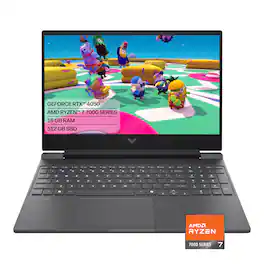
HP - Victus 15.6" 144Hz Full HD Gaming Laptop - AMD Ryzen 7 7445HS (2023) - 16GB Memory - NVIDIA GeForce RTX 4050 - 512GB SSD - Mica Silver

Begin your gaming journey with the perfect combination of power and customization. Get great, stable performance for all your games with the AMD processor, and use the OMEN Gaming Hub toolkit to open up your gaming possibilities.

Alienware - 16X Aurora 16" 3K OLED Gaming Laptop Intel Core Ultra 7 Series 2 2026 16GB Memory NVIDIA GeForce RTX 5060 512GB Storage - Blue
5.0(2)

Essential power. No distractions. Optimized performance in a sleek design, featuring a WQXGA 240Hz 500 nits display, stylish anodized aluminum lid and bottom cover and Intel Core Ultra processors. Alienware 16X Aurora delivers an immersive gaming-first experience in a sleek design. Get the performance you need, anywhere – powered by Intel Core Ultra HX processors (Series 2) and up to NVIDIA GeForce RTX 5070 Laptop GPUs.

Pros for Alienware - 15.3" 2K Gaming Laptop - Intel Core 7 Series 2 240H 2026 - 16GB Memory - NVIDIA GeForce RTX 4050 6GB - 512GB Storage - Black
Heat Dissipation, Portability, Build Quality, Refresh RateOverall Performance, Heat DissipationOverall Performance, Portability, Heat Dissipation, Speed, Noise LevelThere were no pros for this product—
Cons for Alienware - 15.3" 2K Gaming Laptop - Intel Core 7 Series 2 240H 2026 - 16GB Memory - NVIDIA GeForce RTX 4050 6GB - 512GB Storage - Black
Storage Capacity, Battery Life, Graphics Performance, Noise LevelBattery LifeBattery Life, Storage Capacity, Connectivity, WeightThere were no cons for this product—

Specs

Questions & Answers

  • Does the laptop have second M.2 SSD slot?

    While the laptop has only one M.2 2230/2280 solid state drive, the storage space can be upgraded up to 1 TB.

    Answered by YourDellTeam
    YourDellTeam response
Sponsored