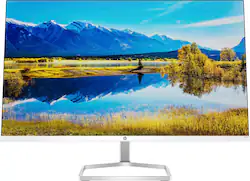
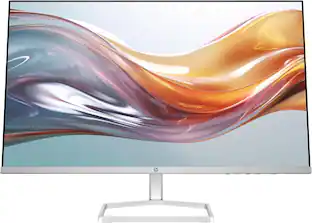
HP - 27" IPS LED FHD FreeSync Monitor (HDMI x2, VGA) with Integrated Speakers - Ceramic White
- Key Specs
- Refresh Rate: 75Hz (The number of frames per second the device can produce natively without enhancement. Higher rates help produce smooth, seamless pictures.)
- Maximum Resolution: 1920 x 1080 (Maximum resolution refers to the highest number of pixels that a screen can process and display. Higher resolution signals produce more detailed images.)
- Response Time: 5 milliseconds (The speed at which pixels can change colors is called response time. It is measured in milliseconds (ms).)
- Panel Type: IPS (Technology that affects response time and image quality.)
- Synchronization Technology: FreeSync (AMD Adaptive Sync) (Generally, these technologies allow syncing between a computer/console game's frame rate and the device's refresh rate for a smoother display without tearing.)
- Screen Size: 27 inches (Size of the screen, measured diagonally from corner to corner.)
- Display Connector(s): 2 x HDMI, 1 x VGA (The number and type of connectors used to connect to an external display.)
- General
- Brand: HP
- Model Number: M27fwa
- Product Name: 27" IPS LED FHD FreeSync Monitor (HDMI x2, VGA) with Integrated Speakers
- Color: Ceramic White
- Operating System Compatibility: Chrome, Mac, Windows
- Display
- Refresh Rate: 75Hz (The number of frames per second the device can produce natively without enhancement. Higher rates help produce smooth, seamless pictures.)
- Maximum Resolution: 1920 x 1080 (Maximum resolution refers to the highest number of pixels that a screen can process and display. Higher resolution signals produce more detailed images.)
- Native Resolution: 1920 x 1080 (Native resolution of a screen refers to its single, fixed resolution. Sometimes screens must scale an image up or down in order to fit the native resolution. This can cause a loss of resolution or detail.)
- Contrast Ratio: 1000:1 (Measured difference between a displayed image's brightest whites and darkest blacks. The larger the first number, the more detail and color that can be displayed.)
- Response Time: 5 milliseconds (The speed at which pixels can change colors is called response time. It is measured in milliseconds (ms).)
- Display Type: LED
- Panel Type: IPS (Technology that affects response time and image quality.)
- Synchronization Technology: FreeSync (AMD Adaptive Sync) (Generally, these technologies allow syncing between a computer/console game's frame rate and the device's refresh rate for a smoother display without tearing.)
- Aspect Ratio: 16:9 (The measurement of the width of a screen compared to the height of a screen, expressed as a ratio.)
- Curved Screen: false
- Brightness: 300 candela per square meter (A measure of the total light output.)
- Screen Size: 27 inches (Size of the screen, measured diagonally from corner to corner.)
- High Dynamic Range (HDR): true (An HDR-compatible 4K TV or other HDR-compatible product displays HDR video content when it's available from sources like 4K Ultra HD Blu-ray Discs and 4K streaming services.)
- Horizontal Frequency: 86 kilohertz (Also known as "horizontal scan rate," this measurement describes the number of horizontal lines displayed per second and is used to calculate a screen's refresh rate.)
- Horizontal Viewing Angle: 178 degrees (The maximum angle at which the display can be viewed with acceptable visual performance from either side.)
- Vertical Viewing Angle: 178 degrees (The maximum angle at which the display can be viewed with acceptable visual performance from above or below.)
- Touch Screen: false (Touch-screen devices make navigating more intuitive. Using a touch-screen display, you can do things such as tap to select, hold and drag to move items, swipe to scroll, and pinch to zoom.)
- On-Screen Display Languages: 10 (English, Spanish, German, French, Italian, Netherlands, Portuguese, Japanese, T-Chinese and S-Chinese) (The available language options for displayed text.)
- Connectivity
- Number of DisplayPort Inputs (Total): 0
- Number of HDMI Inputs (Total): 2
- Number of DVI Inputs: 0 (The number of digital cables carrying analog (VGA) video signals that can be connected to the product.)
- Number of Mini DisplayPort Inputs: 0
- Number of Thunderbolt Ports (Total): 0
- Display Connector(s): 2 x HDMI, 1 x VGA (The number and type of connectors used to connect to an external display.)
- Number of USB Ports (Total): 0
- Headphone Jack: true (The device features an interface that allows for the connection of headphones.)
- Compatibility
- Wall Mountable: false (The product is able to be secured to a wall. Some products are designed ready to mount, while others may require additional hardware/accessories for installation.)
- Voice Assistant Built-in: No (A digital assistant built into the device that uses voice commands to answer questions and control smart devices.)
- Features
- Tiltable: true
- Adjustable Stand Height: false
- Anti-Glare: true (Product has features, such as a matte finish, that reduce the likelihood for screen glare.)
- Eye Relief Features: Low blue light, Anti-glare
- Built-In Webcam: false
- Integrated Speaker(s): true
- Built-in Speaker Type: Front firing (Backward, downward, and front-firing speakers direct sound into the room from those respective directions. A soundbar is typically long and rectangular, and designed to act as an all-in-one speaker with greater sound production than that of a TV alone. An acoustic surface is the result of small sound actuators embedded directly behind the screen, turning the entire screen's surface into a speaker.)
- Smart Capable: false (Smart, or smart-capable devices are able to connect directly to your home network in order to stream content from the Internet, run Internet-based apps, or connect to other smart devices.)
- Dimensions
- Product Height With Stand: 17.21 inches
- Product Height Without Stand: 14.01 inches
- Product Width: 23.93 inches (The out of box width of the item. Width is measured as the horizontal distance from one side of the item to the other as it would be primarily used or placed.)
- Product Depth (With Stand): 7.4 inches
- Product Weight: 7.05 pounds (The out of box weight of the item.)
- Stand Included: true
- Stand Width: 8.7 inches (The horizontal measurement of the stand/base, or the distance from the outside of one leg to the outside of the opposite leg, as it is attached to the product.)
- Cord Length: 71 inches
- Certifications Listings & Approvals
- ENERGY STAR Certified: true (Devices carrying the ENERGY STAR service mark, such as computer products and peripherals, kitchen appliances, and other products, generally use 20% to 30% less energy than required by federal standards.)
- EPEAT Qualified: true (The Electronic Product Environmental Assessment Tool (EPEAT) was designed to provide an environmental assessment tool for purchasers. In order to qualify for EPEAT, a product must meet all 23 required criteria.)
- EPEAT Level: Silver (The Electronic Product Environmental Assessment Tool (EPEAT) was designed to provide an environmental assessment tool for purchasers. In order to qualify for EPEAT, a product must meet all 23 required criteria. Products are rated Bronze, Silver or Gold based on how many of 28 optional criteria they meet (below 50%, 50%, 75%).)
- Other
- UPC: 195697745942
You won't believe your eyes or ears: Thrive with a monitor that sounds as good as it looks with built-in audio for a complete work or play experience. Plus, streamline your setup with its slim profile, modern design and innovative cable management. The new definition of high definition: Look into your dreams, this monitor comes packing IPS technology, 99% sRGB color gamut, a 75Hz refresh rate, and AMD FreeSync to keep your eyes up to speed with your imagination. Feels as good as it looks: Let your eyes rest easy all day long with HP Eye Ease Eyesafe certified technology that doesn't sacrifice color quality. Looks so responsible: Monitor designed with sustainability in mind with post-consumer recycled plastics and packaged in recycled materials. Doing good never looked so good.
- Step up to the best: No matter where you stand, an HP IPS monitor delivers clear, vivid images. IPS technology ensures image accuracy and consistency across the ultra-wide viewing spectrum.
- Share the panoramic view: Vibrant detail from practically any position with consistent color and image clarity maintained across ultra-wide 178-degree horizontal and vertical viewing angles.
- HP Eye Ease with Eyesafe Certification: HP Eye Ease technology keeps your eyes comfortable with an always-on blue light filter that presents your vivid content with zero impact on color accuracy.
- Integrated speakers: No need to buy external speakers for great audio. With integrated speakers this display is ready to go once you’re connected.
- Highly accurate color: With 99% sRGB color space, this HP display provides ideal color reproduction with minimal effort. Perfect for photos, videos—all your creative projects.
- Integrated cable management: Cord and wire pass-through located on the display stand reduces cord-clutter and helps keep your workspace clean and organized.
- AMD FreeSync technology: See and feel the difference of fluid, responsive gameplay. By synchronizing the refresh rate with your GPU, AMD FreeSync makes display stutter, input lag, and screen tears ancient history.
- Full HD display: Be prepared for brilliant visuals and crisp images with the unforgettable quality of this stunning FHD / 1080p display.
- Three-sided micro-edge display: See more of your screen with a threesided micro-edge display that maximizes your viewing area.
- An easier way to connect: With both HDMI and VGA ports, this display is ready to connect for brilliant high definition visuals over a smooth digital connection.
- Easily personalize and adjust your display: Customize your display with easy, intuitive HP Display Center software that lets you tailor your settings, partition screens, and even dim the screen.
- Environmentally conscious: Energy efficient design and components help reduce power consumption and energy costs.
- Sustainable design: Designed with sustainability in mind, the plastic enclosures are made with 85% recycled materials and 5% recycled ocean bound plastics. All packaged in recyclable packaging.
Whats Included
- Power cord
- HDMI cable
- AC adapter
- Quick set up guide
- Document kit
Product Manuals
Q: Hi, is this monitor mountable? I don't see any mounting holes in the back.
A: Hello. Thanks for your question. This HP M27fwa FHD Monitor does not have VESA mounting holes.
A: Thank you for reaching out, apologies for what you're experiencing. There is no screen protector on the monitor, but it has an anti-glare coating. Please do not remove it. It sounds as if you have an issue with resolution, and that can be fixed by changing settings. This short tutorial may help: https://mostechtips.com/solved-second-monitor-blurry-issue-in-windows-10/
A: Hello! And thank you for choosing HP. When it comes to running software, the monitor has little to do with the performance in in which the computer runs such software. Monitors have many variables to considered when you want to purchase one such as resolution, Hertz that translate into frames per second and ports. In this case, the monitor will simply output what your laptop "sends" to it at 1080p of resolution with a maximum of 75 fps (75 Hz).
Q: Can I plug my ROKU stick into the HDMI port and use this as a TV display?
A: Streaming sticks, media players and consoles will work, but you cannot use the remote to control the monitor. Volume control, input selection, settings and power would all have to be done from the monitor directly.
Q: Does the HP <27fwa have a microphone?
A: Thank you for the question. The HP M27fwa does not have a microphone.
Q: Which HP monitor has a built-in monitor
A: Hello, Barney! It's unclear what you mean by your question as this HP 27" Monitor is itself a monitor/display. Feel free to rephrase and resubmit your question so we can give a more accurate answer. Thank you for your interest in our HP monitors!
Q: Can I buy 2 of these and hook them together and hook them to my pc but my pc only has one hdmi port
A: Thank you for reaching out. You can use a USB Type-A or USB Type-C HDMI adapter to connect the second monitor.
Q: Can this monitor be used in a vertical position?
A: No, this monitor cannot pivot 90 degrees to use in the vertical position.
People also viewed
 $299.99The price was $369.99
 $160.99The price was $201.23
 $319.99The price was $359.99

Today's top picks
- $299.99The price was $369.99
 $249.99The price was $329.99
 $209.99The price was $289.99
 $159.99The price was $199.99