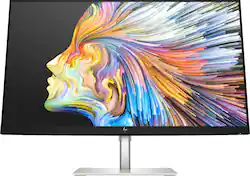
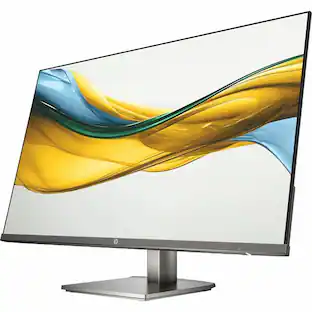
HP - 28" IPS LED 4K UHD Monitor with HDR (HDMI, DisplayPort) - Silver & Black
- Key Specs
- Refresh Rate: 60Hz (The number of frames per second the device can produce natively without enhancement. Higher rates help produce smooth, seamless pictures.)
- Maximum Resolution: 3840 x 2160 (Maximum resolution refers to the highest number of pixels that a screen can process and display. Higher resolution signals produce more detailed images.)
- Response Time: 4 milliseconds (The speed at which pixels can change colors is called response time. It is measured in milliseconds (ms).)
- Panel Type: IPS (Technology that affects response time and image quality.)
- Synchronization Technology: Not Applicable (Generally, these technologies allow syncing between a computer/console game's frame rate and the device's refresh rate for a smoother display without tearing.)
- Screen Size: 28 inches (Size of the screen, measured diagonally from corner to corner.)
- Display Connector(s): 1 x DisplayPort 1.2, 1 x HDMI 2.0 (The number and type of connectors used to connect to an external display.)
- General
- Brand: HP
- Model Number: U28 4K HDR
- Product Name: 28" IPS LED 4K UHD Monitor with HDR (HDMI, DisplayPort)
- Color: Silver & Black
- Operating System Compatibility: Windows
- Display
- Refresh Rate: 60Hz (The number of frames per second the device can produce natively without enhancement. Higher rates help produce smooth, seamless pictures.)
- Maximum Resolution: 3840 x 2160 (Maximum resolution refers to the highest number of pixels that a screen can process and display. Higher resolution signals produce more detailed images.)
- Native Resolution: 3840 x 2160 (Native resolution of a screen refers to its single, fixed resolution. Sometimes screens must scale an image up or down in order to fit the native resolution. This can cause a loss of resolution or detail.)
- Contrast Ratio: 10,000,000:1 (Measured difference between a displayed image's brightest whites and darkest blacks. The larger the first number, the more detail and color that can be displayed.)
- Response Time: 4 milliseconds (The speed at which pixels can change colors is called response time. It is measured in milliseconds (ms).)
- Display Type: LED
- Panel Type: IPS (Technology that affects response time and image quality.)
- Synchronization Technology: Not Applicable (Generally, these technologies allow syncing between a computer/console game's frame rate and the device's refresh rate for a smoother display without tearing.)
- Aspect Ratio: 16:9 (The measurement of the width of a screen compared to the height of a screen, expressed as a ratio.)
- Curved Screen: false
- Pixel Density: 157 pixels per inch (The number of pixels present per inch on the device's display. Higher pixel density improves the clarity and sharpness of the displayed image.)
- Brightness: 400 candela per square meter (A measure of the total light output.)
- Screen Size: 28 inches (Size of the screen, measured diagonally from corner to corner.)
- High Dynamic Range (HDR): true (An HDR-compatible 4K TV or other HDR-compatible product displays HDR video content when it's available from sources like 4K Ultra HD Blu-ray Discs and 4K streaming services.)
- Horizontal Frequency: 136 kilohertz (Also known as "horizontal scan rate," this measurement describes the number of horizontal lines displayed per second and is used to calculate a screen's refresh rate.)
- Horizontal Viewing Angle: 178 degrees (The maximum angle at which the display can be viewed with acceptable visual performance from either side.)
- Vertical Viewing Angle: 178 degrees (The maximum angle at which the display can be viewed with acceptable visual performance from above or below.)
- Touch Screen: false (Touch-screen devices make navigating more intuitive. Using a touch-screen display, you can do things such as tap to select, hold and drag to move items, swipe to scroll, and pinch to zoom.)
- On-Screen Display Languages: English, Spanish, German, French, Italian, Netherlands, Portuguese, Japanese, T-Chinese and S-Chinese (The available language options for displayed text.)
- Connectivity
- Number of DisplayPort Inputs (Total): 1
- Number of HDMI Inputs (Total): 1
- Number of DVI Inputs: 0 (The number of digital cables carrying analog (VGA) video signals that can be connected to the product.)
- Number of Mini DisplayPort Inputs: 0
- Number of Thunderbolt Ports (Total): 0
- Display Connector(s): 1 x DisplayPort 1.2, 1 x HDMI 2.0 (The number and type of connectors used to connect to an external display.)
- Number of USB Ports (Total): 3
- USB Ports: 1 x USB-A 3.1, 2 x USB-C 3.0 (The number and type of USB ports the product has.)
- Headphone Jack: true (The device features an interface that allows for the connection of headphones.)
- Compatibility
- Wall Mountable: true (The product is able to be secured to a wall. Some products are designed ready to mount, while others may require additional hardware/accessories for installation.)
- VESA Wall Mount Standard: 100mm x 100mm (VESA wall mount standards refer to the spacing of screw holes built into a TV in order to fit with standard TV wall mounts. These standards are implemented into most TVs and monitors.)
- Features
- Tiltable: true
- Adjustable Stand Height: true
- Anti-Glare: true (Product has features, such as a matte finish, that reduce the likelihood for screen glare.)
- Eye Relief Features: Low blue light, Anti-glare
- Built-In Webcam: false
- Integrated Speaker(s): false
- Dimensions
- Product Height With Stand: 20.92 inches
- Product Height Without Stand: 14.61 inches
- Product Width: 25.08 inches (The out of box width of the item. Width is measured as the horizontal distance from one side of the item to the other as it would be primarily used or placed.)
- Product Depth (With Stand): 7.09 inches
- Product Weight: 14 pounds (The out of box weight of the item.)
- Stand Included: true
- Stand Width: 10.24 inches (The horizontal measurement of the stand/base, or the distance from the outside of one leg to the outside of the opposite leg, as it is attached to the product.)
- Cord Length: 71 inches
- Power
- Power Consumption: 155 watts
- Power Saving/Off Mode: 0.5 watts (This mode will turn the display and/or the device off, or into a standby mode, after a preset length of time with no activity to conserve power.)
- Certifications Listings & Approvals
- ENERGY STAR Certified: true (Devices carrying the ENERGY STAR service mark, such as computer products and peripherals, kitchen appliances, and other products, generally use 20% to 30% less energy than required by federal standards.)
- EPEAT Qualified: true (The Electronic Product Environmental Assessment Tool (EPEAT) was designed to provide an environmental assessment tool for purchasers. In order to qualify for EPEAT, a product must meet all 23 required criteria.)
- EPEAT Level: Silver (The Electronic Product Environmental Assessment Tool (EPEAT) was designed to provide an environmental assessment tool for purchasers. In order to qualify for EPEAT, a product must meet all 23 required criteria. Products are rated Bronze, Silver or Gold based on how many of 28 optional criteria they meet (below 50%, 50%, 75%).)
- Other
- UPC: 194850451591
Discover a fresh way to see your world with this expansive 34-inch curved display. Surround yourself with beautiful colors and crisp Quad HD details for incredible entertainment experiences.
- Ultra High Definition 4K: Experience cinematic quality with the incredible definition of 4K. Visuals this impressive are simply unforgettable.
- Factory Color Calibration: True color accuracy with a color-calibrated 4K display.
- HP Eye Ease: An always-on blue light filter that keeps your eyes comfortable with zero impact on color accuracy.
- Power Delivery with USB-C: Simply plug your laptop or mobile device into the USB-C port while one connection lets you view your content on the big screen as the display charges your device.
- VESA Certified Display HDR 400: Brighten your screen with a VESA Certified HDR 400 panel. Stream HDR games and movies with enhanced contrast on your HDR display, creating a vivid, lifelike visual experience.
- Adjust your view: Adjust your screen’s height for comfortable viewing with swivel, pivot and tilt capabilities.
- Virtually edge-to-edge panel: A virtually edge-to-edge panel means maximized screen area and expansive entertainment.
- Extensive port connectivity: HDMI, DisplayPort and a USB 3.0 deliver advanced connectivity for the latest hardware and accessories.
- Extreme detail: Amazing clarity is delivered by 10,000,000:1 dynamic contrast ratio for deeper blacks, brighter whites, and crisper colors.
- Off the desk and on the wall: This display is equipped with standard VESA mounting for showcasing on a wall or swivel arm.
Whats Included
- A/C power cable 6.2 ft | External power adapter (180W) | HDMI cable 5.9 ft
- DP cable 5.9 ft | USB-C cable | Quick Start guide | Product notice | Warranty
Product Manuals
A: Hi USBme! Here are the full specs for this monitor: https://www8.hp.com/h20195/V2/GetPDF.aspx/c06978890
A: No, this monitor does not have a camera built in. I saw that Best Buy's details are also incomplete. FreeSync works on this monitor but Best Buy doesn't mention it.
Q: Will this monitor charge up my MacBook Air M1 via the USB C connection?
A: YES. I have a M1 from 2020 and charging does work perfect.
Q: What is the lowest total height while on its stand? I need to fit it under an overhang.
A: It goes down to 16.5". I have a similar problem with a swinging cabinet door, and this is perfect--I just push it down to open the cabinet and then push it back up after. Very convenient.
A: Hello, the monitor is specifically for projecting the picture of what is being operated/played by the computer itself. It is only a display. A hard drive, optical drive, will not be compatible with the monitor but will function from a port on the desktop pc. Thank you for being an HP customer!
A: Thank you for the question. You should be alright. We assume you're wanting to view 4K content - your Envy will have integrated UHD graphics that can handle 4K content.
A: The USB-C port on the monitor supports power delivery so you can power the monitor through a USB-C connection. It will not charge your MacBook Pro.
Q: Is this monitor factory calibrated?
A: Hello, yes, the HP UHD monitor is factory calibrated. Thank you for being an HP customer!
People also viewed
 $299.99The price was $369.99
 $249.99The price was $329.99

Today's top picks
 $199.99The price was $249.99
 $789.99The price was $1,049.99
 $799.99The price was $1,199.99