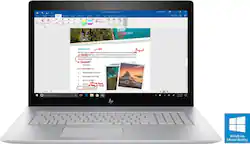
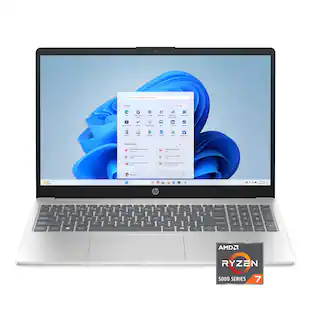
HP - ENVY 17.3" Touch-Screen Laptop - Intel Core i7 - 16GB Memory - NVIDIA GeForce MX150 - 1TB Hard Drive - Natural Silver
- Key Specs
- Screen Type: Touchscreen LED
- Screen Size: 17.3 inches (Size of the screen, measured diagonally from corner to corner.)
- Screen Resolution: 1920 x 1080 (Full HD) (Screens come in a range of resolutions (measured in pixels, horizontal x vertical). The higher the resolution, the greater the picture quality.)
- Touch Screen: true (Touch-screen devices make navigating more intuitive. Using a touch-screen display, you can do things such as tap to select, hold and drag to move items, swipe to scroll, and pinch to zoom.)
- Processor Model: Intel 8th Generation Core i7 (Your computer's processor is like its brain. Working in combination with system memory, the power of the processor determines the complexity of software you can run, how many programs you can have open at the same time, and how fast those programs will run. Most computers feature an AMD, Intel or Snapdragon processor.)
- Storage Type: HDD
- Total Storage Capacity: 1000 gigabytes
- System Memory (RAM): 16 gigabytes (Random-access memory (RAM) is a computing device's short-term data storage, which allows active information to be accessed quickly. The size and type of RAM determines how efficiently the device can handle large amounts of information at one time. For example, gaming or video editing requires more RAM for optimal performance.)
- Graphics: NVIDIA GeForce MX150 (Often referred to as a "graphics processing unit" (GPU), this device is responsible for displaying image content and decoding/encoding video content in programs and games.)
- Backlit Keyboard: true (Integrated lights allow for visibility of the keys in low-light conditions.)
- General
- Brand: HP
- Model Number: 17M-AE111DX
- Product Name: ENVY 17.3" Touch-Screen Laptop - Intel Core i7 - 16GB Memory - NVIDIA GeForce MX150 - 1TB Hard Drive
- Color: Natural Silver
- Display
- Screen Type: Touchscreen LED
- Screen Size: 17.3 inches (Size of the screen, measured diagonally from corner to corner.)
- Screen Resolution: 1920 x 1080 (Full HD) (Screens come in a range of resolutions (measured in pixels, horizontal x vertical). The higher the resolution, the greater the picture quality.)
- Stylus Input: Built for Windows Ink (Active) (An active stylus/pen is able to communicate directly with a compatible device; active electromagnetic resonance (EMR) pens are powered via a device's screen and active electrostatic (AES) pens require an additional power source. A passive stylus does not have electronic features and is compatible with most capacitative touch screens.)
- Touch Screen: true (Touch-screen devices make navigating more intuitive. Using a touch-screen display, you can do things such as tap to select, hold and drag to move items, swipe to scroll, and pinch to zoom.)
- Processor
- Processor Brand: Intel
- Processor Model: Intel 8th Generation Core i7 (Your computer's processor is like its brain. Working in combination with system memory, the power of the processor determines the complexity of software you can run, how many programs you can have open at the same time, and how fast those programs will run. Most computers feature an AMD, Intel or Snapdragon processor.)
- Processor Model Number: Core i7-8550U
- Storage
- Storage Type: HDD
- Total Storage Capacity: 1000 gigabytes
- Hard Drive Capacity: 1000 gigabytes (The amount of data that can be stored on the device's mechanical hard drive. Hard disk drives (HDDs) typically have larger capacities than solid state drives (SSDs) but may have slower speeds.)
- Hard Drive RPM: 7200 revolutions per minute (A hard drive's data is stored on disks, or platters, that spin while transferring information to the host system. The higher the RPM, the faster the hard drive's performance.)
- Hard Drive Accelerator: None (A module integrated (or added) into a PC to improve performance speed. By acting as a high-speed cache, an accelerator speeds up access times to the hard drive, which results in faster web browsing, improved gaming experience, and overall more responsiveness.)
- Memory
- System Memory (RAM): 16 gigabytes (Random-access memory (RAM) is a computing device's short-term data storage, which allows active information to be accessed quickly. The size and type of RAM determines how efficiently the device can handle large amounts of information at one time. For example, gaming or video editing requires more RAM for optimal performance.)
- Type of Memory (RAM): DDR4 SDRAM (Each type of RAM delivers a different level of speed, bandwidth, energy efficiency and performance.)
- Number Of Memory Slots: 2
- Graphics
- Graphics Type: Dedicated (Dedicated graphics uses a separate graphics card for processing video images. Because it does not use memory from the system's RAM, there is no extra burden on the CPU and graphics are processed more efficiently. Integrated graphics shares system RAM to process video images.)
- GPU Brand: NVIDIA
- Graphics: NVIDIA GeForce MX150 (Often referred to as a "graphics processing unit" (GPU), this device is responsible for displaying image content and decoding/encoding video content in programs and games.)
- Compatibility
- Operating System: Windows 10 Home (The operating system manages all software and hardware, including files, memory and connected devices. Most importantly, it lets you interact with your device and your programs in a visual way; otherwise, you'd be typing computer code to get anything done.)
- Operating System Architecture: 64-bit (An operating system (OS) manages computer hardware, software resources, and programs in conjunction with the system's processor. 64-bit operating systems can handle more data at once than 32-bit systems, resulting in faster speeds, more effiency, and overall improved performance.)
- Connectivity
- Number of USB Ports (Total): 4
- Number Of Ethernet Ports: 1
- Power
- Battery Cells: 3-cell
- Camera
- Front-Facing Camera: true
- Features
- Backlit Keyboard: true (Integrated lights allow for visibility of the keys in low-light conditions.)
- Touchpad Type: Imagepad with multi-touch gesture support
- Media Card Reader: true (A hardware device that allows for access to data on a memory card and enables the transfer of its files to a computer. These devices may have one or multiple slots for various types of memory cards, and may be integrated into the computer or available as an external device.)
- Audio Technology: Bang & Olufsen with dual speakers
- Cable Lock Slot: Kensington Security Slot (K-Slot)
- Casing Material: Aluminum
- Dimensions
- Product Height: 0.92 inches (The out of box height of the item. Height is measured as the vertical distance from the bottom of the item to the top as it would be primarily used or placed.)
- Product Width: 16.38 inches (The out of box width of the item. Width is measured as the horizontal distance from one side of the item to the other as it would be primarily used or placed.)
- Product Depth: 11.14 inches (The out of box depth of the item. Depth is measured as the distance from the front of the item to the back as it would be primarily used or placed.)
- Product Weight: 6.73 pounds (The out of box weight of the item.)
- Certifications Listings & Approvals
- ENERGY STAR Certified: true (Devices carrying the ENERGY STAR service mark, such as computer products and peripherals, kitchen appliances, and other products, generally use 20% to 30% less energy than required by federal standards.)
- EPEAT Qualified: true (The Electronic Product Environmental Assessment Tool (EPEAT) was designed to provide an environmental assessment tool for purchasers. In order to qualify for EPEAT, a product must meet all 23 required criteria.)
- EPEAT Level: Silver (The Electronic Product Environmental Assessment Tool (EPEAT) was designed to provide an environmental assessment tool for purchasers. In order to qualify for EPEAT, a product must meet all 23 required criteria. Products are rated Bronze, Silver or Gold based on how many of 28 optional criteria they meet (below 50%, 50%, 75%).)
- Included
- Optical Drive Type: CD, CD-R, CD-RW, DVD+R, DVD+RW, DVD-R, DVD-RW (An optical disk drive (ODD) uses a laser light to read data from or write data to an optical disc. These discs include CDs, DVDs, and Blu-ray Discs. This allows you to play music or watch movies using prerecorded discs.)
- Numeric Keypad: true
- Other
- UPC: 191628835621

Get ready to be amazed with this HP business laptop. It starts with an Intel Core i7 processor and 16GB of RAM and handles almost any task you throw at it, and a DVD writer makes it easy to produce backups. An NVIDIA GeForce MX150 graphics card lets you use extra screens with this HP business laptop.
- Windows 10 operating system: Brings back the Start menu from Windows 7 and introduces new features, such as the Edge web browser that lets you mark up web pages on your screen. Learn more ›
- Built for Windows Ink: Bring your ideas to life with the power of a digital pen and your imagination.
- 17.3" Full HD touch screen for hands-on control: Touch navigation makes the most of Windows 10. The 1920 x 1080 resolution boasts impressive color and clarity. IPS technology for wide viewing angles. LED backlight.
- 8th Gen Intel® Core™ i7-8550U mobile processor: Ultra-low-voltage platform. Quad-core, eight-way processing. The Intel Turbo Boost Technology 2.0 delivers dynamic extra power when you need it.
- 16GB of system memory for intense multitasking and gaming: Reams of high-bandwidth DDR4 RAM allow you to smoothly run your graphics-heavy PC games and video-editing applications as well as numerous programs and browser tabs at the same time.
- 1TB hard drive for ample file storage space: Holds a significant collection of digital photos, music, HD videos and DVD-quality movies. 7200 rpm spindle speed enables rapid read/write times for handling large files and complex applications.
- NVIDIA GeForce MX150 graphics: Driven by 2GB dedicated video memory, quickly render high-quality images for videos and games.
- Exceptionally rich audio experience: Dual HP speakers, HP Audio Boost and expert tuning by Bang & Olufsen bring audio perfection to your laptop.
- Windows Mixed Reality: Enjoy amazing experiences with Windows Mixed Reality, combining VR with a phenomenal sense of presence. This PC is Windows Mixed Reality headset compatible.Learn more ›
- Weighs 6.7 lbs. and is 0.9" thin overall: Prioritizes screen size without sacrificing portability, so you get lots of viewing space without the laptop being too hefty to carry around. Three-cell prismatic lithium-ion battery.
- Aluminum enclosure with natural silver HP finish: Creates a sophisticated look and provides a rigid but lightweight frame.
- Bluetooth interface synchronizes with compatible devices: Wirelessly transfer photos, music and other media between the laptop and your Bluetooth-enabled cell phone or MP3 player, or connect wireless accessories.
- One USB Type-C and three USB 3.1 ports: The USB 3.1 Type-A ports are backward-compatible with USB 2.0 devices (at 2.0 speeds).
- HDMI output expands your viewing options: Connect an HDTV or high-definition monitor to set up two screens side by side or just see more of the big picture.
- Built-in card reader for simple photo transfer: The multiformat digital media card reader supports a variety of media cards.
- Next-Gen Wireless-AC connectivity: Connects to your network or hotspots on all current Wi-Fi standards. Connect to a Wireless-AC router for speed nearly 3x faster than Wireless-N. The Gigabit Ethernet LAN port also plugs into wired networks.
- Built-in HP Wide Vision FHD IR camera with dual-array digital microphone: Makes it easy to video chat with family and friends or teleconference with colleagues over Skype or other popular applications.
- Backlit keyboard for easy typing in dim or dark locations: Features an Island-style keyboard with numeric keypad and chiclet keys, a touchpad supporting multitouch gestures.
- DVD/CD drive: Watch and write DVDs using the integrated optical drive.
- Additional ports: Microphone-in/headphone-out combo jack.
Whats Included
- 90W AC adapter
- HP ENVY 17.3" Touch-Screen Laptop - Intel Core i7 - 16GB Memory - NVIDIA GeForce MX150 - 1TB Hard Drive
Product Manuals
Q: Is the processing speed 1.8 gHz, or 2.8 gHz? Not sure if typo on specifications list.
A: As I understand it, this machine has a low-threshold processing speed of 1.8 GHz, but can comfortably be overclocked to 4.0 GHz. I've done a LOT of research on this model and I'm completely in love. The eighth generation i7 8550ou chip is apparently something to behold. Now, if I could ask a question in return - can this laptop be upgraded from 16GB to 32 GB of RAM? And if I choose to add, for example, a 250 GB SSD, can I dedicate it to the OS and all applications? Finally, can it be installed for me by The Geek Squad? And if so, how much (roughly) will it cost? If push comes to shove, I'll try to do it myself, but I'd rather not do any damage to such a beautiful machine, obviously. Thanks in advance.
A: There are several docking stations this can be connected to, and it can be upgraded.
A: Yes, without any problems. It's a good, reliable, work horse.
Q: is windows 10 unstable and difficult to learn as I have heard?
A: It is not unstable and is easy to learn and easy to use. From a computer user since 1988.
A: Yes it does. I have the system setup to unlock with my face, with a PIN as backup.
Q: Does this laptop have 2 drive bays
A: The research I came up with is that it has two (2) internal SATA drive bays & one external optical DVD/CD drive bays. One of SATA drive bays has the 1 TB HDD (7200 rpm). The other can be loaded with an SSD if desired.
Q: Does this laptop have a backlit keyboard?
A: Yes, hit the Windows Key and the F5 Key simultaneously and it will toggle the keyboard back-lighting on and off. If the battery is low, this feature may automatically turn off when you go into low power mode...
A: Micosoft Ink is now offered in Windows 10. You do not have to purchase it seperate. Here is a article explaining how to turn it on - https://www.pcworld.com/article/3152093/windows/how-to-turn-on-the-ink-workspace-in-windows-10.html
People also viewed
 $1,299.00The price was $1,379.99
 $959.99The price was $1,099.99
 $845.00The price was $999.99
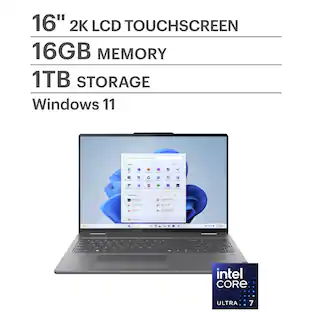 $894.99The price was $1,049.99
 $436.00The price was $599.99


Today's top picks
 $199.99The price was $249.99
 $789.99The price was $1,049.99











