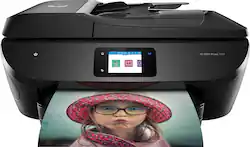
HP - ENVY 7858 Wireless All-In-One Inkjet Printer - Black
- Key Specs
- Networking: Wireless, Wired
- ENERGY STAR Certified: false (Devices carrying the ENERGY STAR service mark, such as computer products and peripherals, kitchen appliances, and other products, generally use 20% to 30% less energy than required by federal standards.)
- Printer Type: All In One
- ISO Color Print Speed: 10 pages per minute (The number of color pages able to be printed per minute in the device's default single-side mode, as tested by the International Standards Organization (ISO).)
- ISO Mono Print Speed: 15 pages per minute (The number of black ink (grayscale) pages able to be printed per minute in the device's default single-side mode, as tested by the International Standards Organization (ISO).)
- Touch Screen: true (Touch-screen devices make navigating more intuitive. Using a touch-screen display, you can do things such as tap to select, hold and drag to move items, swipe to scroll, and pinch to zoom.)
- General
- Brand: HP
- Model Number: ENVY Photo 7858
- Product Name: ENVY 7858 Wireless All-In-One Inkjet Printer
- Color: Black
- Display Screen: true
- Display Screen Size: 2.65 inches
- Dimensions
- Product Height: 7.6 inches (The out of box height of the item. Height is measured as the vertical distance from the bottom of the item to the top as it would be primarily used or placed.)
- Product Width: 17.9 inches (The out of box width of the item. Width is measured as the horizontal distance from one side of the item to the other as it would be primarily used or placed.)
- Product Depth: 16.1 inches (The out of box depth of the item. Depth is measured as the distance from the front of the item to the back as it would be primarily used or placed.)
- Product Weight: 16.7 pounds (The out of box weight of the item.)
- Features
- Automatic Document Feeder: true
- Photo Printing: true
- Monochromatic/Color: Color
- Automatic Two-Sided Printing: true
- Tray Capacity: 125
- Duty Cycle: Up to 1,000 (The maximum number of pages per month that the device can produce without failing, as specified by the manufacturer.)
- Certifications Listings & Approvals
- EPEAT Qualified: false (The Electronic Product Environmental Assessment Tool (EPEAT) was designed to provide an environmental assessment tool for purchasers. In order to qualify for EPEAT, a product must meet all 23 required criteria.)
- Ink
- Compatible Cartridges: HP 64 Black Original Ink Cartridge, HP 64 Tri-Color Original Ink Cartridge, HP 64XL Black Original Ink Cartridge, HP 64XL Tri-Color Original Ink Cartridge
- Ink Subscription Service Available: false (The printer monitors ink usage and alerts the subscription provider when levels are low. A purchased subscription provides refills of ink based on usage.)
- Memory
- Memory Card Slot: true
- Paper Info
- Automatic Document Feeder Capacity: 35 sheets
- Paper Feeder: Cassette tray
- Paper Handling: 125-sheet input tray; 25-sheet output tray
- Compatible Media Types: Plain Paper; HP Photo Papers; HP Matte Brochure or Professional Paper; HP Matte Presentation Paper; HP Glossy Brochure or Professional Paper; Other Photo Inkjet Papers; Other Matte Inkjet Papers; Other Glossy Inkjet Papers, Plain Paper, Light/Recycled
- Performance
- Printer Resolution (Black): Up to 1200 x 1200 (Refers to the number of pixels/dots, both horizontally and vertically, of the image produced by the printer in black ink. Generally, the higher the resolution, the sharper and cleaner the produced image.)
- Printer Resolution (Color): Up to 4800 x 1200 (Refers to the number of pixels/dots, both horizontally and vertically, of the image produced by the printer in colored ink. Generally, the higher the resolution, the sharper and cleaner the produced image.)
- Approximate Page Yield (Black): 200
- Approximate Page Yield (Color): 165
- Copier Info
- Copier Resolution (Black): Up to 300 x 300 (Refers to the number of pixels/dots, both horizontally and vertically, of the image produced by the copier in black ink. Generally, the higher the resolution, the sharper and cleaner the produced image.)
- Copier Resolution (Color): Up to 600 x 600 (Refers to the number of pixels/dots, both horizontally and vertically, of the image produced by the copier in colored ink. Generally, the higher the resolution, the sharper and cleaner the produced image.)
- Scanner Info
- Scanner Resolution: Up to 1200 x 1200 (Refers to the number of pixels/dots, both horizontally and vertically, of the image produced by the scanner. Generally, the higher the resolution, the sharper and cleaner the produced image.)
- Connectivity
- Minimum System Requirements: PC: Microsoft® Windows® 10, 8.1, 8, 7: 1 GHz 32-bit (x86) or 64-bit (x64) processor, 2 GB available hard disk space, CD-ROM/DVD drive or Internet connection, USB port. MAC: OS X v10.10 Yosemite, OS X v10.11, OS X v10.12, 1 GB HD, Internet
- Other
- UPC: 190781024798
Get productive performance and photos that shine with powerful all-in-one capabilities. Produce authentic colors, and set up, connect, and print right from your mobile device.
- Stunning photos for less than 5 cents: With HP Instant Ink, get ink delivered to your door and print photos for less than five cents
- The power of your printer in the palm of your hand: Printing photos just got easier – from social media, the cloud, and your camera-roll gallery.
- A new level of wireless connectivity you can count on: Get simple Wi-Fi® setup in minutes, and start printing fast
- HP's most productive printer for home: Simply insert an SD or USB card, then view, edit, and print photos quickly.
- ISO speed: Black Up to 15 ppm; Color Up to 10 ppm
- Scan resolution: Hardware Up to 1200 dpi; Optical Up to 1200 dpi
- Copy speed: Black Up to 13 ppm; Color Up to 5 ppm
- Standard connectivity: USB 2.0 client and 1 USB host (for thumbdrive); 1 Wi-Fi 802.11b/g/n; 1 Ethernet; 1 RJ-11 (Fax), dual band wifi 2.4/5Ghz, BLE,SD card slot
- Paper handling: Up to 125 sheets standard; Up to 5 envelopes; Up to 40 cards; Up to 40 sheets labels; Up to 125 sheets legal
- Duty cycle (monthly volume): Up to 1,000 pages
Whats Included
- HP ENVY Photo 7858 All-in-One Printer
- HP 64 Setup H Black Instant Ink Ready Cartridges (~230 pages)
- HP 64 Setup H Tri-color Instant Ink Ready Cartridges (~145 pages)
- Power Cord; Phone cord; USB Cable
- Setup card; Getting started guide; Media Pack
- $20 prepaid card for HP Instant Ink
Product Manuals
Q: Dose the black still print when the color ink runs out
A: Hello, Chad. Thanks for your question. Yes, you can print in single-cartridge mode with this HP Envy Photo 7858 printer. That means you can take out the tricolor ink cartridge. And the printer will go into single cartridge mode automatically so you can print with the black ink cartridge.
Q: what features does this model printer have.
A: The Envy 7858 printer can print, copy (35-page auto document feeder), scan, and fax.
A: Yes, the Envy 7858 printer is compatible with the iPad.
Q: what color ink cartridges does the 7858 use?
A: Thank you for your question! The HP ENVY Photo 7858 All-in-One Printer uses HP 64 or 64XL ink cartridges. It is also eligible for HP Instant Ink which is designed to save you money and time by shipping you ink when you're running low, and you pay only for the pages you print. It’s the most economical and the easiest way to have the ink delivered right to your door, you save up to 50% and you’ll never run out of ink! For service details, see http://hpinstantink.com
A: Thank you for asking. Yes, the Envy 7858 has a port for connecting your landline for faxing.
A: They are actually the same printer, just with a different model number. And yes, the 7855 has fax capability and can print in color.
Q: Will the hp 7858 print card stock that is much thicker than typewriter paper?
A: Thank you for the question. The Envy Photo 7858 supports media weights as follows: A4: 75 to 90 g/m²; HP envelopes: 75 to 90 g/m²; HP Photo Paper: up to 300 g/m²; HP 10 x 15 cm photo paper: up to 300 g/m².
Q: Is the HP #7858 compatible to set up with an Acer Chromebook with Chrome OS ?
A: Thank you for the question. Yes, the Envy 7858 is compatible with Chrome OS.