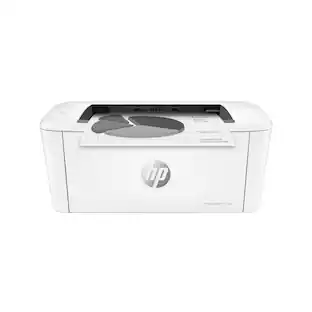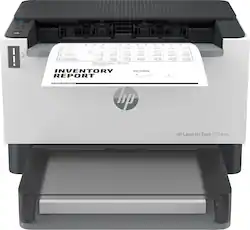
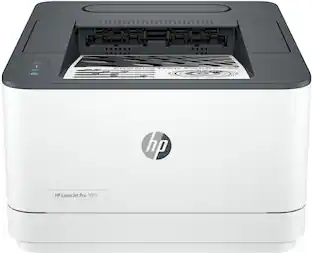
HP - LaserJet Tank 2504dw Wireless Black-and- Laser Printer preloaded with up to 2 years of toner - White
- Key Specs
- Networking: Wireless, Wired
- ENERGY STAR Certified: true (Devices carrying the ENERGY STAR service mark, such as computer products and peripherals, kitchen appliances, and other products, generally use 20% to 30% less energy than required by federal standards.)
- Printer Type: Printer
- Duty Cycle: Up to 25,000 (The maximum number of pages per month that the device can produce without failing, as specified by the manufacturer.)
- ISO Mono Print Speed: 23 pages per minute (The number of black ink (grayscale) pages able to be printed per minute in the device's default single-side mode, as tested by the International Standards Organization (ISO).)
- Monochromatic/Color: Monochromatic
- General
- Brand: HP
- Model Number: 2R7F4A#BGJ
- Product Name: LaserJet Tank 2504dw Wireless Black-and-White Laser Printer preloaded with up to 2 years of toner
- Color: White
- Display Screen: false
- Dimensions
- Product Height: 8.46 inches (The out of box height of the item. Height is measured as the vertical distance from the bottom of the item to the top as it would be primarily used or placed.)
- Product Width: 13.73 inches (The out of box width of the item. Width is measured as the horizontal distance from one side of the item to the other as it would be primarily used or placed.)
- Product Depth: 15.37 inches (The out of box depth of the item. Depth is measured as the distance from the front of the item to the back as it would be primarily used or placed.)
- Product Weight: 13.67 pounds (The out of box weight of the item.)
- Features
- Automatic Document Feeder: false
- Photo Printing: false
- Automatic Reduction/Enlargement: false
- Automatic Two-Sided Printing: true
- Wide Format Printing: false (Machines with this function support printing on media with widths between 18 and 100 inches, such as posters, banners, canvases, and more.)
- Wide Format Scanning: false
- Connectivity
- Wired Connectivity: Ethernet
- Wireless Connectivity: Wi-Fi (The manner in which a device sends data to another device over a short distance without the use of wires or cables.)
- Minimum System Requirements: Microsoft Windows 11, 10, 7 SP1: 32-bit or 64-bit, 2 GB available hard disk space, Internet connection, Microsoft Internet Explorer or Edge
- Certifications Listings & Approvals
- EPEAT Qualified: true (The Electronic Product Environmental Assessment Tool (EPEAT) was designed to provide an environmental assessment tool for purchasers. In order to qualify for EPEAT, a product must meet all 23 required criteria.)
- EPEAT Level: Silver (The Electronic Product Environmental Assessment Tool (EPEAT) was designed to provide an environmental assessment tool for purchasers. In order to qualify for EPEAT, a product must meet all 23 required criteria. Products are rated Bronze, Silver or Gold based on how many of 28 optional criteria they meet (below 50%, 50%, 75%).)
- Ink
- Compatible Cartridges: HP 153A
- Ink Subscription Service Available: false (The printer monitors ink usage and alerts the subscription provider when levels are low. A purchased subscription provides refills of ink based on usage.)
- Ink Cartridges Required: 1 x Black (The quantity and color of ink cartridges required for the printer to operate.)
- Ink Cartridges Included: 1 x Black (The quantity and color of ink cartridges included.)
- Paper Info
- Paper Feeder: Bottom loader
- Paper Handling: Input Capacities: Up to 250 Sheets Standard; Up to 10 envelopes; Output Capacities: Up to 100 sheets Standard;
- Supported Paper Sizes: Plain paper, Heavy paper, Bond paper, Label, Light paper, Envelope
- Tray Capacity: 100
- Performance
- Approximate Page Yield (Black): 5000
- Printer Resolution (Black): Up to 600 x 600 (Refers to the number of pixels/dots, both horizontally and vertically, of the image produced by the printer in black ink. Generally, the higher the resolution, the sharper and cleaner the produced image.)
- Output Tray Capacity: 100
- Recommended Monthly Volume: 25,000 (The maximum number of pages that can be printed per month, as recommended by the manufacturer. Printing in excess of this number may reduce the machine's overall lifespan or print quality over time.)
- First Page Out Time: 8 seconds (The time it takes the printer to print and deliver the first page in the output tray. May depend on the complexity of the copy being printed.)
- Other
- UPC: 195908727606
Business capabilities with up to 5,000 monochrome pages of prefilled toner and an ultra-low cost per page. Pre-filled with up to 2 years of Original HP Toner. The HP Toner Tank System makes it easy to refill delivering the lowest cost per page in black and white.
- Get high-quality printing with the lowest cost per page in black and white: Print up to 5,000 monochrome pages with a full tank of Original HP Toner.
- Protection for your everyday printing: HP Wolf Essential Security helps keep your passwords, scans, and prints private, and helps keep your home network safe from hackers looking to gain access.
- Full features for business-ready capability: Experience less downtime and refill toner in just 15 seconds with ultra-high yield HP toner refill options
- Reduce environmental impact: HP Toner Refill Systems were designed to use over 75% less plastic.
- Print Speed:: Letter: Up to 23 ppm; First Page Out: As fast as 7.9 sec black
- Print Resolution:: Black (best): Up to 600 x 600 dpi
- Standard Connectivity:: Hi-Speed USB (compatible with USB 2.0 specifications); Ethernet 10/100 BT; 802.11a/b/g/n (2.4/5 GHz) Wi-Fi radio + BLE
- Mobile Printing Capability:: HP Smart App; Apple AirPrint; Mopria Certified; Wi-Fi Direct printing
- Duty cycle:: Monthly (letter): Up to 25,000 pages
- Display:: Icon LCD
- Paper Handling:: Up to 250 sheet and 10 envelope; Up to 250 sheet and 10 envelope
Whats Included
- HP LaserJet Tank 2504dw Printer
- Power Cord
- Setup Guide, Reference Guide, Regulatory/Support Flyers
Product Manuals
Disclaimers
- Print speeds vary with use. See manufacturer for info on print speeds.
A: Thank you for the question. This particular model does not need an HP account to work, but it would be of big assistance when needing software, warranty service, and support. (It's required for HP+ models, but this is not an HP+ model). While you can connect to your PC and use standard drivers and software, the HP Smart App used from your PC or smartphone will be of great benefit with its advanced scanning features, mobile fax, and shortcuts.
Q: does this work with chromebook
A: Yes, it will work just fine with a Chromebook.
A: Thank you for asking. Yes, you can print from an iPad. Minimum system requirements for Apple include Apple® macOS v10.15 Catalina, macOS v11 Big Sur, and macOS v12 Monterey. The LaserTank 2504dw is also compatible with Apple AirPrint.
A: Thank you for the question. Paper is loaded print-side up. The document image is printed on the top side of the loaded paper and is delivered face-down in the output tray.
Q: Does the ink smear if you use highlighter?
A: Not at all…as this laser print adheres very well to the paper.
A: Hello. Thanks for your question. You can change the printing default to single sided printing. For Windows: The easiest way to get to the "Printer Preferences" is through the printer and scanner settings. From the start menu, type printer, and scanner settings. Once you get there, look for your printer. Click on it. Then Manage. Then, printer preferences. Go to "Print on Both Sides" and toggle to "None". Finally, select Apply. For Mac: https://support.apple.com/guide/mac-help/change-default-printer-a-printers-mac-mchlp1036/mac If you need further assistance, we recommend reaching out to HP Support: https://support.hp.com
Q: Is this printer/scanner compatible with MacBook Pro?
A: Yes. I use my HP LaserJet Tank 2504dw with all of my Apple devices.
People also viewed
 $309.99The price was $349.99
 $399.99The price was $659.00
 $339.99The price was $379.99


Today's top picks
- $399.99The price was $659.00
- $309.99The price was $349.99
- $339.99The price was $379.99