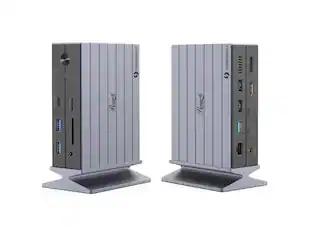
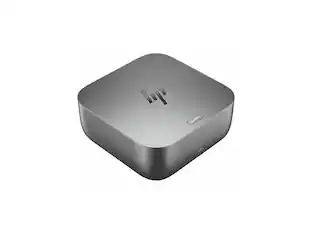
HP - Thunderbolt 4 280W Ultra G6 Dock
About this product
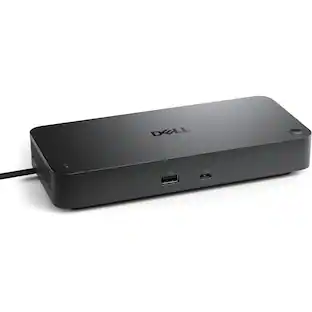
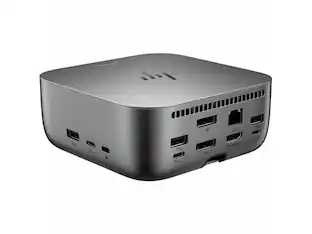
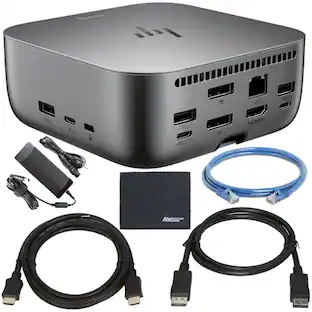
Maximize your productivity and enjoy ample connectivity with the HP Thunderbolt 4 280W Ultra G6 Dock, which supports multiple display configurations including 5K (5120 x 2880) resolution at up to 60 Hz on a single display or up to four simultaneous 4K (3840 x 2160) displays at 60 Hz, delivers up to 280W power delivery to your host device, and enables high-speed bidirectional data transfer via its 40 Gb/s Thunderbolt 4 port—compatible with systems running Windows 11 and 10, macOS, Linux, ThinPro, and ChromeOS. The dock features a front-facing USB-C 3.2 Gen 2 port with 15W power delivery for easy access, a right-side USB-A 3.2 Gen 2 port, a nano security lock slot, and another USB-C 3.2 Gen 2 port with 15W power delivery, two left-side USB-A 3.2 Gen 2 ports, and a rear panel equipped with the bidirectional 40 Gb/s Thunderbolt 4 port, a USB-C 3.2 Gen 2 port with DP Alt Mode and USB power delivery, two USB-A 3.2 Gen 1 ports, an HDMI port, two DisplayPort 1.4 inputs, and a 2.5 GbE RJ45 connector, all powered by an included 330W AC adapter that supports and outputs 12V/5A, 15V/5A, 20V/5A, 5V/3A, and 9V/3A to compatible devices while delivering up to 280W via the Thunderbolt 4 port to both HP and non-HP devices supporting Power Delivery 3.1. Enjoy hands-off manageability from anywhere with cloud management via Poly Lens, which enables automatic firmware updates and easy monitoring of telemetry and analytics to optimize workspaces, while HP Wolf Security—integrating HP Sure Start and Zero Trust Framework—provides complete end-to-end protection against potential threats. Thoughtfully designed for longevity, the dock is durably crafted with replaceable parts to maximize fleet lifecycle, features a built-in power consumption module to monitor energy use, and comes in plastic-free packaging, complemented by an intuitive and compact design with LED lighting and on-screen display for device status updates and rear-facing USB-C cable connectivity to declutter desks. Enhance device management with Intel vPro Active Management Technology, allowing authorized administrators to remotely access notebooks via wired connections even when powered off, and the time-saving Electronic Tag (eTag) asset management tool that lets IT teams track docks by product name, serial number, and MAC Address from anywhere, while compatibility with the myHP application centralizes access to settings for the docking station and other HP devices, unlocking hardware and software innovations through a single dashboard.
Thunderbolt 4 280W Ultra G6 Dock
This dock can support multiple display configurations, including 5K (5120 x 2880) resolution at up to 60 Hz on a single display or up to four simultaneous displays at 4K (3840 x 2160) resolution at up to 60 Hz. Power your host device with up to 280W power delivery and transfer highspeed data via the bi-directional 40 Gb/s Thunderbolt 4 port. This dock is compatible with systems running Windows 11/10, macOS, Linux, ThinPro, and ChromeOS.
Everything, secured
Prevent potential threats with HP Wolf Security, interlacing HP Sure Start and Zero Trust Framework to provide complete end-to-end security. Work and rest easy knowing everything from the dock to the cloud is protected.
Hands-off manageability
Cloud manageability with Poly Lens unlocks hands-off manageability from anywhere. Administer automatic firmware updates anytime and easily monitor telemetry and analytics to optimize workspaces and support users effectively.
Built to last
Thoughtfully designed with longevity in mind. Durably crafted with replaceable parts to maximize your fleet's lifecycle. Built with a power consumption module to monitor your energy consumption. Consciously wrapped in plastic-free packaging.
Product Notice
- Maximum Number of Displays Supported4Number of DisplayPort Outputs (Total)4Number of Thunderbolt Ports (Total)4
Reviews
This product doesn't have any reviews yet.

Compare similar products
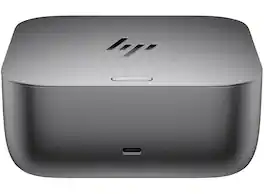
Maximize your productivity and enjoy ample connectivity with the HP Thunderbolt 4 280W Ultra G6 Dock, which supports multiple display configurations including 5K (5120 x 2880) resolution at up to 60 Hz on a single display or up to four simultaneous 4K (3840 x 2160) displays at 60 Hz, delivers up to 280W power delivery to your host device, and enables high-speed bidirectional data transfer via its 40 Gb/s Thunderbolt 4 port—compatible with systems running Windows 11 and 10, macOS, Linux, ThinPro, and ChromeOS. The dock features a front-facing USB-C 3.2 Gen 2 port with 15W power delivery for easy access, a right-side USB-A 3.2 Gen 2 port, a nano security lock slot, and another USB-C 3.2 Gen 2 port with 15W power delivery, two left-side USB-A 3.2 Gen 2 ports, and a rear panel equipped with the bidirectional 40 Gb/s Thunderbolt 4 port, a USB-C 3.2 Gen 2 port with DP Alt Mode and USB power delivery, two USB-A 3.2 Gen 1 ports, an HDMI port, two DisplayPort 1.4 inputs, and a 2.5 GbE RJ45 connector, all powered by an included 330W AC adapter that supports and outputs 12V/5A, 15V/5A, 20V/5A, 5V/3A, and 9V/3A to compatible devices while delivering up to 280W via the Thunderbolt 4 port to both HP and non-HP devices supporting Power Delivery 3.1. Enjoy hands-off manageability from anywhere with cloud management via Poly Lens, which enables automatic firmware updates and easy monitoring of telemetry and analytics to optimize workspaces, while HP Wolf Security—integrating HP Sure Start and Zero Trust Framework—provides complete end-to-end protection against potential threats. Thoughtfully designed for longevity, the dock is durably crafted with replaceable parts to maximize fleet lifecycle, features a built-in power consumption module to monitor energy use, and comes in plastic-free packaging, complemented by an intuitive and compact design with LED lighting and on-screen display for device status updates and rear-facing USB-C cable connectivity to declutter desks. Enhance device management with Intel vPro Active Management Technology, allowing authorized administrators to remotely access notebooks via wired connections even when powered off, and the time-saving Electronic Tag (eTag) asset management tool that lets IT teams track docks by product name, serial number, and MAC Address from anywhere, while compatibility with the myHP application centralizes access to settings for the docking station and other HP devices, unlocking hardware and software innovations through a single dashboard.

Universal docking for today's laptops. Connect your USB-C-enabled laptop to your displays, accessories, and wired network with the versatile, elegant, and space-saving HP USB-C Dock G5.
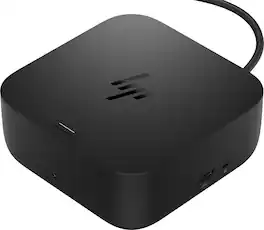
Power your workspace with the dock that redefines its class. Say goodbye to cable chaos with your desk’s new best friend: the HP USB-C 100W G6 Dock. One USB-C cable links your laptop up with all your gear. More ports, less fuss, and everything just works so you can stay in the zone.
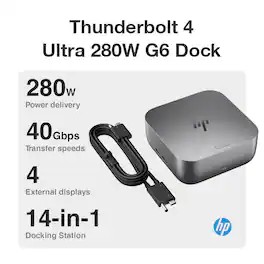
Power supply: 280 W external power adapter
| Pros for HP - Thunderbolt 4 280W Ultra G6 Dock | |||
|---|---|---|---|
| There were no pros for this product— | Overall Performance, Connectivity, Setup, Design | There were no pros for this product— | There were no pros for this product— |
| Cons for HP - Thunderbolt 4 280W Ultra G6 Dock | |||
| There were no cons for this product— | Port Quantity, Compatibility | There were no cons for this product— | There were no cons for this product— |
Specs
Customers often buy these together
 $72.89The price was $81.99







Customers ultimately bought

Explore tech essentials Sponsored



Keep exploring
 $38.99The price was $45.99
 $219.89The price was $249.99