Outlet EventEnds Oct. 26. Limited quantities. No rainchecks.Shop now

Main Content
product image

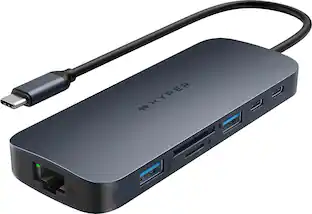
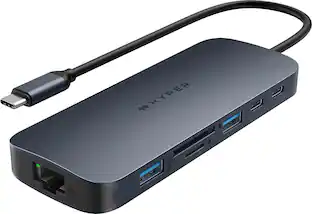
Hyper - HyperDrive Viper 10-in-2 USB-C Hub - Space Gray

Model: HD392-Gray
SKU: 6427853
This item is no longer available in new condition. See similar items below
  • Key Specs
    • Number of USB Port(s): 10
  • General
    • Brand: Hyper
    • Model Number: HD392-Gray
    • Product Name: HyperDrive Viper 10-in-2 USB-C Hub
    • Color: Space Gray
  • Features
    • Hub Type: USB hubs (The type of connection, such as Ethernet or USB, used to connect peripheral devices to the hub for shared access.)
  • Ports
    • Number of USB Port(s): 10
    • Port Type(s): HDMI, HDMI (USB 2.0 connects external drives, gaming controllers, smartphones, MP3 players and other accessories.USB 3.0 transfers data faster than USB 2.0, but only when used with USB 3.0 devices.USB Type-C provides fast speeds and versatile power, featuring connectors with identical ends that plug in upside down or right side up. Adapters allow for video as well as backward compatibility.Thunderbolt provides ultra-high bandwidth for fast data transfer between devices featuring a Thunderbolt or MiniDisplayPort connection.HDMI allows you to connect a projector or display HD media on your HDTV or monitor.Media card slots allow you to transfer photos from your digital camera or camcorder.)
  • Other
    • UPC: 817110014571

The HyperDrive VIPER 10-Port USB-C Hub turns 2 USB-C ports into 10 ports on the MacBook Pro(14" and 16" displays), MacBook Air, and any USB-C device (2 x 4K 60Hz HDMI, 3 x USB-A, Gigabit Ethernet, MicroSD/SD, 60W USB-C PD, and 3.5mm Audio Jack). It allows the MacBook Pro & MacBook Air (14"-16" Intel, M1, M1 Pro & M1 Max) to connect to 2 x 4K 60Hz HDMI extended displays (requires 2 x USB-C connection). Slide back to separate USB-C cables to connect to any USB-C device as a 9-port USB-C Hub (with 4K 60Hz HDMI) or USB-C to 4K 60Hz HDMI adapter.

  • 10-port USB-C Hub for MacBook Pro/Air: Turns two USB-C ports into 10 ports with 2 x 4K 60Hz HDMI, 3 x USB-A, Gigabit Ethernet, MicroSD/SD, 60W USB-C power delivery, and a 3.5mm audio jack
  • Dual 4K 60Hz HDMI Extended Displays: Allows MacBook Pro & MacBook Air to connect to 2 x 4K 60Hz HDMI extended displays (requires 2 x USB-C connection). Extends two displays for M1 Pro/M1 Max & 2016-2020 Intel MacBooks and one display for the M1 2020 MacBooks.
  • Works with any USB-C device: Slide back to separate USB-C cables to connect to any USB-C device as a 9-port USB-C Hub (with 4K60Hz HDMI) or USB-C to 4K60Hz HDMI adapter.
  • USB-C power delivery: Supports USB-C pass-through charging. Allows USB-C device to be charged while using the USB-C hub at the same time.
  • Gigabit ethernet: Allows for fast network connection where wireless networks are unavailable.
  • Convenient Expansion Ports: Additional three USB-A 3.0 ports, microSD and SD memory card slots for quick data transfer. *Apple SuperDrive not supported.
  • Compatible with Any USB-C Device: Provides Dual Monitor ouput for Macbook Pro 14" M1 Pro, Macbook Pro 16" M1 Pro, MacBook Pro - 16" Intel Core i7, i9, MacBook Pro - 16" Intel Core i5.
Whats Included
  • HyperDrive VIPER 10-in-2 USB-C Hub for MacBook Pro & MacBook Air

Q: Will this Usb hub work with the new MacBook M1 2020?

A: Yes, that’s what I’m currently using it for. It was really one of the only products that worked for this use.

Q: Is this expected to be compatible with the new 13-inch MBP with the M1 chip?

A: This is a correction to my previous answer in which I stated the hub will not work with the M1 Air. The hub DOES work. In reading other discussion boards, I learned that Apple has physically tightened their USB-C jacks to make it harder for device cables to disconnect accidentally. Sure enough, I noticed a small gap between the twin USB-C plug and the side of the Air. I gave the plug a more forceful push... there was a click... and everything plugged into the hub started working. Since comments here apparently cannot be edited or deleted once submitted, I am adding this correction.

Q: Will this support two external monitors on a 2020 Macbook Pro 13 inch? Thanks.

A: The previous answer is incorrect. The new M1 Macbook only supports 1 external monitor. Even though this dock has two HDMI outputs, only one will work at a time. I unfortunately read this exact answer and went out and bought this device to end up disappointed. What you can do to get around this is to get a usb to HDMI adapter, and utilize display link technology to get a second external monitor.

Q: Does this come with the power pass through?

A: Yes, it does have power pass through. My MacBook Air M1's power supply plugs into the hub, and the hub's dual USB-C plugs transfer power when plugged into the computer. One thing to note: Apple has physically tightened their USB-C jacks to make it harder for device cables to disconnect accidentally. The first time I used the hub, it did not seem to be working. Eventually, I noticed a small gap between the twin USB-C plug and the side of the Air. I gave the plug a more forceful push... there was a click... and everything plugged into the hub came on.

Q: Big Sur is not supporting most of the multiple display hubs and docks, does this one works with macOS Big Sur?

A: Yes, the Hyper 10-in-2 hub works fine with my new M1 MacBook Air running Big Sur iOS. However, the twin USB-C jacks on the air have been redesigned to offer a tighter fit to prevent external devices from coming unplugged accidentally. Make sure the hub's plug sits flush against the side of the machine as in the attached photo.

Q: Can I keep it plugged in all the time? Does it matter if it gets hot?

A: It only warms up after running a HDD drive on it for long periods of time transferring data