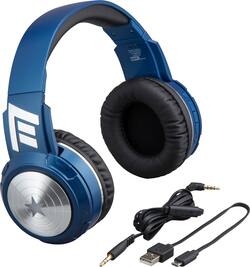
iHome - Marvel Avengers Wireless Over-the-Ear Headphones - Black/Blue
- Key Specs
- Sound Mode: Stereo
- Connection Type: Wireless
- Wireless Connectivity: Bluetooth (The manner in which a device sends data to another device over a short distance without the use of wires or cables.)
- True Wireless: false (These headphones not only lack wires between the device and headphones, they also lack wires between the headphones themselves. (true wireless is really only possible with in-ear headphones))
- Maximum Wireless Range: 33 feet
- Headphone Fit: Over-the-Ear
- Adjustable Headband: true
- General
- Brand: iHome
- Model Number: VI-B96CA.FXV7
- Product Name: Marvel Avengers Wireless Over-the-Ear Headphones
- Color: Black/Blue
- Audio
- Sound Isolating: false
- Sound Mode: Stereo
- Connectivity
- Connection Type: Wireless
- Wireless Connectivity: Bluetooth (The manner in which a device sends data to another device over a short distance without the use of wires or cables.)
- True Wireless: false (These headphones not only lack wires between the device and headphones, they also lack wires between the headphones themselves. (true wireless is really only possible with in-ear headphones))
- Bluetooth Version: Other (The Bluetooth specification formalized by the Bluetooth Special Interest Group. All versions of the Bluetooth standard are backwards compatible with previous versions.)
- Maximum Wireless Range: 33 feet
- Features
- Controls: Track selection, Volume
- Maximum Talk Time: 27 hours
- Design
- Headphone Fit: Over-the-Ear
- Style: Kids
- Adjustable Headband: true
- Power
- Rechargeable: true
- Material
- Ear Cushion Material: Leatherette
- Other
- UPC: 092298929958
Pump your own heroic soundtrack through these eKids Captain America headphones. Voice control and Bluetooth capability let you stream and manage music from a compatible device, and a tangle-free cable is included for wired playback. These eKids Captain America headphones are adjustable and padded for comfort, and the shield on each ear glows during use.
- Bluetooth 5.0 EDR interface: Enables simple wireless pairing with your Bluetooth-enabled device.
- Rechargeable battery: Offers up to 27 hours of use on a charge.
- Over-the-ear design: For a secure fit.
Whats Included
- iHome Marvel Avengers
- Drawstring bag
Product Manuals
A: Yes. For the PlayStation 4, you can just use a regular set of 3.5mm headphones to hear game audio through the port on the DualShock 4. To do so, from the PS menu, go to Settings > Devices > Audio Devices > output to Headphones > With your headphones plugged in select "All Audio" as opposed to "Chat Audio."
Q: Can you hear with the aux cable, even when the headphones are not charged?
A: Yes. The benefit to these headphones is the ability to use charged via Bluetooth or uncharged via aux cord.
Q: Will wireless headphones work for watching TV?
A: Yes only if your tv has Bluetooth.
A: From personal experience, doesn’t last a full 48 hours. However, if you have the side lights on, it’ll drain the battery out slightly faster.
A: You have to keep the headphones off whenever you use an Aux cord. It doesn’t matter what kind of headphones you use, it should be off whenever you’re not using Bluetooth.
Q: How do you get the Bluetooth to work?
A: If your smartphone or music player is Bluetooth compatible (supports the A2DP Bluetooth Profile) you may pair these iHome headphones with your phone or music player to listen to music and make or receive calls as long as the two devices are within the Bluetooth operating range of approximately 33-feet of each other. Note: Your iHome headphones must be in the Power “Off” mode to begin the manual pairing process. 1. Make sure that your headphones are switched “Off”. Make sure that your smartphone or music player is “On”. 2. Press and hold the Multi-function button on your headphones for about 6 seconds until you hear the “Power On” and “Pairing” voice prompts. The LED indicator begins alternately flashing blue and red to indicate it is trying to pair with a compatible device. 3. If necessary, turn on the Bluetooth function of your phone or music player so that it begins searching for a compatible device. 4. “iHome_B96” should appear on your phone or music player’s compatible devices list. You may also see a message such as “Not Paired”. Tap on that message to complete the pairing process. If your phone or music player asks for a “password” to complete the pairing process, enter ‘0000’ on the keypad of your phone or music player. 5. When pairing is successful the screen on your phone should show “iHome_B96 Connected” or similar message and you will hear the voice prompt say “Your device is connected”. The LED indicator on the headphones will begin flashing blue two times per 5 seconds. Your headphones are now ready for use. NOTE: If your headphones are not able to find a Bluetooth device that is in range and “discoverable” within 3 minutes, the headphones will automatically power “Off” to preserve the battery.
Q: Can these be used to protect the ears from a concert or loud event?
A: Unfortunately and from personal experience, no. They do not provide protection in a concert or loud event. They’re not even good for vacuuming around the house.
Q: can these headphones work in a vehicle. are they IR. Infared? are these Bluetooth?
A: Yes, they can work in a vehicle, just make sure that your phone isn’t paired with the vehicle or turn off the radio. It’s not strong enough to be Infared. And they are Bluetooth.
People also viewed
 $199.99The price was $249.99
 $299.00The price was $429.00
 $194.99The price was $249.99

Today's top picks
 $499.99The price was $749.99
- $199.99The price was $249.99
 $789.99The price was $1,049.99