Rating 4.5 out of 5 stars with 42 reviews
4.5- Ease of use (16)
- Sound Quality (10)
- Price (3)
Customer Images
The vast majority of our reviews come from verified purchases. Reviews from customers may include My Best Buy members, employees, and Tech Insider Network members (as tagged). Select reviewers may receive discounted products, promotional considerations or entries into drawings for honest, helpful reviews.
- Rated 5 out of 5 stars
Works Great!!
I got it in the mail less than a week after I ordered it. I was scared how well this product would work with my Squire and iPhone 11 Pro Max on garageband. I wanted to record songs on the go without having to carry around several amps. I was scared it wasn't going to work well or at all but I hooked it up to an official apple 3.5 mm jack to 8 pin lightning adapter and it worked wonders! It definitely gets the job done, and records well, (dont panic if you cant hear it, it takes some adjusting in garageband to hear your own audio feedback). The only thing is when you do hear your feedback it isn't very clear sounding. Its muffled and slightly grainy but I can't complain much for $50! I definitely recommend if you're on a budget and looking for something quick to plug up you guitar with!
Posted by Mary
- Rated 5 out of 5 stars
good good good yeah yeah yeah
great product, i use it to record requintos on my ipad but it will work on iphone too just make sure to get an adapter to connect it. easy to use and good sound quality
Posted by Angel
- Rated 5 out of 5 stars
Small but mighty
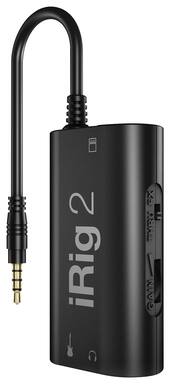
Very small--plastic...Plugged into my ipdad--downloaded the app for it and wow--very impressive. Their app is much easier to use than Garage Band. You can purchase additional "patches" for types of music, etc--they are not cheap---but for a nice little practice rig it can't be beat.
Posted by Specker
- Rated 5 out of 5 stars
The missing link for my live streams!
Glad I was able to receive my IRig before they sold out! I wanted to live stream my DJ sets and this enabled me to do it in a very inexpensive way. Sound quality is excellent even though it's not a stereo signal.
Posted by Fosterman
- Rated 5 out of 5 stars
Works with all of my devices, including my laptop
I've known about the iRig series for over 10 years, and I wanted something that would simplify recording my guitar, keyboard, and electric violin, so I took a chance and purchased the IK Multimedia iRig 2 audio interface. I expected it to work fine with my iPad Mini (generation 1) and my iPhone 7 (using Apple's Lightning to 3.5mm adapter), though I also assumed that it would not work when I tried connecting it my Lenovo laptop's headset input. To my surprise, it actually did work with my laptop. I have yet to really tap into the iRig 2's fullest potential, and I still need to group all of my audio input apps into one folder on both iPhone and iPad, but so far, I'm very pleased with the IK Multimedia iRig 2.
Posted by jayoders1986