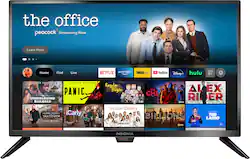
Access live over-the-air channels and streaming with this 24-inch TV—and control it all with your voice. Ask Alexa to launch apps, search for titles and more. A full HD experience in 1080p provides crystal clear images. You won’t miss a second with the Insignia 24" Class F20 Series LED Full HD Smart Fire TV.
A: This is a 24 in - Full HD - 1080p TV and you can download any available app on this TV. You can search for apps on amazon.com > Menu ( ≡ ) > Under Digital Content & Devices select Fire TV > under Movies, TV and Games select Fire TV Apps and Channels > on the left side, under Device Type select Fire TV Edition TV and type the name of the app in the search bar at the top of the page.
Q: Is it possible to use bluetooth earbuds/headphones with this TV?
A: You can hook up a Bluetooth transmitter into the 3.5 mm headphone jack on the TV.
Q: Can I occasionally use this TV as a laptop monitor (extended display/2 screen mode)?
A: Occasionally yes but type is not as clear as it is on a monitor.
A: The included remote cannot control other devices. Try the Power On feature, when enabled, the TV turns on displaying the last used input. To activate it, go Home > Settings > Display & Sounds > Power On and select Last Input.
Q: are there button controls on the top, side or bottom of the screen or only use the remote?
A: This TV has a Power/Input button at the bottom of the screen. Use the included remote to control the TV.
Q: can i replace the leg stand with a center stand
A: You can attach a Universal TV Stand to the VESA Mounting Pattern on the back of the TV.
A: This unit is around 35 watts.
Q: Is this tv 12 Volt compatible? Looking to put in RV
A: I did a chat session with Best Buy today (7/12/22) and the agent told me this tv IS 12 volt compatible, and come with 12 volt plug.