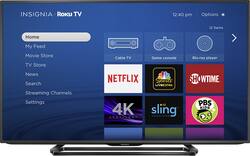
Insignia™ - 50" Class (49.5" Diag.) - LED - 2160p - Smart - 4K Ultra HD TV - Roku TV
- Key Specs
- Display Type: LED
- Screen Size Class: 50 inches (The group size measurement of a screen. This differs from a screen size measured diagonally from corner to corner.)
- High Dynamic Range (HDR): false (An HDR-compatible 4K TV or other HDR-compatible product displays HDR video content when it's available from sources like 4K Ultra HD Blu-ray Discs and 4K streaming services.)
- Refresh Rate: 60Hz (The number of frames per second the device can produce natively without enhancement. Higher rates help produce smooth, seamless pictures.)
- Smart Platform: Roku TV (Just like a computer, a smart TV needs an operating system (also called a smart platform) in order to access the Internet, connect with entertainment apps, and play streaming content. Some common TV smart platforms are; Roku TV, Android TV, and Chromecast.)
- General
- Brand: Insignia™
- Model Number: NS-50DR710NA17
- Product Name: 50" Class (49.5" Diag.) - LED - 2160p - Smart - 4K Ultra HD TV - Roku TV
- Color: Black
- Dimensions
- Product Height With Stand: 27.4 inches
- Product Width: 44.2 inches (The out of box width of the item. Width is measured as the horizontal distance from one side of the item to the other as it would be primarily used or placed.)
- Product Depth With Stand: 12.1 inches
- Product Height Without Stand: 31.1 inches
- Product Depth Without Stand: 3.2 inches
- Product Weight With Stand: 44.2 pounds
- Product Weight Without Stand: 29 pounds
- Display
- Display Type: LED
- Screen Size: 49.5 inches (Size of the screen, measured diagonally from corner to corner.)
- Screen Size Class: 50 inches (The group size measurement of a screen. This differs from a screen size measured diagonally from corner to corner.)
- High Dynamic Range (HDR): false (An HDR-compatible 4K TV or other HDR-compatible product displays HDR video content when it's available from sources like 4K Ultra HD Blu-ray Discs and 4K streaming services.)
- Curved Screen: false
- Refresh Rate: 60Hz (The number of frames per second the device can produce natively without enhancement. Higher rates help produce smooth, seamless pictures.)
- Brightness: 240 nits (A measure of the total light output.)
- Maximum Contrast Ratio (Native): 4000:1 (The difference between the brightest and the dimmest a screen panel can be. A higher contrast produces more in-depth images.)
- Language(s) Displayed: English, French (The available language options for displayed text or captions.)
- Features
- Remote Control Type: IR
- Smart Capable: true (Smart, or smart-capable devices are able to connect directly to your home network in order to stream content from the Internet, run Internet-based apps, or connect to other smart devices.)
- Smart Platform: Roku TV (Just like a computer, a smart TV needs an operating system (also called a smart platform) in order to access the Internet, connect with entertainment apps, and play streaming content. Some common TV smart platforms are; Roku TV, Android TV, and Chromecast.)
- Indoor Or Outdoor Use: Indoor (Indicates the appropriate environment product was designed to be used in.)
- Text-To-Speech: true (A system that converts language text into speech.)
- Video Description: true (Indicates whether the device features descriptive video service (DVS). This service provides narration of key elements in the program, such as actions, costumes, and scene changes, to help engage visually-impaired audiences.)
- V-Chip: true (Feature that blocks television programming if it has a content rating outside of the acceptable rating(s) configured by the user.)
- TV Tuner: Digital (The ATSC TV Tuner is a component built into conventional TV sets or other devices for receiving over-the-air broadcast TV without a cable/satellite box. Digital tuners may be purchased separately and connected to a device if it does not have one built in.)
- Connectivity
- RF Antenna Input: true (This input is used to connect devices such as antennas or cable boxes to a TV via a coaxial cable.)
- Number Of USB Port(s) (Total): 1 (The total number of USB ports including all generations and versions.)
- Headphone Jack: true (The device features an interface that allows for the connection of headphones.)
- Compatibility
- VESA Wall Mount Standard: 400mm x 200mm (VESA wall mount standards refer to the spacing of screw holes built into a TV in order to fit with standard TV wall mounts. These standards are implemented into most TVs and monitors.)
- Audio
- Surround Sound Supported: DTS TruSurround (Surround sound systems use multiple audio channels and speakers to create an immersive sound experience for the listener. There are also various proprietary technologies that imitate this kind of sound via a device's built-in speakers or soundbar.)
- Speaker Output: 10 watts
- Power
- ENERGY STAR Certified: false (Devices carrying the ENERGY STAR service mark, such as computer products and peripherals, kitchen appliances, and other products, generally use 20% to 30% less energy than required by federal standards.)
- EPEAT Qualified: false (The Electronic Product Environmental Assessment Tool (EPEAT) was designed to provide an environmental assessment tool for purchasers. In order to qualify for EPEAT, a product must meet all 23 required criteria.)
- Estimated Annual Operating Cost: 28 United States dollars (Predicted cost of operating the product under average conditions for one year.)
- Estimated Annual Electricity Use: 233 kilowatt hours (Predicted amount of electricity needed to operate the product under average conditions for one year.)
- Included
- Stand Included: true
- Box Dimension
- Height: 30.9 inches
- Width: 52.3 inches
- Depth: 6.3 inches
- CubicDimension: 10181.241 inches
- Other
- UPC: 600603190971
Play games or stream videos with the expanded capabilities of this Insignia 4K Ultra HD TV, and enjoy the sharp images of four times full HD. This 50-inch television offers clear views from any angle, and Smart technology lets you connect to the Internet with ease. Personalize the home screen on this Insignia 4K Ultra HD TV for custom viewing.
- 49.5" screen (measured diagonally from corner to corner): A great size for a living room or mid-sized home theater space.
- LED TVs perform well in all lighting conditions: They also deliver plasma-like deep blacks and rich colors.
- 2160p resolution for breathtaking HD images: Watch 4K movies and TV shows at 4x the resolution of Full HD, and upscale your current HD content to gorgeous, Ultra HD-level picture quality.
- 60Hz refresh rate: An 8ms response time for refreshing the picture helps reduce blurring during fast-motion scenes.
- Built-in Roku smart platform delivers access to a world of entertainment: Stream from Netflix, YouTube, Hulu Plus, or choose from more than 1,000 other streaming channels.
- Personalize your Home screen: Easily switch between inputs and streaming channels.
- Cast your entertainment from your smartphone to the TV screen: Cast personal photos, videos, and music from your smartphone in just a few taps. With Netflix and YouTube apps, send movies, shows and more directly to the Roku TV.
- Control your TV with a smartphone: The free Roku app lets you control Roku TV from a phone or tablet with the same buttons you'll find on the standard Roku remote. Compatible with most iOS, Android, Windows 8.1 and Windows Phone devices.
- Search with your voice: Using the Roku mobile app, you can find the content you're looking for using voice commands. Just say what you're looking for and Roku Voice Search delivers results in the palm of your hand.
- DTS TruSurround: Two full-range 10W front speakers delivers an immersive virtual surround sound experience over front facing speaker configurations.
- 4 HDMI inputs for the best home theater connection: High-speed HDMI delivers a full 4K picture and digital surround sound in one convenient cable. HDMI cable not included.
- 1 USB input: Easily connect your digital camera, camcorder or other USB device.
Whats Included
- Insignia 50" Class (49.5" Diag.) - LED - 2160p - Smart - 4K Ultra HD TV - Roku TV
- Owner's Guide
- Remote control and AAA batteries
- Safety Sheet document
A: I am using an HD antenna and the built in Roku. the interface allows you to select the input source - you just click on the icon and it switches to the channels available through that access port. It shows the antenna, whatever apps you may have subscribed to, and any HDMI ports you have plugged in all on one screen. It does take a little time getting everything set up, made harder by the simplified remote (no keyboard to enter passwords, etc.) Once it's done, it's done though. My antenna gives me 26 local channels. You can also subscribe to all access apps for CBS, ABC or NBC (for a small monthly fee) if you want to be able to watch on-demand for those stations. HULU offers past season episodes from them but current seasons usually require a fee. I am subscribing to Sling TV, Hulu and CBS all access. So far so good!
Q: How does the remote work without numbers on it, what do I do about flipping through channels?
A: very slowly. The remote is ridiculously simple. Both cable remotes i have used integrated well
A: No, you do not. There are thousands of free streaming channels available. Sling is a pay service hat offers channels such as ESPN, History, National Geographic, AMC. etc. I use it thru my roku. Roku is just the device used to stream, like your dish. I have SlingTV (love it) and many other streaming channels, some free, some not free.
A: The bottom of the screen is about 2½" from whatever surface you place the TV on. BUT.... There's a piece that hangs down in the middle, and I'm almost 100% certain this is where the IR receiver resides. This piece is only about 1½" up. Also worth noting that the stand occupies 5" of space out from the front of the TV (and width-wise it's about 24" at its narrowest, ~25½" at its widest IN FRONT OF THE TV--under the TV the stand is wider than this). I'd say a sound bar is impractical unless you either wall-mount both the TV and sound bar, or find a way to place the sound bar above or below the TV, and not in front of it.
Q: If the TV days 4k ultra does that mean it's a 2160 pixel?
A: Yes... 2160 is 4k. Next step down is the 1080 pixel.
A: I figured it out. Make sure on the tv you select HDMI 2.0 for the input you are using before selecting 4k on the Xbox One S
Q: Is the ps4 compatible with this tv?
A: The PS4 will play on this television.
Q: what are the stand measurements
A: 12" deep x 26 1/2" wide ( measurements are completely accurate and at widest and deepest points...width wise stand rounds out )
People also viewed
 Clearance$379.99The price was $399.99
 $1,399.99The price was $2,499.99



Today's top picks
 $499.99The price was $749.99
 $199.99The price was $249.99
 $789.99The price was $1,049.99








