Rating 4.6 out of 5 stars with 784 reviews
4.6- Sound Quality (171)
- Compatibility (119)
- Price (87)
- Ease of use (43)
- Cable Length (32)
Customer Images
The vast majority of our reviews come from verified purchases. Reviews from customers may include My Best Buy members, employees, and Tech Insider Network members (as tagged). Select reviewers may receive discounted products, promotional considerations or entries into drawings for honest, helpful reviews.
- Rated 4 out of 5 stars
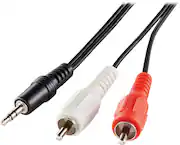
Optional audio cable for not so modern big screens
Sound is good enough if your TV does not have modern HDMI plug ins.
Posted by Mundo07
- Rated 5 out of 5 stars
Does the job for a nominal price.
It seems there is less and less need for analog connections any more. I needed this for my van that has the drop down movie screen. The length is perfect and the price was cheap. The cables work great, as good as the original.
Posted by aubie1983
- Rated 5 out of 5 stars
Durable Cable
Great sound with cable connects easily and has enough length.
Posted by Gabev
- Rated 5 out of 5 stars
Great for the price
Great for the price good quality and was easy to use.
Posted by EdwardA
- Rated 5 out of 5 stars
Get Connected!!
I had trouble trying to carry music back and forth from car to car-then it dawned on me to use the Aux connections on my cars. This cable allows me to use one media device in all my cars-no CDs to mess with. This cord fits all......great purchase for folks on the go.
Posted by LastSamurai