Rating 4.6 out of 5 stars with 3696 reviews
4.6- Compatibility (697)
- Ease of use (457)
- HDMI (456)
- Price (290)
- Performance (215)
- Lag (11)
Customer Images
The vast majority of our reviews come from verified purchases. Reviews from customers may include My Best Buy members, employees, and Tech Insider Network members (as tagged). Select reviewers may receive discounted products, promotional considerations or entries into drawings for honest, helpful reviews.
- Rated 5 out of 5 stars
Reat HDMI adaptor for my pc
I did not have an extra HDMI in my tv for my pc and I nedeed in order to play my new oculus game so I got a new HDMI adaptor which has a display port on the other side, it really worked great and it was very easy to hook, good purchase and cheap also
Posted by Marco
- Rated 5 out of 5 stars
As expected
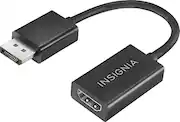
Not too much to say about this product, other than it works great. My computer tower came with 4 display ports and one HDMI. I have 2 monitors that are only HDMI... and there lies the problem. Alas! problem solved. This adapter plugs right into a display port, then an HDMI is then connected to the adapter and the screen. Screen now displays what it needs to. I would recommend this product to anyone that needs it, or they wont be able to view what's on the computer screen. Solid product, solid build, solid no wiggle connection.
Posted by RogueWave
- Rated 5 out of 5 stars
Works the way you think it should!
i have a bunch of hdmi cables and 4 monitors to hook up to my computer, i just upgraded to a 1080 geforce card which is great, but it only has 1 hdmi out and i needed 3, it now uses these data ports... will instead of paying more for a data to hdmi cable i got this one and it still sends audio out to the monitors sand everything!
Posted by buster
- Rated 5 out of 5 stars
DP2HDMI
Great product. Worked immediatley out of the box. No drivers to install.
- Rated 5 out of 5 stars
Good for adding second or third monitor
Used with my r7 series video card because for my 3 monitor setup one monitor had to be hooked up via display port. This solved that problem perfectly.
Posted by Stephen