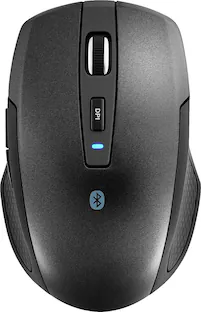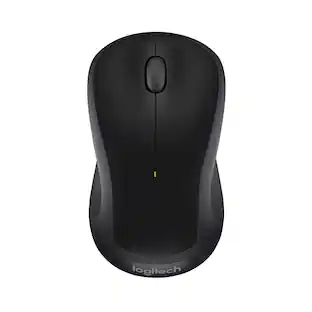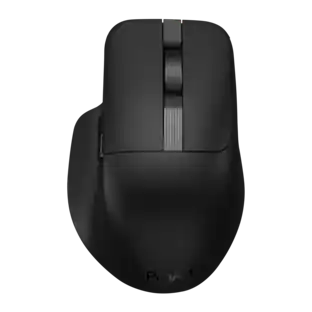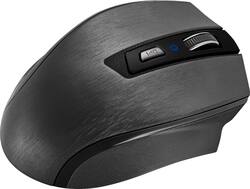
Insignia™ - Dual-Mode WirelessOptical Standard Mouse - Wireless - Black
- Key Specs
- Lighting Type: None
- Maximum Sensitivity: 3600 dots per inch (Mouse sensitivity is measured in dots per inch (DPI). The higher the DPI, the more sensitive the mouse is and may be more useful for high-density pixel screens. Lower DPI typically means more precision and accuracy in mouse movement.)
- Connection Type: Wireless
- General
- Brand: Insignia™
- Model Number: NS-PMDM2019
- Product Name: Dual-Mode WirelessOptical Standard Mouse
- Color: Black
- System Requirements: Apple MacOS X 10.x or later, Microsoft Windows 7 / 8 / 8.1 / 10, Android 7.0 (Nougat) or later (The software that a product must have for it to be able to integrate with another product.)
- Features
- Mouse Type: Standard
- Lighting Type: None
- Performance
- Mouse Operation: Scroll wheel
- Tracking Method: Optical (There are several types of computer mice, optical and laser being among the most common. Optical mice detect less detail and provide more precise and accurate movement. Laser mice detect more detail and can be used on a wider variety of surfaces, but are more sensitive to small movements.)
- Maximum Sensitivity: 3600 dots per inch (Mouse sensitivity is measured in dots per inch (DPI). The higher the DPI, the more sensitive the mouse is and may be more useful for high-density pixel screens. Lower DPI typically means more precision and accuracy in mouse movement.)
- Minimum Sensitivity: 600 dots per inch (Mouse sensitivity is measured in dots per inch (DPI). The higher the DPI, the more sensitive the mouse is. Lower DPI typically means more precision and accuracy in mouse movement, but higher DPI may be useful for high-density pixel screens.)
- Connectivity
- Connection Type: Wireless
- Wireless Connectivity: Bluetooth (The manner in which a device sends data to another device over a short distance without the use of wires or cables.)
- Operating System Compatibility: Android, Mac, Windows
- Power
- Mouse Power Source: Battery-powered
- On/Off Switch: true
- Rechargeable Battery (Mouse): false
- Battery Size: AA (The battery size required for operation.)
- Batteries Included: true (Indicates whether the product comes with the required batteries for its operation.)
- Other
- UPC: 600603251368
Control two devices with this Insignia dual mode wireless mouse. Advanced optical tracking technology offers impressively precise navigation, and multiple dpi settings let you change cursor speeds to suit your preference. Choose between Bluetooth connectivity and a wireless USB transceiver to easily sync this Insignia dual mode wireless mouse with your computer.
- Dual wireless mode: You can connect mouse to your computer using either the included nano receiver or by using Bluetooth.
- Optical technology: LED lights scan the surface beneath the mouse to detect movement with a fair amount of accuracy, suitable for everyday computing and browsing.
- Scroll wheel: Enables smooth, fast movement.
- Maximum of 3600 dpi: Lets you find the perfect sensitivity.
- Compatible with most Windows and Mac computers and select tablets: Works across a wide array of computers and tablets.
Whats Included
- AA battery
- Insignia Dual-Mode Wireless Mouse
- USB wireless receiver
Q: Does this mouse connect via a wireless USB receiver or strictly bluetooth
A: The mouse comes with a USB receiver so you can either connect via the receiver or off the bluetooth.
Q: What are the functions of those thumb buttons?
A: They page forward and page back.
Q: How loud is the click? Looking for a silent mouse.
A: Sounds loud like any normal mouse
Q: Can I change the functions of the buttons in my computer settings?or Is there an insigna software?
A: No, you cannot change the functions of the buttons.
Q: Are the thumb buttons customizable?
A: No, the buttons are not customizable.
A: I have no issues connecting via Bluetooth. I have a Lenovo laptop running windows 10. Took less than a minute to connect.
A: While you can use more than device because it has a dongle and Bluetooth, you cannot use the mouse simultaneously with two devices. There is not a button on the mouse that will switch between two devices.
Q: My laptop is a Dell. Is this mouse compatible with all computers.
A: Yes it’s compatible.
People also viewed
 $109.99The price was $119.99
 $75.99The price was $79.99