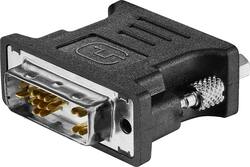
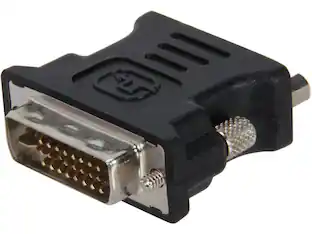
Insignia™ - DVI-A to VGA Adapter - Black
- Key Specs
- Connector Type (End 1): DVI-A
- Gender (End 1): Male
- Connector Type (End 2): VGA
- Gender (End 2): Female
- General
- Brand: Insignia™
- Model Number: NS-PV905012
- Product Name: DVI-A to VGA Adapter
- Color: Black
- Connectivity
- Cable Type: DVI
- Product Type: Adapter
- Connector Type (End 1): DVI-A
- Gender (End 1): Male
- Connector Type (End 2): VGA
- Gender (End 2): Female
- Warranty
- Warranty - Parts: 1 year
- Warranty - Labor: 1 year
- Other
- UPC: 600603264283
With all the computer programs and internet tabs you have open to do your work, you need a little extra screen space to keep it all organized. This DVI-A to VGA adapter lets you extend or mirror your computer display onto a second monitor, making it easier to organize programs and windows. Simply use this adapter to connect a DVI-A or DVI-I compatible computer to a VGA monitor. The analog signal supports high-resolution imagery for excellent viewing quality. Give yourself a better computer experience with the Insignia NS-PV905012 DVI-A to VGA Adapter.
- DVI-A/DVI-I to VGA: Mirror or extend your computer’s display by connecting from your computer’s DVI-A or DVI-I port to an VGA-enabled monitor. (Compatible with DVI-A and DVI-I (both single and dual link) ports only. Not compatible with DVI-D ports.)
- For VGA displays: Connect a VGA cable (not included) from the adapter to a TV or monitor with VGA.
- Compatible with DVI-I: The DVI-A connector can also connect to both dual- and single-link DVI-I ports, sending an analog signal to your display. (Note: This passive analog adapter does not convert analog signals to digital.)
- Secure fit: DVI thumbscrews keep your connection secure.
- Compact size: Easily store this adapter in a pocket or bag while traveling.
- Black design: Durable black plastic casing matches your computer accessories.
Whats Included
- Insignia™ DVI-A to VGA Adapter
Product Manuals
Q: What side is female and male? By that I mean is the VGA male or the DVI?
A: DVI-A is the male side and VGA is the female side on the adapter. Make sure the you check the the desktop uses DVI-I, DVI-I dual link, DVI-A connection. Here is a screenshot of the compatible display connection in back of desktop
People also viewed








Today's top picks
 $199.99The price was $249.99
 $279.99The price was $479.99
 $575.00The price was $749.99
 $799.99The price was $1,199.99
 $979.99The price was $1,049.99