Insignia™ - HDMI to VGA Adapter - Cool gray
Customers are saying
Customers consistently note the overall performance and compatibility of the HDMI to VGA adapter. They find it easy to use and appreciate its connectivity. The adapter's price and small size are also well-received features.
Features
HDMI to VGA
Mirrors or extends your screen to a second VGA-enabled display for better presentations, multitasking and gaming.
Versatile usage
HDMI connection works with computers, gaming consoles, DVD players and more.
High-quality video
Supports resolutions up to 1920 × 1080 at 60Hz for high-quality video.
Plug-and-play design
Requires no additional software for easy setup.
3.5 mm audio port
Allows you to connect an audio cable (not included).
Micro USB port
Lets you add additional power if your device doesn’t supply enough (cable not included).
Flexible placement
3 in. cable keeps the adapter close to your devices.
Backed by Best Buy
For quality and reliability that you can trust.
This cable is designed to convert HDMI output to VGA input. It does not convert VGA output to a HDMI input.
Specifications
- Brand CompatibilityUniversalModel CompatibilityComputers, gaming consoles, DVD players and more.
Reviews
Rating 4.8 out of 5 stars with 735 reviews
- Overall Performance (203)
- Compatibility (128)
- Ease of use (91)
- Connectivity (32)
- Price (28)
Customer Images
The vast majority of our reviews come from verified purchases. Reviews from customers may include My Best Buy members, employees, and Tech Insider Network members (as tagged). Select reviewers may receive discounted products, promotional considerations or entries into drawings for honest, helpful reviews.
Compare similar products
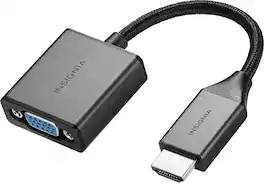
This Insignia HDMI to VGA Adapter can mirror the display from a computer or gaming console to any VGA-enabled monitor. Or extend your existing display to a second monitor, making it easier to organize programs and windows for day-to-day use at work or while browsing. This adapter supports resolutions up to 1920 × 1080 at 60Hz for high-quality video, and a 3.5 mm port lets you hook up your audio. Its hassle-free setup requires no additional software.
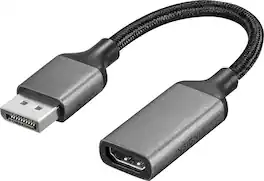
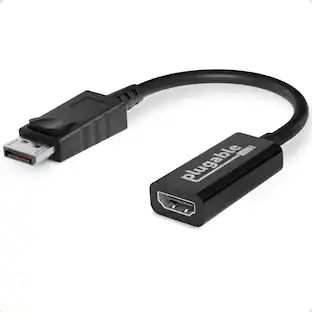
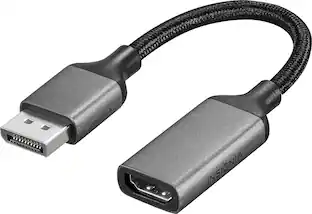
Improve your workstation by connecting your laptop to an external monitor with this Insignia DisplayPort to HDMI Adapter. The adapter supports 4K Ultra HD to prevent loss in quality when transferring between screens. It features a sleek braided cable jacket that flexes and bends to easily connect, and the plug-and-play design makes setup a breeze.

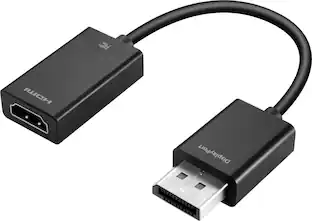
This Best Buy Essentials DisplayPort to HDMI Adapter can mirror or extend the display from your DisplayPort device to a HDMI-supported monitor. It supports resolutions up to 1920 × 1080 at 60 Hz for high-quality video (and audio is supported when provided by the source). It has 24K gold plating to help guard against corrosion and loss of quality.

The Insignia VGA to HDMI Adapter mirrors the display from a VGA computer or laptop to any HDMI-enabled monitor, TV, Projector. Or extend your existing display to a second monitor, making it easier to organize programs and windows for day-to-day use at work or while browsing. This adapter supports resolutions up to 1920 × 1080 at 60 Hz for high-quality video, and an attached USB cable lets you hook up your audio and enables video output. Its hassle-free setup requires no additional software. This product can’t support HDMI to VGA output. To enable the adaptor correct setting up, the VGA port need to be connected your PC or laptop, a HDMI cable (not included) is required to connect the monitor, TV, projector, and the USB cable need to be connected with USB port of computer.
| Pros for Insignia™ - HDMI to VGA Adapter - Cool gray | |||
|---|---|---|---|
| Overall Performance, Compatibility, Ease of use, Price, Connectivity | Overall Performance, Functionality | Overall Performance, Ease of use, Price, Compatibility, HDMI | Overall Performance, Ease of use, Compatibility, HDMI, Price |
| Cons for Insignia™ - HDMI to VGA Adapter - Cool gray | |||
| There were no cons for this product— | There were no cons for this product— | Resolution, Refresh Rate, Lag | Resolution |
Specs
Questions & Answers
Connected HP computer to Dell monitor with HDMI cable. When turned on, monitor displays "no vga connector". Will this adapter, connected to HDMI on computer and vga connection on monitor solve this?
Answered by InsigniaCustomerSupportYes, the Insignia™ HDMI to VGA Adapter should help resolve the issue you're experiencing. This adapter is designed to convert the HDMI output from your HP computer to the VGA input on your Dell monitor. Here are the steps to set it up: 1. Connect the Adapter: Plug the HDMI end of the adapter into your HP computer's HDMI port. 2. Connect the VGA Cable: Attach one end of a VGA cable to the VGA port on the adapter and the other end to the VGA port on your Dell monitor. 3. Power the Adapter: If your adapter has a micro-USB port for additional power, connect it to a USB power source to ensure stable performance. 4. Select the Input Source: On your Dell monitor, make sure to select the VGA input source. This setup should allow your monitor to display the output from your computer. If you continue to experience issues, ensure that the monitor is set to the correct input source and that all connections are secure. If you have any other questions or need further assistance, feel free to ask!
is this a 15pin to hdmi ??
Answered by InsigniaCustomerSupportHello there, thank you for your interest to our Insignia™ - HDMI to VGA Adapter. Yes, this Video Graphics Array has a 15 pins in three rows. Ivy| Insignia Support. https://www.bestbuy.com/site/insignia-hdmi-to-vga-adapter-cool-gray/6483552.p?skuId=6483552
My new HP computer lists "Display Port 1.4 x HDMI." My old monitor for HP Pavilion 23cw is VGA. Should I be able to use this adapter to make my old monitor work with the new computer?
Answered by InsigniaCustomerSupportThank you for your inquiry! Yes, you should be able to use the Insignia™ HDMI to VGA Adapter to connect your new HP computer (which has DisplayPort 1.4 via HDMI output) to your older HP Pavilion 23cw monitor, which only supports VGA input. Keith | Insignia Support

How is the input delay?
Answered by InsigniaCustomerSupportThe Insignia HDMI to VGA Adapter is an active converter, meaning it processes the signal, which can introduce a small amount of input delay. However, this delay is generally minimal and not noticeable for most everyday uses. If you're using it for gaming or other activities where low latency is crucial, you might notice a slight lag, but for typical tasks like presentations or connecting to a monitor, it should work just fine. Keith | Insignia Support https://www.bestbuy.com/site/insignia-hdmi-to-vga-adapter-cool-gray/6483552.p?skuId=6483552
Does this HDMI to VGA adapter require any software to set up?
No, this adapter has a plug-and-play design and requires no additional software for setup.
This question and answer was generated by AI based on customer and product data.

Customers often buy these together
 $129.99The price was $149.99
 $1,299.99The price was $1,599.99
 $20.99The price was $24.99


Customers ultimately bought
Explore tech essentials Sponsored
 Techtober Deal$22.49The price was $24.99


Discover related products
 Techtober Deal$27.99The price was $35.99