Black Friday in JulyEnds Sunday. Limited quantities. No rainchecks.Shop now

Skip to contentGo to Product Search
Main Content
A Best Buy brand

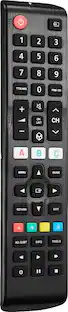
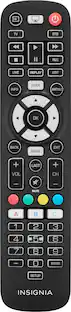
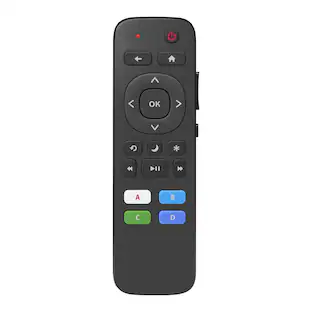
Insignia™ - Replacement Remote for Hisense TVs - Black

Model: NS-RMTHSNS25
SKU: 6618136
Sold byBest Buy
$19.99
Accidental Geek Squad Protection
94% of reviewers would recommend
Warranty Protection Plans
Availability
Pickup at
Sold by
Best Buy

Key Accessories:

More Buying Options from Best Buy

Open-Box
$11.99 - $19.99

About This Item

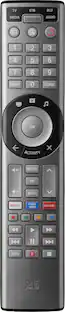
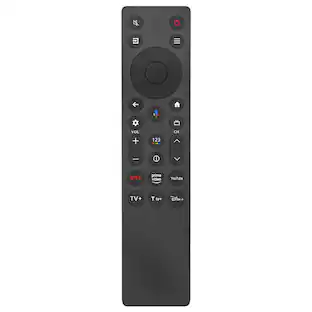
Regain control of your TV with the Insignia Replacement Remote for Hisense TVs. Compatible with nearly all Hisense TVs, this remote is pre-programmed for easy pairing. The remote can also be programmed to control the audio level on your soundbar or speaker system. Compatible with IR and macro learning, you can set up three shortcut keys and quickly program your Insignia remote to open your favorite smart TV apps.
  • Key Specs
    • Remote Control Type: Learning, Universal
  • General
    • Brand: Insignia™
    • Model Number: NS-RMTHSNS25
    • Product Name: Replacement Remote for Hisense TVs
    • Color: Black
  • Features
    • Remote Control Type: Learning, Universal
    • Setup Method: Learning
    • Number of Buttons: 43
  • Connectivity
    • Wireless: true
    • Connectivity Technology: Infrared (The manner in which a device sends data to another device over a short distance.)
  • Compatibility
    • Compatible Product(s): Television, Soundbar
  • Power
    • Rechargeable: false
    • Battery Size: AAA (The battery size required for operation.)
    • Number of Batteries Required: 2
    • Number Of Batteries Included: 2
  • Dimensions
    • Product Weight: 0.17 ounces (The out of box weight of the item.)
  • Warranty
    • Warranty - Parts: 1 year
    • Warranty - Labor: 1 year
  • Other
    • UPC: 600603326110

Regain control of your TV with the Insignia Replacement Remote for Hisense TVs. Compatible with nearly all Hisense TVs, this remote is pre-programmed for easy pairing. The remote can also be programmed to control the audio level on your soundbar or speaker system. Compatible with IR and macro learning, you can set up three shortcut keys and quickly program your Insignia remote to open your favorite smart TV apps.

  • Easily replace missing or damaged remote: Preprogrammed to pair quickly and easily with your existing Hisense TV.
  • Connect to soundbar, audio receiver, or speakers: Control the volume of various connected audio devices with searchable codes. Works with products by Insignia, Yamaha, Bose, Vizio, Philips, Samsung, LG, Panasonic, Sony, and dozens more.
  • 3 shortcut buttons: Program the three shortcut keys with macro learning to quickly open favorite apps on your smart TV, such as Netflix, ESPN+, and more.
  • Comfortable feel: Slim, lightweight design gives it a comfortable grip.
  • Brought to you by Best Buy: Insignia brings you affordable, dependable products with all the features you need.
Whats Included
  • Insignia™ Replacement Remote for Hisense TVs
  • AAA battery (x2)
  • Quick Setup Guide

Q: How many buttons are there on the replacement remote?

A: There are 43 buttons on the replacement remote.

Q: How many batteries does the Hisense TV remote require?

A: The Hisense TV replacement remote requires two batteries.

Q: Does this remote have voice control capabilities?

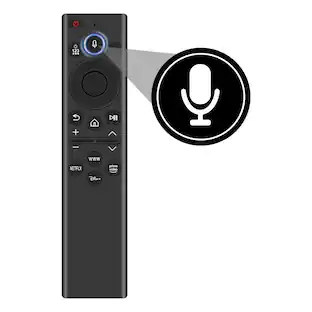
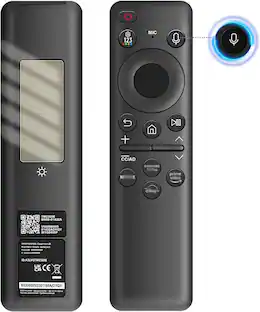
A: No, this remote does not have voice control capabilities.

Q: What kind of technology does this remote use to connect?

A: This remote uses infrared connectivity technology.

Q: Is the Insignia remote pre-programmed for Hisense TVs?

A: Yes, the Insignia remote is pre-programmed to pair easily with Hisense TVs.

Q: Are there any shortcut buttons available on this remote?

A: Yes, this remote has three shortcut buttons that can be programmed.

Q: Can this Insignia remote be used to control a soundbar?

A: Yes, this Insignia remote can control the volume of connected audio devices.

Sponsored

Reviews

Customers are sayingCustomers are delighted by the overall performance and ease of use, noting that the device pairs seamlessly with their televisions. While users appreciate the smooth connectivity and broad compatibility, some have reported issues with the functionality of the number buttons. Additionally, a few customers expressed a desire for a backlight feature to improve usability in low-light conditions.
This summary was generated by AI based on customer reviews.
  • Ease of Use (22)
  • Overall Performance (22)
  • Compatibility (4)
  • Connectivity (4)
  • Button Functionality (11)
  • Backlight (3)

Customer Images

The vast majority of our reviews come from verified purchases. Reviews from customers may include My Best Buy members, employees, and Tech Insider Network members (as tagged). Select reviewers may receive discounted products, promotional considerations or entries into drawings for honest, helpful reviews.

  • Rated 2 out of 5 stars

    Basic remote - Can’t use #buttons

    I bought this remote because I wanted to change channels using the number buttons and the original remote does not have number buttons. I was very disappointed to find out that the number buttons on this replacement aren’t useful. I am seriously considering returning this remote. Now if you break/loose your original remote and want a basic replacement, this item is for you.

    Posted by Valueshopper

  • Rated 1 out of 5 stars

    Poor quality remote

    Broken in less than 2 months, looks as good as the day I bought it on 12th of March 2026, woke up this morning the 25th of April and it has stopped working. It was a nice remote when it was working though

    Posted by OnyemaE

  • Rated 4 out of 5 stars

    Hassle Free

    The QUICK SET UP GUIDE helped me establish an uncomplicated connection between an INSIGNIA Replacement Remote and my TV, an Android HiSENSE flat screen. For my senior level of visual acuity, the Team's selection of a high contrast format with black font on a white field made for an easy read. Instructions EN ESPANOL are on the back side of the fold out. For HiSENSE owners with collateral enhancements, the printed guide includes instructions for setting up VOLUME CONTROL for Sound Bars, Audio Receivers, and/or Speakers.   IR LEARNING affords linkage between your old and new remote. Included are steps to MACRO LEARNING to establish Shortcut Buttons. FACTORY RESET is easy if a clean slate is required to disentangle too many wrong turns during set up. Customer Service is 877 467 4289 if additional guidance is required. Bear in mind this unit does NOT have a backlit touch pad. My fault that I expected a 2025 remote to be backlit. The feature would be an upgrade in convenience from my old unit.  Missing that feature is my only disappointment. So, a dark room for theatre-mode viewing still requires a separate light source --- a headlamp, a phone, flashlight, or other option --- to manage the remote, especially necessary to avoid "stumble bum" button screw ups that inadvertently lose the channel or create some other havoc. A backlit keyboard may not be important to other consumers but missing that feature was my only disappointment. All other operations functioned without obstacle: easy battery installation, automatic remote to HiSense TV connection, a user friendly keypad layout for high legibility and easy navigation as well as a lightweight but durable hand. The warranty is ONE YEAR for this INSIGNIA product trademarked by BEST BUY. 

    Posted by greenrita

  • Rated 3 out of 5 stars

    Ave3rage good replacement for broken / lost remote

    The remote is neatly packaged. Batteries and start guides / code sheet are included. It is compatible with Hisence TV's, and since it is a learning remote, should be able to be programmed for other TV's as well. The paring is simple and straightforward. It is touted to be capable of learning IR and macro functions for other devices. The remote fits well in your hand – but is quite a bit larger than the original remote. Also can also be used to control a sound bar, and there is an included list of audio codes. After automatically searching, installing and connecting to the TV, the functions seemed to work same as the original remote. However, the number pad did not work for directly inputting OTA channels. It still requires scanning the entire list from the beginning. The actual buttons had a long / deep travel, and I found sometimes when I thought I had activated a function, I actually had not. Then had to press harder to activate a function. This may be a personal preference, and others may like it..... For the price, I find this seem to be an average remote, and has similar capabilities as many in the price range. It certainly is compatible with Hisense – and other TV's / devices – and would be a good replacement if the original remote is lost or broken.

    Posted by ebk02

  • Rated 5 out of 5 stars

    Good alternative to OEM remote control replacement

    The Insignia remote control is specially programmed to work with Hisense TVs. In the box, along with the remote control, you get AAA batteries and a quick start guide. I did notice how much thicker it is compared to the original Hisense remote control. Once I inserted the batteries, I expected it to work with my Hisense TV right away, but it did not. The good news is that programming the remote control is a simple process. Before you start, make sure your Hisense TV is on. All you have to do is hold down the A and C buttons until the power button LED blinks twice and stays on. After that, point the remote at your Hisense TV and hold down the power button until the TV powers off. Once this happens, immediately release the power button. There is only a three-second window before it shuffles to the next code. If done successfully, the TV should power back on, and you should be able to operate basic TV functions like volume up and down and changing the channel. If some functions are not working—for example, the mute button—there is an IR learning process that uses your original Hisense TV remote control. To begin, hold down the B and C buttons until the power LED blinks twice and stays on. Press the button you want to program on the Insignia remote (for example, the mute button), and the power LED should blink rapidly. Next, press the corresponding button on the original remote control. If done successfully, the button should work normally. Believe it or not, there is also a macro feature that allows you to store up to 15 steps. This lets you program the remote to open a specific app, which can be mapped to the A, B, or C button. The Insignia remote control does include some smart features and the ability to learn commands from the original remote. However, there are some drawbacks when comparing it to the original Hisense remote that came with my TV: there is no backlight, it is larger and thicker, and the buttons feel stiff when pressed. Overall, I would still recommend it if you are looking for a more affordable option than buying a new original Hisense remote control, especially since it works right out of the box once programmed.

    Posted by J0A0A7

Compare similar products

Insignia™ - Replacement Remote for Hisense TVs - Black
4.5(62)

Regain control of your TV with the Insignia Replacement Remote for Hisense TVs. Compatible with nearly all Hisense TVs, this remote is pre-programmed for easy pairing. The remote can also be programmed to control the audio level on your soundbar or speaker system. Compatible with IR and macro learning, you can set up three shortcut keys and quickly program your Insignia remote to open your favorite smart TV apps.

ALLIMITY - ERF3M90H Replacement Remote, Fit for Hisense 4K Smart TV 43A6H 43A65H 43A68H 50A65H 50A68H 50A6H 55A6H 65A6H 75A6H - Black
1.0(1)

ERF3M90H Replacement Remote Control, Fit for Hisense 4K Smart TV, Remote Model: ERF3M90H, Compatible With: 43A6H 43A65H 43A68H 50A65H 50A68H 50A6H 55A6H 65A6H 75A6H 43A53FUA 50A62GUA 55A53FUA 65A66GUA 75A62GUA 43A53EUA 50A53FUA 55A66GUA 65A53FUA 70A56EUA 75A53FUA 85A66GUA 50A66GUA 55U75H 65A65H 75U75H 65U7H 55U8H 75U8K 55U8K 75U7K 65U8K 55U7G 65U7G 75U7G 55U7H 65A68H 75A65H 65U75H 55A65H 55A68H 75A68H 65U6H 55U6K 65U6K 75U6K 55U7K 65U7K 55U6H 65U8H 75U8H 50U6H 75U6H 85U7H 75U7H

Insignia™ - 3-Device Universal Remote - Black

Losing or damaging your remote control can be a headache, but you can regain control of your TV and other devices with the Insignia NS-RMT3D21 3-Device Universal Remote. Our remote is compatible with nearly all major brands and offers easy preprogramming for an effortless pairing that won’t require any codes. And you can even set up your remote to adjust your soundbar volume without changing devices, giving you full control of your audio. Program the remote with your favorite apps, using it to open your most-used streaming services. If you still have your old remote, you can even teach your new remote its functions, guaranteeing that you’ll have access to everything right at your fingertips.

Insignia™ - Replacement Remote for Insignia, TCL & Hisense Roku TVs - Black

Replace a missing or damaged Roku TV remote with the Insignia Roku Replacement Remote for Insignia, TCL, and Hisense TVs. The remote features both IR learning and macro-learning to easily customize its four programmable buttons to your liking. There are user-friendly buttons to intuitively handle almost any function you are looking for. The remote easily fits in your hand with its slim, lightweight design.

Pros for Insignia™ - Replacement Remote for Hisense TVs - Black
Ease of Use, Overall Performance, Compatibility, ConnectivityThere were no pros for this productOverall Performance, Compatibility, Setup, Ease of use, PriceOverall Performance, Ease of Use, Connectivity, Setup, Button Functionality
Cons for Insignia™ - Replacement Remote for Hisense TVs - Black
Button Functionality, BacklightThere were no cons for this productVoice Control, Button Layout, Battery Life, InstructionsVoice Control, Compatibility

Specs

No content
Sponsored

Similar products from outside of Best Buy

sponsored
Ask BlueAI