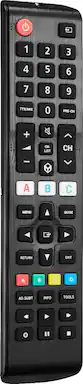
Losing or damaging the remote control is a headache, but you can regain control of your TV with the Insignia NS-RMTSAM21 Replacement Remote for Samsung TVs. Our remote is compatible with nearly all Samsung TVs and pre-programmed for easy pairing. And you can even set up your remote to adjust your soundbar or audio receiver volume, giving you full control of your audio. Program your three favorite apps to the remote to open your most-used streaming services and more. If you still have your old remote, you can even teach your new remote functions from it, guaranteeing that you’ll have access to everything right at your fingertips. This Insignia remote has just what you need.
Q: Is this remote compatible with all Samsung TVs?
A: This remote pairs quickly and easily with nearly all existing Samsung TVs.
Q: Can this remote control be used to control streaming services?
A: Yes, you can program the 3 app shortcut buttons to open apps on your smart TV, like Netflix, Hulu and more.
Q: What type of batteries does this remote use?
A: This remote uses two AAA batteries, which are not included.
Q: How long does the battery last on this remote?
A: This remote offers one year of battery life with two AAA batteries.
Q: Does this remote control work with other brands of soundbars?
A: Yes, the remote can be paired with Yamaha, Bose, Denon, Samsung, JBL, Harman, Kardon, LG, JVC, Marantz, Philips, Onkyo, Panasonic, Technics, Pioneer and Sony brands.
Q: Can I use this remote as a universal remote for direct tv and on Samsung tv?
A: Hello Marie, Yes, Follow these steps: 1.Open DIRECTV on your TV device. 2.Choose Settings and then System. 3.Select Remote & Devices, then Program Your Remote. 4.Choose the TV manufacturer or sound bar you want to add. 5.Follow the prompts to finish up. Insignia Products Shella For more information about your product visit: https://www.bestbuy.com/site/brands/best-buy-brands/pcmcat1596746025285.c?id=pcmcat1596746025285
Q: What are the A-B-C buttons for?? How do I access Prime??
A: A,B and C are App Shortcut buttons. Launch the app store and search for “Amazon Prime Video” on your Amazon Fire TV. Alternatively, Click here to install the app. Select “Download” to install the app. Once installed, log in using your Amazon Prime Video credentials. Rudson S.| Insignia Support. https://www.insigniaproducts.com/contact-us
Q: Will this Insignia Replacement Remote be compatible with Samsung Model: LS27EMNKUY/ZA?
A: Yes, the Insignia replacement remote (NS-RMTSAM21) is designed to be compatible with most Samsung TVs, including the Samsung Model LS27EMNKUY/ZA. If you encounter any issues, you can refer to the setup instructions provided with the remote to ensure it works properly. Jeth | Insignia Support. https://www.bestbuy.com/site/insignia-replacement-remote-for-samsung-tvs-black/6448217.p?skuId=6448217
Customers enjoy the Replacement Remote for Samsung TVs, particularly its ease of use and overall performance. Many appreciate its compatibility with Samsung TV models and the restoration of full remote functionality. Some customers have noted issues with the button layout, and a desire for a backlight feature.
The vast majority of our reviews come from verified purchases. Reviews from customers may include My Best Buy members, employees, and Tech Insider Network members (as tagged). Select reviewers may receive discounted products, promotional considerations or entries into drawings for honest, helpful reviews.

Losing or damaging the remote control is a headache, but you can regain control of your TV with the Insignia NS-RMTSAM21 Replacement Remote for Samsung TVs. Our remote is compatible with nearly all Samsung TVs and pre-programmed for easy pairing. And you can even set up your remote to adjust your soundbar or audio receiver volume, giving you full control of your audio. Program your three favorite apps to the remote to open your most-used streaming services and more. If you still have your old remote, you can even teach your new remote functions from it, guaranteeing that you’ll have access to everything right at your fingertips. This Insignia remote has just what you need.

The One For All Samsung TV Replacement Remote is the ideal replacement for your original Samsung TV remote control. No setup required, simply insert the batteries and start using your remote. Features 3 shortcut keys to your favourite streaming services. 100% compatible with all Samsung TVs.

Losing or damaging your remote control can be a headache, but you can regain control of your TV and other devices with the Insignia NS-RMT3D21 3-Device Universal Remote. Our remote is compatible with nearly all major brands and offers easy preprogramming for an effortless pairing that won’t require any codes. And you can even set up your remote to adjust your soundbar volume without changing devices, giving you full control of your audio. Program the remote with your favorite apps, using it to open your most-used streaming services. If you still have your old remote, you can even teach your new remote its functions, guaranteeing that you’ll have access to everything right at your fingertips.

Easily replace your lost or broken Samsung Smart TV remote with this brand-new universal replacement remote control, compatible with a wide range of Samsung QLED, UHD, 4K, 8K, and 3D Smart TVs.No programming required — simply insert 2 × AA batteries (not included), and it works right out of the box, just like the original. Designed for durability and reliability, this remote delivers the same performance at a fraction of the cost.
| Pros for Insignia™ - Replacement Remote for Samsung TVs - Black | |||
|---|---|---|---|
| There were no pros for this product— | There were no pros for this product— | ||
| Cons for Insignia™ - Replacement Remote for Samsung TVs - Black | |||
| There were no cons for this product— | There were no cons for this product— |